How to create an app to Scan Receipts

Hi Folks,

Have u ever tried creating an App using Azure Cognitive Services.

Here is an excellent video tutorial on how to create an app to Scan Receipts using Azure Cognitive Services Form Recognizer API from MVP @Vivek Bhavishi..

Additional Resources:
Form Recognizer API Docs – https://docs.microsoft.com/en-us/azure/cognitive-services/form-recognizer/

Form Recognizer API Reference – https://westus2.dev.cognitive.microsoft.com/docs/services/form-recognizer-api-v2-preview/operations/AnalyzeReceiptAsync

Hope you will find it useful…

Cheers,

PMDY

Are you still using WS-Trust Auth and OrganizationServiceProxy…then it is time to change …

Hi Folks,

Microsoft had recently announced on docs.microsoft.com that using WS-Trust authentication security protocol to connect to your Common Data Service had been deprecated.

So what does this mean??

Firstly you need to note that this only applies to client applications that connect to CDS.

It does not impact your custom plug-ins, workflow activities, or on-premises/IFD service connections.

Below are the places where you need to replace them…

If your code uses Username & Password for authenticating with Common Data Service or an application, you are likely using the WS-Trust security protocol.

  • If you are using the OrganizationServiceProxy  class at all in your code, you are using WS-Trust.
  • If you are using CrmServiceClient.OrganizationServiceProxy  in your code, you are using WS-Trust.

Check the following:

  1. If your client applications using Microsoft.Xrm.Sdk.Client.OrganizationServiceProxy:

         Action Required:

        Replace all occurrences of the type OrganizationServiceProxy with  the IOrganizationService interface

      2.                            using CrmServiceClient with the “Office365” authentication type:

          Action Required:

          Switch over to using an OAuth based connection string, Note that LoginPrompt can be set to “never” to simulate the way that the Office 365 behavior worked. Please note that the App ID and Redirect URI should be created in AAD in your tenant.

Few points to note before we conclude:

  • An update to Microsoft.CrmSdk.XrmTooling.CoreAssembly is available for download through NuGet package that includes auto redirect support. This library will redirect an authentication type of Office365 to OAuth.
  • If you were not able to login even using OAuth, check if MultiFactor Authentication/conditional access is enabled, if so consider registering application user (Service Principal) in Azure Active Directory.


References:

CDS/CRM SDK – WS-Trust auth and OrganizationServiceProxy Deprecated

Use of Office365 authentication with the WS-Trust security protocol


If you still have issue, don’t hesitate to comment here…or reach to community using this link…

Cheers,

PMDY


New Experimental Features in Power Automate

Aaron Back's avatarDynamics Back Page

Power Automate has introduced some exciting new features that have been long-awaited. These are small changes, but will make creating flows much easier.

Turning on the experimental features

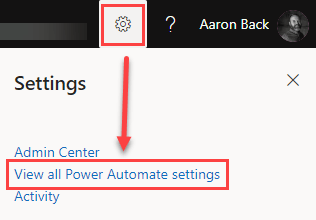
First, you need to make sure you turn on these features. This is done by logging into https://flow.microsoft.com. Then click the gear icon in the upper-right corner and select “View all Power Automate settings”.

Power Automate Experimental Features navigation

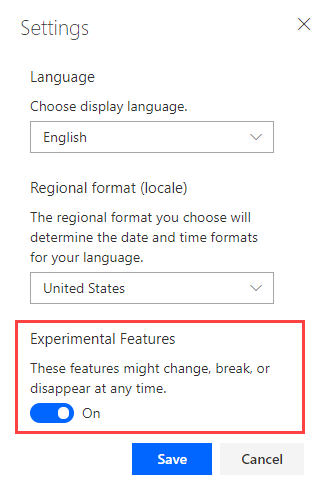
Once you select this option you will see a small Settings window pop up. From here, you need to toggle on the “Experimental Features” and then click “Save”.

Power Automate Experimental Features settings

Note: These are experimental features. As noted in the screen shot above, these features could change, break, or disappear. So, there are no guarantees.

What are the new features?

Once you have the experimental features enabled, you will notice a couple of awesome new features.

First, you will notice the labels and field inputs have a different layout…

View original post 326 more words