

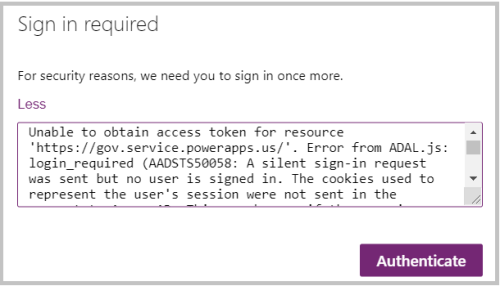
Power Apps recently introduced sharing capabilities with Guest Users. Upon sharing users were not able to access app because of error “Unable to obtain access token for resource ‘https://gov.service.powerapps.us/’. A silent sign-in request was sent but no user is signed in. The cookies used to represent the user’s session were not sent in the request to Azure AD”.
As we were investigating this issue and reaching out to Microsoft support team, we came to know this is not just for Guest users and because of browser cookie settings. Make sure third-party cookies are not blocked and enabled. You can refer below steps to enable third party cookies:
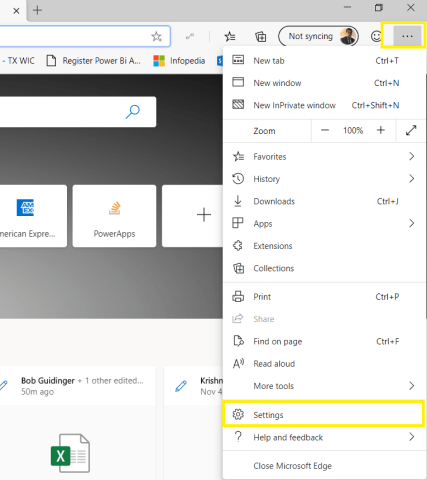
Microsoft Edge:
- Go to Settings from right side navigation
- Click on Site Permissions in Left side navigation and select Cookies and site data
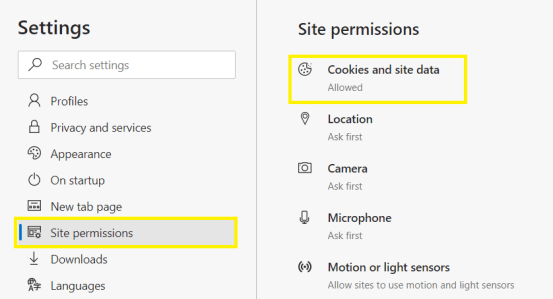
- Make sure options are enabled and disabled as shown below
 Chrome:
- Go to Settings from right side navigation
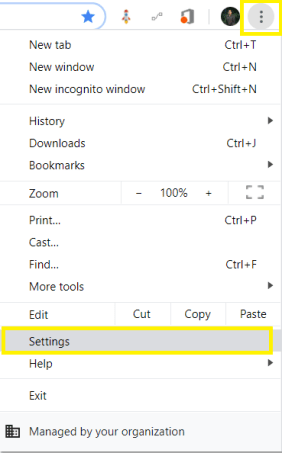
- Expand Advanced…
View original post 42 more words
Discover more from ECELLORS CRM Blog
Subscribe to get the latest posts sent to your email.

 ECELLORS CRM Blog