
In the earlier blog post, we have seen how to connect to your Azure IOT Hub using Raspberry PI Online Simulator and send telemetry data…
In this post, we will be using Azure IOT Device Client SDK’s for sending the Telemetry data to IOT Hub…
This approach uses .NET Core SDK libraries using a Console application….
Creating a C# Console Application
- Open Visual Studio, go to File -> New -> and select Project.
- In Templates, select Visual C#, select Console App (.NET Framework) and give an appropriate name in the ‘Name’ textbox and then click the OK button.
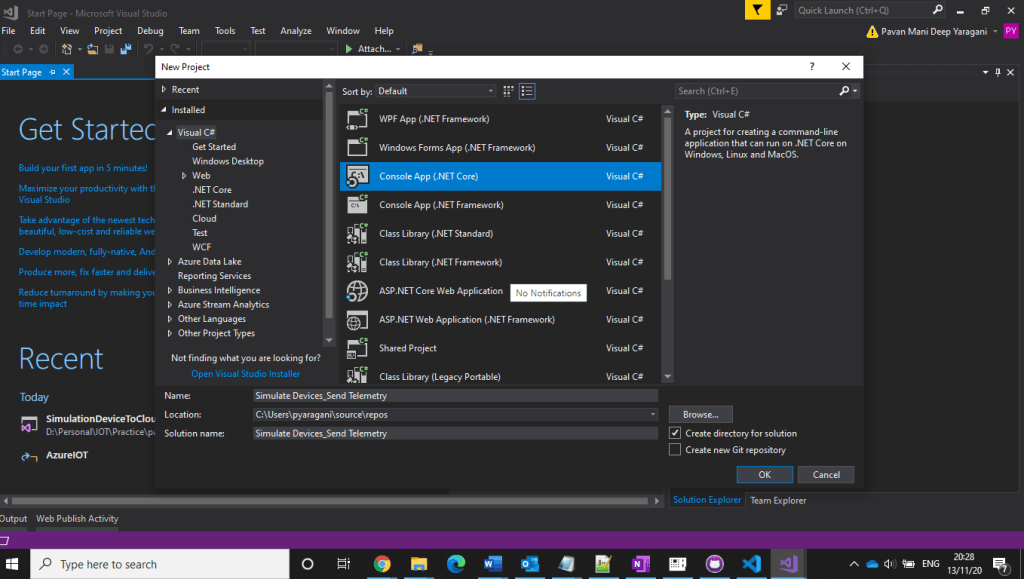
3. Installing Microsoft Azure IOT Device Client SDK…Go to Project -> Manage NuGet Packages.
4. Click Browse tab and search for Microsoft.Azure.Devices.Client. You will see the Microsoft.Azure.Devices.Client device SDK will have listed in the search result and click Install button
5. Now, click the I Accept button to accept the license agreement.
6. It will take a few minutes to install the SDK in our project
7. Get IoT device connect string from Azure IoT Hub…navigate to Azure Portal –> IOT Hub –> IOT Devices –> Select respective device to be connected.
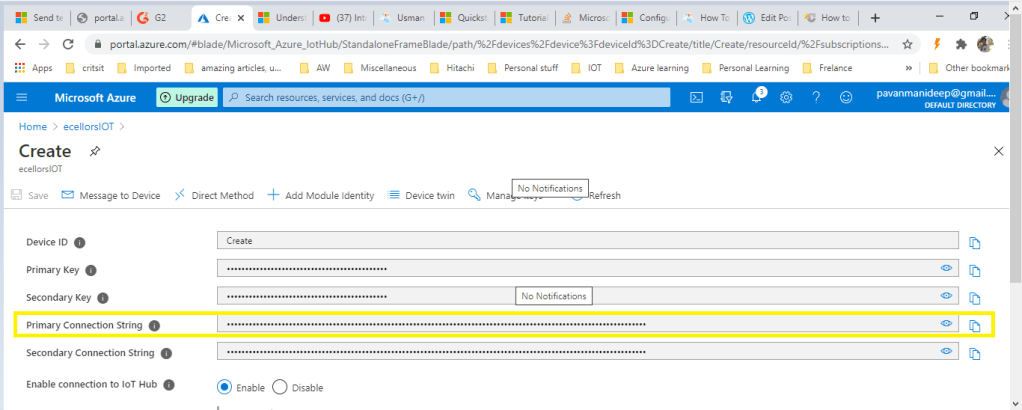
- Using Microsoft.Azure.Devices.Client library we can create device client. The device client has CreateFromConnectionString method which requires device connection string as parameter. Create a read only static string s_connectionString01 and assign the connection string that we copy from Azure Portal.
- Here you can create a random temperature and humidity values using Random() method.
- Copy the code in the Program.cs from the GitHub repository…
That’s it. Now, run the web application, go to Debug menu, and click on “Start without Debugging” or press F5. This will display the below result

Hope you had learned a new approach to send telemetry data to Azure IOT Hub…stay tuned…for more on Azure IOT….
Hope this helps….
Cheers,
PMDY
 ECELLORS CRM Blog