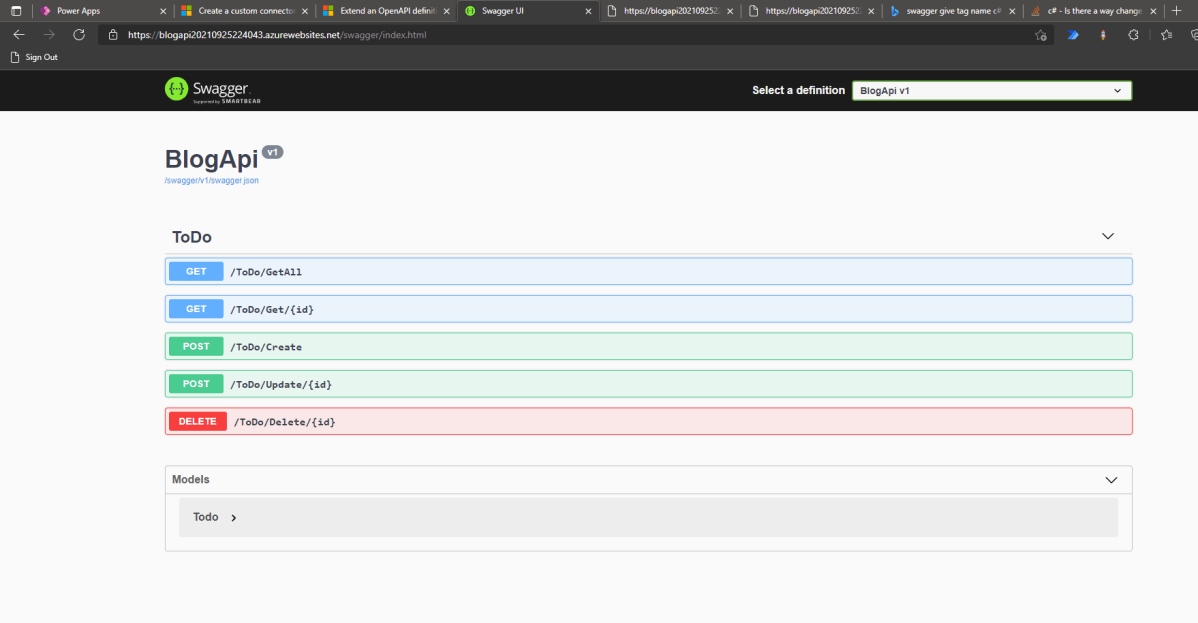
Today we will learn how to create Swagger API > deploy it to Azure (App Service) > make custom connector > use it in Canvas Apps. Without further ado, let’s make it!
Create API
First, we need to open your CMD line, then set the CMD (using CD command) to the directory where you want to create the folder. Once you are already in the folder that you want it, run the below command (you need to have dotnet installed):
dotnet new webapi -o BlogApi
By default, the CLI will help you to generate WeatherController. I will remove all the things that are related to the WeatherController and make the below Controller:
using Microsoft.AspNetCore.Mvc; namespace BlogApi.Controllers; public class Todo { public Guid Id { get; init; } = Guid.NewGuid(); public string? Name { get; set; } public string? Description { get; set; } public bool IsCompleted { get…
I hope there isn’t any one who doesn’t know about security roles and access privileges being in Dynamics space. Most of the people should be aware of doing this via application, in this post, sharing one simple way to grant access to the records using C# code. Please use the below code to achieve the same.
An unhandled exception has occurred during execution of the plugin. An error occured while getting default Team of Requestor BusinessUnit[A]Microsoft.Crm.Sdk.Messages.GrantAccessResponse cannot be cast to [B]Microsoft.Crm.Sdk.Messages.GrantAccessResponse. Type A originates from ‘Microsoft.Crm.Sdk.Proxy, Version=9.0.0.0, Culture=neutral, PublicKeyToken=31bf3856ad364e35’ in the context ‘Default’ at location ‘C:\Microsoft.Crm.Sdk.Proxy.dll’. Type B originates from ‘Hisol.SCS.CRM.Plugins, Version=1.0.0.0, Culture=neutral, PublicKeyToken=bb2727b96c9cb15e’ in the context ‘LoadNeither’ in a byte array.
Hope some day or the other, every CRM Consultant will face this issue where they need to retrieve more than 5000 records in one go.
As every one in the internet suggests, paging cookie is the easiest way to achieve the same.
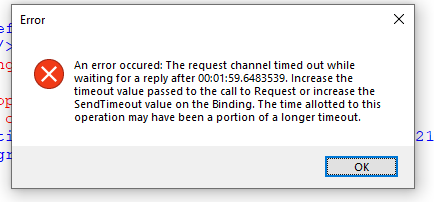
However here there is a catch…if you will use distinct=”false” no-lock=”true” along with your fetch query, you will never achieve the expected result and the timeout error keeps on popping up.
Pretty surely Microsoft have had documented this one, but I couldn’t find any relevant Microsoft article stating this. So thought of sharing this tip over my blog so that some day it will help some one. Here is the complete solution…
//Call the method to use Paging cookie and fetch multiple records in one go....
EntityCollection fetchDonationTransactionRecords = RetrieveAll(service, fetch);

/// <summary>
        /// RetrieveAll
        /// </summary>
        /// <param name="service"></param>
        /// <param name="fetchXml"></param>
        /// <returns></returns>
        public static EntityCollection RetrieveAll(this IOrganizationService service, string fetchXml)
        {
            EntityCollection finalCollection = new EntityCollection();
            int fetchCount = 5000;
            // Initialize the page number.
            int pageNumber = 1;
            // Specify the current paging cookie. For retrieving the first page,
            // pagingCookie should be null.
            string pagingCookie = null;

            while (true)
            {
                // Build fetchXml string with the placeholders.
                string xml = CreateXml(fetchXml, pagingCookie, pageNumber, fetchCount);
                EntityCollection recordsCollection = new EntityCollection();
                FetchExpression expression = new FetchExpression(xml);
                recordsCollection = service.RetrieveMultiple(expression);

                // * Build up results here *

                // Check for morerecords, if it returns 1.
                if (recordsCollection.MoreRecords)
                {
                    // Increment the page number to retrieve the next page.
                    pageNumber++;
                    pagingCookie = recordsCollection.PagingCookie;

                    foreach (var record in recordsCollection.Entities)
                    {
                        finalCollection.Entities.Add(record);
                    }
                }
                else
                {
                    // If no more records in the result nodes, exit the loop.
                    if (finalCollection.Entities.Count >= 5000)
                    {
                        foreach (var record in recordsCollection.Entities)
                        {
                            finalCollection.Entities.Add(record);
                        }
                    }
                    else
                    {
                        finalCollection = recordsCollection;
                    }
                    break;
                }
            }
            return finalCollection;
        }
Hope this helps…that’s it for today…be safe & happy CRM’ing….


 ECELLORS CRM Blog