How to pass an object from a model app driven app to a custom page?

Mehdi El Amri's avatarXRM Tricks (Power Platform & Dynamics CRM )

According to the current documentation, we can pass a dataverse record as a parameter. This is still very beneficial for some scenarios. But what if we want to pass a set of parameters without using an existing record.

After several attempts, I managed to pass an object containing some properties from the model driven app to the custom page using the navigateTo method. The next video illustrates this scenario. Indeed, the idea is to pass an object which contains two properties of type text from the MDA to the Custom Page using the navigateTo method.

As you can see, I used the recordId parameter to pass my JSON object. According to the documentation for the navigateTo method, the recordId parameter is optional and expects to be passed a GUID parameter.
Fortunately for us, Microsoft does not check if we pass a GUID or not, the API expects a string. Using…

View original post 210 more words

Power Platform Tools | Developer Toolkit for Visual Studio 2019

Rajeev Pentyala's avatarRajeev Pentyala – Technical Blog on Power Platform, Azure and AI

Power Platform Tools for Visual Studio supports the rapid creation, debugging, and deployment of plug-ins.

You may note that Power Platform Tools for Visual Studio is similar in appearance and function to the Developer Toolkit for Microsoft Dynamics CRM 2013.

While Power Platform Tools for Visual Studio is similar in appearance and function to the Developer Toolkit for Microsoft Dynamics CRM 2013, Power Platform Tools is a new product and completely independent of the Developer Toolkit.

Power Platform Tools is not directly compatible with any templates or projects from the Developer Toolkit and vice versa.

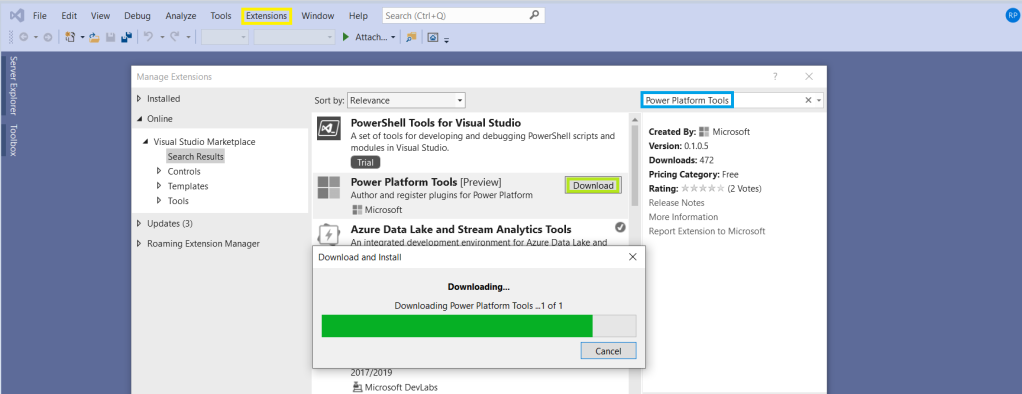
Steps to enable ‘Power Platform Tools’ extension in VS 2019:

  • From the Visual Studio 2019, click on ‘Extensions -> Manage Extensions’.
  • Expand the left navigation panel node Online > Visual Studio Marketplace. Search for “Power Platform Tools”, then click on ‘Download’.

  • Post Download, close all the Visual Studio instances and wait for few seconds…

View original post 112 more words