
Hi Folks,
Have you ever thought of a tool where you can review all your scheduled flows at once in one dashboard, then I am glad to introduce you the latest capability from Microsoft which is none other than Automation Kit.
If we get into detail, the Automation Kit is set of tools that accelerates the use and support of Power Automate for desktop for automation projects. HEAT is guidance that’s designed to help you deploy the automation platform and manage the entire lifecycle of an automation project.
The key features of this Automation Tool Kit:
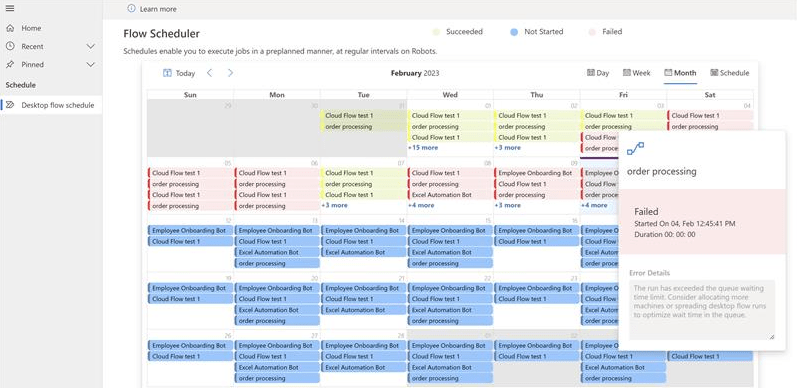
- The ability to view the schedule of Recurring cloud flows
- View schedule by Day, Week, Month and Schedule view
- View the status of Scheduled flows (Success, Failure or Scheduled)
- View the duration of a Cloud Flow run
- View the details any any errors
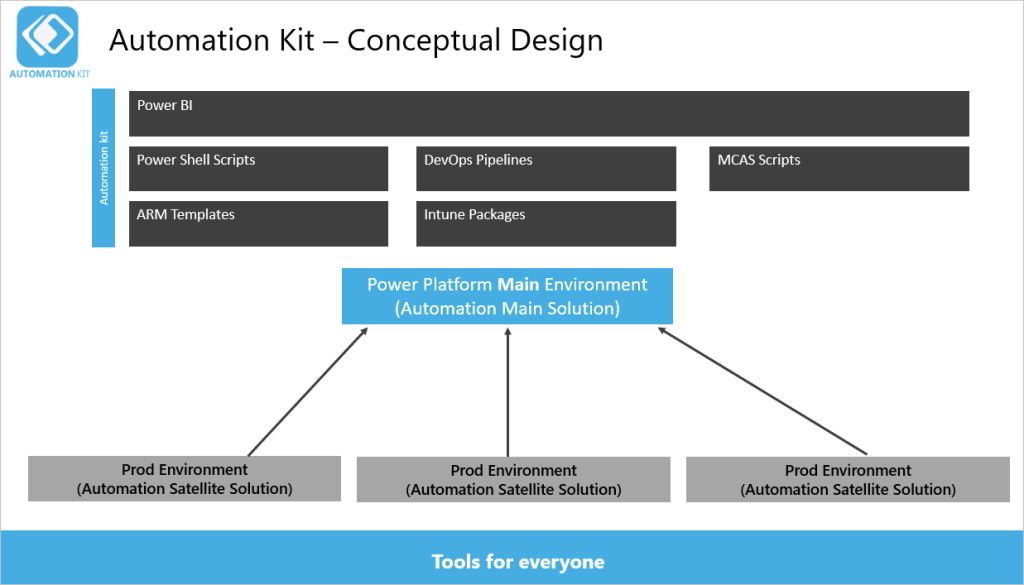
The key element of the solution is the Power Platform main environment.
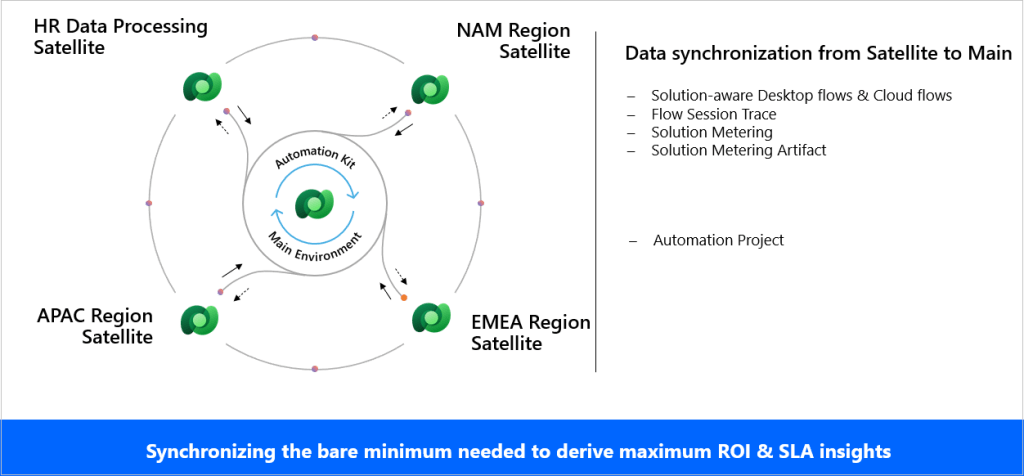
There are usually several satellite production environments that run your automation projects. Depending on your environment strategy, these could also be development or test environments.
Between these environments there is a near-real-time synchronization process that includes cloud or desktop flow telemetry, machine and machine group usage, and audit logs. The Power BI dashboard for the Automation Kit displays this information.
Automation Kit components
The Automation Kit supports an automation CoE with the following components:
- Automation Project: This project is a canvas app that supports requesting automation projects and submitting them for approval.
- Automation Center: This is a model-driven app that organizations can use to create and maintain automation assets, such as master data records, map resources and environments, and assign roles to employees.
- Automation Solution Manager: This is a canvas app in satellite environments that enables the metering of solutions and their artifacts.
- Cloud flows: These cloud flows use Dataverse tables to sync data from satellite environments, in near real time, to the main environment.
- A Power BI dashboard that provides insights and monitors your automation assets.
These two solutions contain the components in the kit.
- The main solution, which you deploy to the main environment.
- The satellite solution, which you deploy in each satellite environment.
Limitations:
- Only Power Automate Desktop and Power Automate solutions contained within a solution are displayed
- At least one Power Automate Desktop has been registered and executed
Reference:
Automation Kit for Power Automate
Automation adoption best practices overview
I am glad to help you know about Power Platform Latest Capability…
Cheers,
PMDY

 ECELLORS CRM Blog