What are Named Formulas in Canvas Apps?

Hi Folks,

Most of us know how to declare variables in our program…declaring a Var variable type is simplest one possible either in C#, Javascript or any scripting language.

Do you know that we can declare variables similarly in Canvas Apps using PowerFx…? A feature which was Generally available now..it’s none other than Named formulas.

With the named formulas, we can easily define and declare variables and only they were run when required, you don’t need to initialize it before hand, thus improving performance. Here you don’t even need to use Var while declaring the variable, you just name it…Also it offers below advantages.

  • The formula’s value is always available.  There is no timing dependency, no App.OnStart that must run first before the value is set, no time in which the formula’s value is incorrect.  Named formulas can refer to each other in any order, so long as they don’t create a circular reference.  They can be calculated in parallel.
  • The formula’s value is always up to date.  The formula can perform a calculation that is dependent on control properties or database records, and as they change, the formula’s value automatically updates.  You don’t need to manually update the value as you do with a variable.  
  • The formula’s definition is immutable.  The definition in App.Formulas is the single source of truth and the value can’t be changed somewhere else in the app.  With variables, it is possible that some code unexpectedly changes a value, but this is not possible with named formulas. That doesn’t mean a formula’s value needs to be static – it can change – but only if dependencies change.
  • The formula’s calculation can be deferred.  Because its value it immutable, it can always be calculated when needed, which means it need not actually be calculated until it is actually needed. If the value is never used, the formula need never be calculated.  Formula values that aren’t used until screen2 of an app is displayed need not be calculated until screen screen2 is visible.  This can dramatically improve app load time and declarative in nature.
  • Named formulas is an Excel concept. Power Fx leverages Excel concepts where possible since so many people know Excel well.  

Tip: Use App.Formulas instead of App.OnStart

The best way to reduce loading time for both Power Apps Studio and your app is to replace variable and collection initialization in App.OnStart with named formulas in App.Formulas.

Example without Named Formulas:

ClearCollect(
MySplashSelectionsCollection,
{
MySystemCol: First(
Filter(
Regions,
Region = MyParamRegion
)
).System.'System Name',
MyRegionCol: First(
Filter(
Regions,
Region = MyParamRegion
)
).'Region Name',
MyFacilityCol: ParamFacility,
MyFacilityColID: LookUp(
FacilitiesList,
Id = GUID(Param("FacilityID"))
).Id
}
);

Example with Named Formulas:

MyRegion = LookUp(
Regions,
Region = MyParamRegion
);
MyFacility = LookUp(
FacilitiesList,
Id = GUID(Param("FacilityID")
);
MySplashSelectionsCollection =
{
MySystemCol: MyRegion.System.'System Name',
MyRegionCol: MyRegion.'Region Name',
MyFacilityCol: ParamFacility,
MyFacilityColID: MyFacility.Id
};

You see the difference between the above two, the one with named formulas is more readable while improving your App performance. Isn’t great…?

References:

https://powerapps.microsoft.com/en-us/blog/power-fx-introducing-named-formulas/

https://learn.microsoft.com/en-gb/power-apps/maker/canvas-apps/working-with-large-apps?WT.mc_id=5004279#use-appformulas-instead-of-apponstart

Cheers,

PMDY

Start Transitioning your Dynamics 365 Client Applications to use Dataverse Client

Hi Folks,

This blog post deals about what you need to do for your client applications in specific to use Dataverse Client API instead of existing CrmServiceClient(Core Assemblies) API.

Below were 3 reasons cited by Microsoft and why we need to just be aware of this move.

1.Cross Platform Application Support: With the introduction of Microsoft.PowerPlatform.Dataverse.Client, the new Dataverse Service Client supports Cross Platform Support.

2. MSAL Authentication: New Dataverse ServiceClient API uses MSAL while our older CrmServiceClient API uses ADAL. ADAL.Net is no longer supported.

3. Performance and functional benefits: We can have one authentication handler per web service connection instead of just one per process. The Dataverse Service Client class supports a smaller interface surface, inline authentication by instance, and Microsoft.Extensions.Logging.ILogger.

What’s the impact?

  • Plug-ins or custom workflow activities – no changes
  • New or existing online applications – changes are needed but not immediately…
  • On-premises applications – this article is not for you, yet

So, meaning it impacts Online Client applications only. While you really don’t need to worry much about this the class member signatures of ServiceClient and CrmServiceClient are the same, except for the class names themselves being slightly different. Application code should not need any significant changes.

As of now, no changes to your code are required, but it is better to keep in mind that in the future the CRM 2011 Service End Point would be deprecated, and this change would be made mandatory.

So, what should you do to incorporate this change?

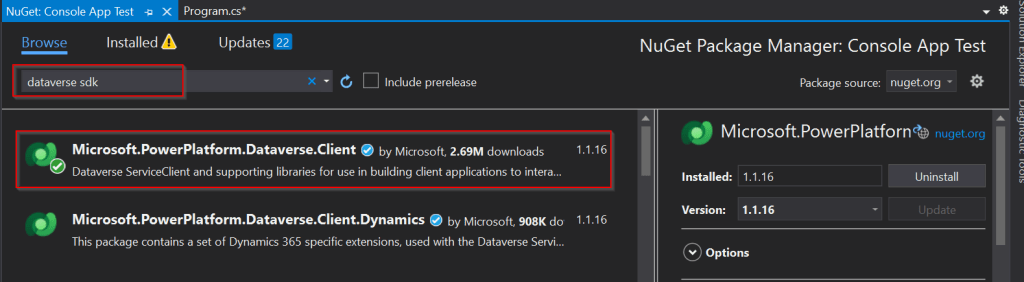
Use the following assemblies from Nuget instead of CrmSdk.CoreAssemblies

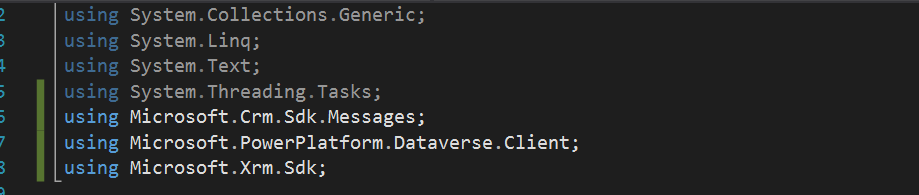
Add the below using statement to use Microsoft.PowerPlatform.Dataverse.Client

Use ServiceClient instead of CrmServiceClient, ServiceClient would return your OrganizationService.

Instead of

Be strategic to minimize the impact to your apps.

Cheers,

PMDY

Entity not visible in Kingswaysoft CDS/CRM Destination component editor – Quick Fix

Hi Folks,

I got a requirement do develop integration between Dynamics 365 and 3rd party data warehouse. Here I have to use SSIS for Integration. Obviously when you want to write data to Dynamics from SSIS, we need to use Kingswaysoft SSIS Components. So, I have retrieved the data from the files coming from 3rd party warehouse and writing the data in to Dynamics using Kingswaysoft Destination component.

During the implementation, I had to create a new entity in Dynamics 365 CE as below and configure it in Kingswaysoft adapter.

But I was unable to select the newly created entity in Destination Entity inside the destination component editor as below. I tried refreshing metadata, rebuild the solution, closed visual studio multiple times, cleared the cache but none of them helped. As shown below. I was not able to select the respective newly created entity.

I was unable to get that even after 2 days…I tried to create another package and set the Kingswaysoft SSIS Destination editor, so here I am able to see the newly created entity. There comes the fix.

So here are the two ways how you can do it using the same SSIS Package itself without using another.

  1. Step: If your connection manager uses SOAP 2011 (Dynamics 365 CE, Dataverse, CRM 2016, 2015, 2013, 2011) …then you can create one more connection with the same configuration.

Then you should see something like below in your connection manager’s section.

Just delete the old connection and rename the new connection to old connection manager name and update the lost references at all places in your package.

2. Step: Change your service end point to Web API as highlighted below

Just update any missing references…that’s it….

Thank you for reading…if you have any issue on the same, please let me know..

Cheers,

PMDY