Microsoft.Xrm.RemotePlugin.Grpc.SandboxFabricGrpcClient error from Plugin in Dynamics 365 – Quick Review

Hi Folks,

I have been encountering a strange error since past few weeks now. If you search for this error in Internet you find nothing…the detailed error message obtained from the Plugin Trace Log is as below

System.ServiceModel.FaultException`1[Microsoft.Xrm.Sdk.OrganizationServiceFault]: Exception occured ... at Microsoft.Xrm.RemotePlugin.Grpc.SandboxFabricGrpcClient.ExecutePluginInternal(IRemotePluginRequest pluginRequest, ExecuteRequest executeRequest, Guid executionId, ISandboxFabricDuplexCommunicationHandler communicationHandler, Boolean returnTraceInfo, Guid organizationId, SandboxFabricCallTracker sandboxFabricCallTracker) +0x5d0
at Microsoft.Xrm.RemotePlugin.Grpc.SandboxFabricGrpcClient.ExecutePlugin(IRemotePluginRequest pluginRequest, IPluginExecutionContext executionContext, IPluginTracingService pluginTracingService, ISandboxFabricDuplexCommunicationHandler communicationHandler, ISet`1 earlySerializedPropertiesList, SandboxFabricCallTracker sandboxFabricCallTracker, ISandboxMemoryStreamProvider memoryStreamProvider) +0x2cd
at Microsoft.Xrm.RemotePlugin.Grpc.SandboxFabricCodeUnit.Execute(ILifetimeScope scope, IExecutionContext context, SandboxFabricCallTracker& sandboxFabricCallTracker, ISandboxMemoryStreamProvider memoryStreamProvider) +0x6e
at Castle.Proxies.Invocations.ISandboxFabricCodeUnit_Execute.InvokeMethodOnTarget() +0x13
at Castle.DynamicProxy.AbstractInvocation.Proceed() +0x2d
at Microsoft.Xrm.RemotePlugin.Client.Interceptors.SandboxFabricPluginTraceInterceptor.Intercept(IInvocation invocation, IExecutionContext context, SandboxFabricCallTracker sandboxFabricCallTracker) +0x1f

The error message looked so strange to me and I couldn’t get any idea on what is happening, I thought some problem with the Plugin Code and it was executing more than 2 mins and hence causing error related to Sandbox service of Dynamics 365. I was executing this logic placed inside an action from Power Automate…this took couple of hours to figure out what was happening…

With no clue, I had started to change Plugin Code in the following ways…

  1. Change the Synchronous Plugin to Asynchronous Plugin
    • It doesn’t show any error in Power Automate now, but in the Plugin Trace Log, it still throws the error
  2. Add Try – Catch Block
    • Add try catch block made me understood that Plugin was causing an exception due to type casting issue in my logic. This worked…

FYI, I have removed some sensitive information from the below error message.

Microsoft recommends us to use Try – Catch block for efficient error handling, in the first place, so always use proper error handling while developing Plugins, Actions or Custom Workflows in Dynamics 365 to avoid such errors.

If you face this kind of error, this is some issue within your code and nothing to do with Microsoft Services, no need to raise a Microsoft Support Ticket for resolving this.

Hope this helps someone facing the same issue…

Cheers,

PMDY

Creating In-App Notifications in Model Driven Apps in an easier way – Quick Review

Hi Folks,

In App notifications are trending these days where many customers are showing interest in implementing these for their businesses.

So, in this blog post, I am going to show you the easiest way to generate In App notification using XrmToolBox in few clicks. Use the below tool to generate one.

So, let me walk you through step by step

Step 1: Open In App Notification Builder in XrmToolBox

Step 2: In App notification is a setting that should be enabled at App level, so meaning if you have developed few Model Driven Apps, you will be able to enable the In App notification individually for each one of them.

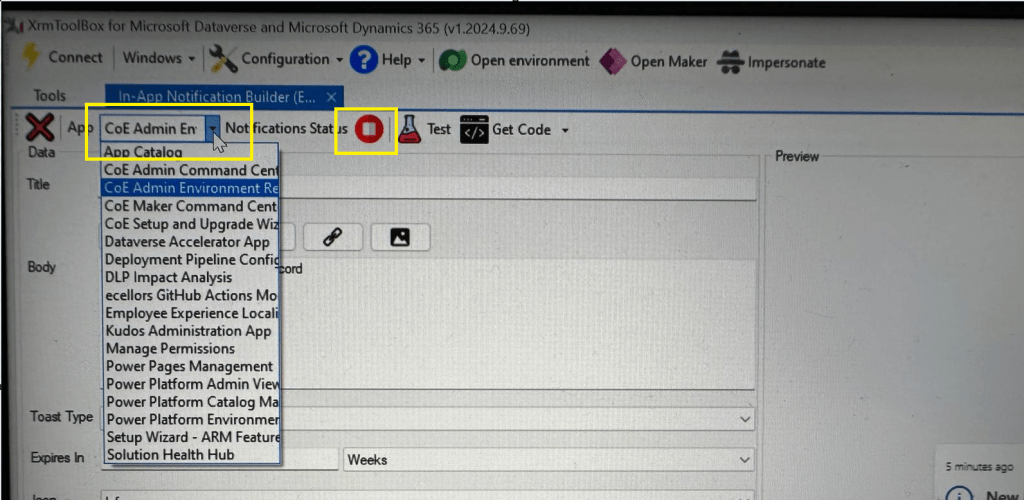
Step 3: In the above snapshot, we should be able to select the respective App for which we want to enable the In App Notification. Red bubble besides indicate that the In App notification is not enabled for this App.

So, we need to enable it by clicking on the red icon itself, you should then be able to get this prompt as below.

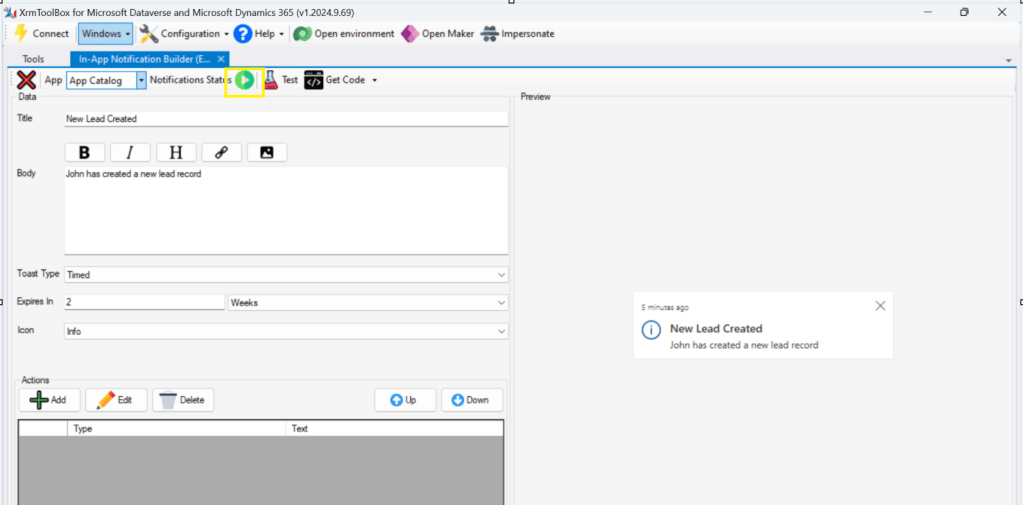
Step 5: Upon confirming the confirmation dialog box, the In App notification will be enabled for that App and you the red button turns to green as below saying that In App Notification is enabled.

Now that the In App notification is enabled in the App, we will proceed with the remaining setup.

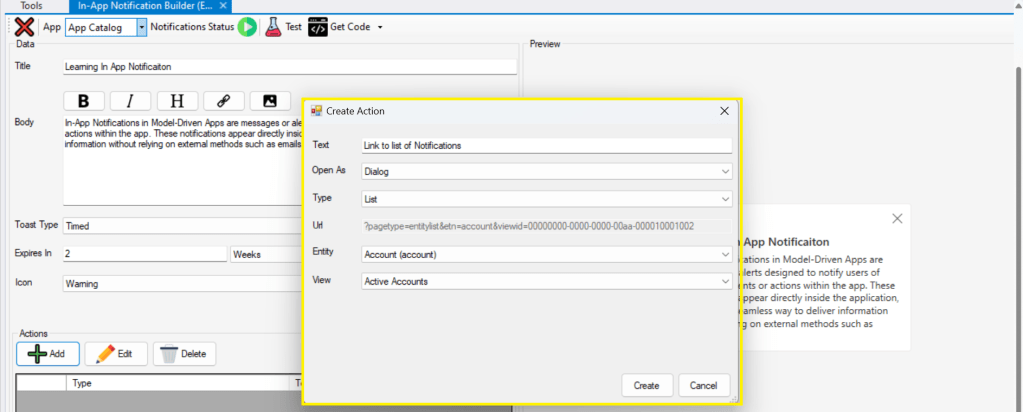
Step 6: You can proceed to give a meaningful title, body for you In App Notification. Also mention the required toast type and specify the expiry duration, Icon. Also Click on Add icon and choose the action required to be performed when In App notification is clicked.

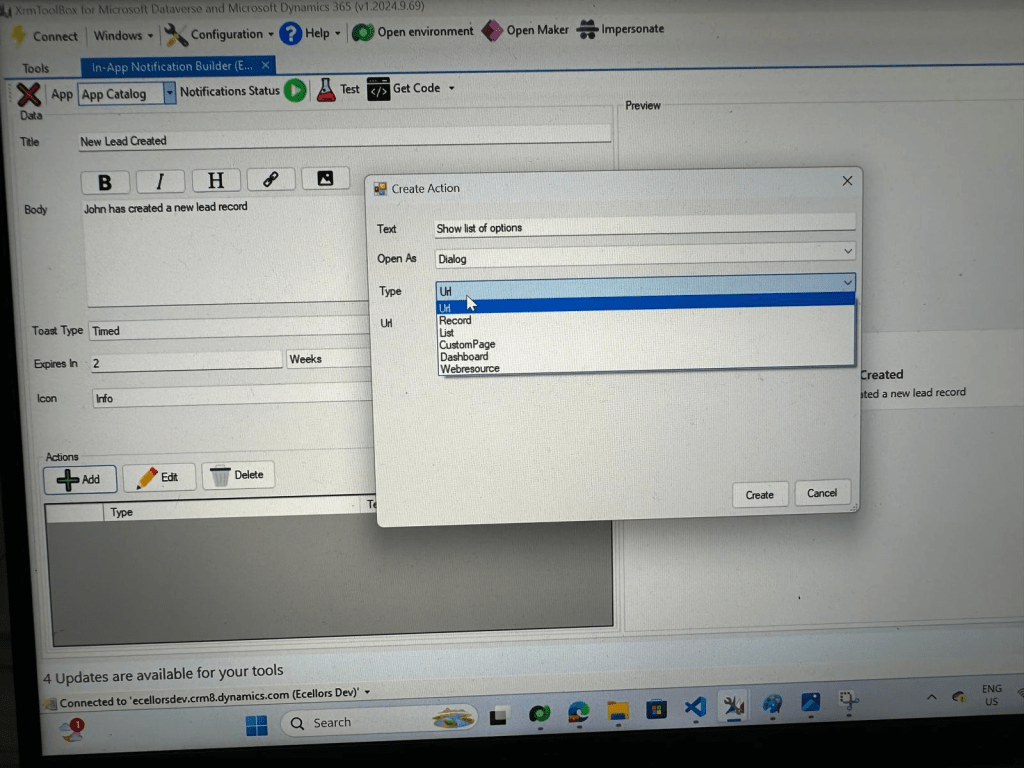
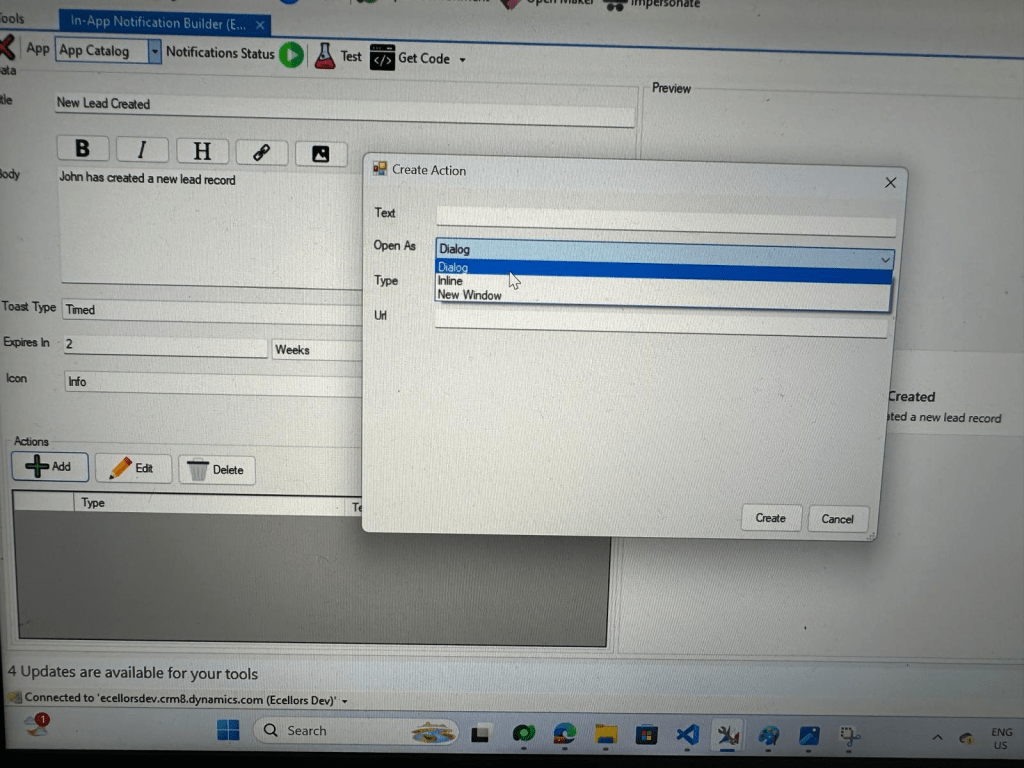
Step 9: You can even choose the type of action to be performed…

For example, let’s use to open as dialog and show list view

Your screen should look something like below

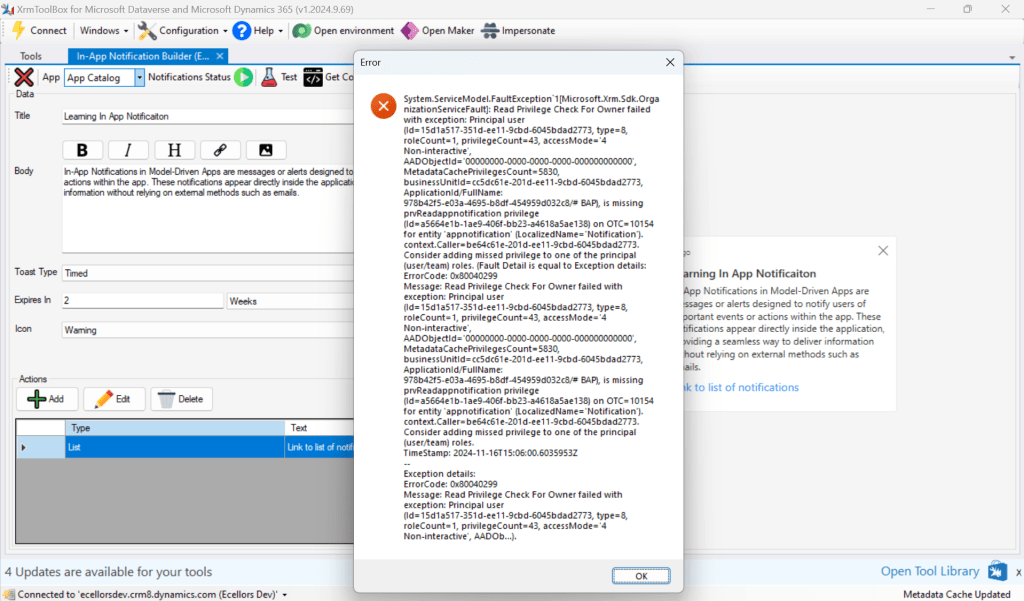
Step 10: Once done, you can click on create and that’s it you have now created In App Notification. Now let’s test this for the user who have priveleges to access this App.

If not, you will face this error..

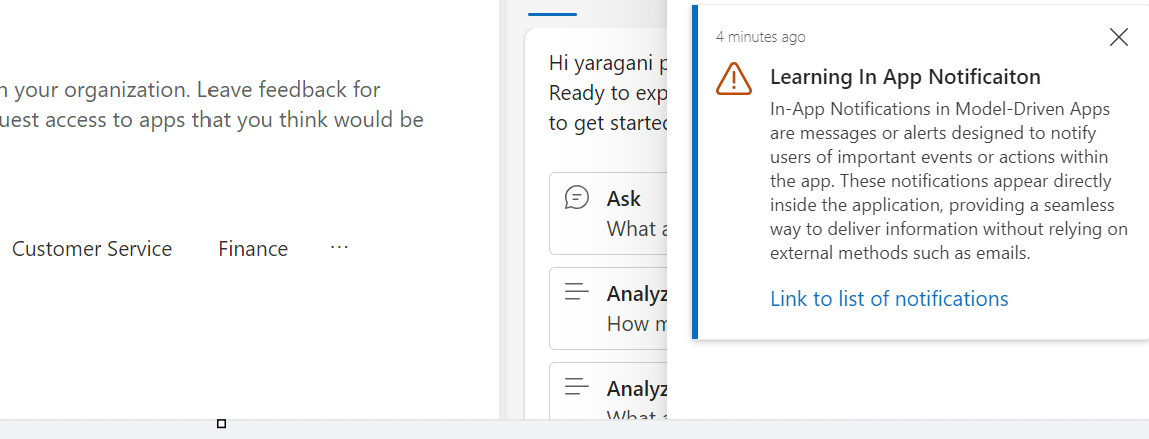
Log in with user account for which the In App Notification is triggered.

Hurray!!!! That’s it, how easy it was to create In App Notification in Low Code manner.

You can even get the code behind this as well…

However, there were other ways to trigger the In App Notification from a Pro Code angle, let’s discuss those as well.

In this case you need to manually turn the In App Notification feature on by going to settings for the Model Driven App as below first.

Notifications can be sent using the SendAppNotification message using SDK.

You can either trigger from and can choose based on your convenience to trigger a similar notification.

Client Scripting

    var systemuserid = '<user-guid>';
    var data = {
    "actions": [
    {
    "data": {
    "url": "?pagetype=entitylist&etn=account&viewid=00000000-0000-0000-00aa-000010001002",
    "navigationTarget": "dialog"
    },
    "title": "Link to list of notifications"
    }
    ]
    };
    var notificationRecord =
    {
    'title': 'Learning In App Notificaiton',
    'body': `In-App Notifications in Model-Driven Apps are messages or alerts designed to notify users of important events or actions within the app. These notifications appear directly inside the application, providing a seamless way to deliver information without relying on external methods such as emails.`,
    'ownerid@odata.bind': '/systemusers(' + systemuserid + ')',
    'icontype': 100000003, // Warning
    'toasttype': 200000000, // Timed
    'ttlinseconds': 1209600,
    'data': JSON.stringify(data)
    }
    Xrm.WebApi.createRecord('appnotification', notificationRecord).
    then(
    function success(result) {
    console.log('notification created with single action: ' + result.id);
    },
    function (error) {
    console.log(error.message);
    // handle error conditions
    }
    );
    view raw JS hosted with ❤ by GitHub

      Plugin/SDK

      var notification = new Entity("appnotification")
      {
      ["title"] = @"Learning In App Notificaiton",
      ["body"] = @"In-App Notifications in Model-Driven Apps are messages or alerts designed to notify users of important events or actions within the app. These notifications appear directly inside the application, providing a seamless way to deliver information without relying on external methods such as emails.",
      ["ownerid"] = new EntityReference("systemuser", new Guid("00000000-0000-0000-0000-000000000000")),
      ["icontype"] = new OptionSetValue(100000003), // Warning
      ["toasttype"] = new OptionSetValue(200000000), // Timed
      ["ttlinseconds"] = 1209600,
      ["data"] = @"{
      ""actions"": [
      {
      ""data"": {
      ""url"": ""?pagetype=entitylist&etn=account&viewid=00000000-0000-0000-00aa-000010001002"",
      ""navigationTarget"": ""dialog""
      },
      ""title"": ""Link to list of notifications""
      }
      ]
      }"
      };
      service.Create(notification);
      view raw gistfile1.txt hosted with ❤ by GitHub

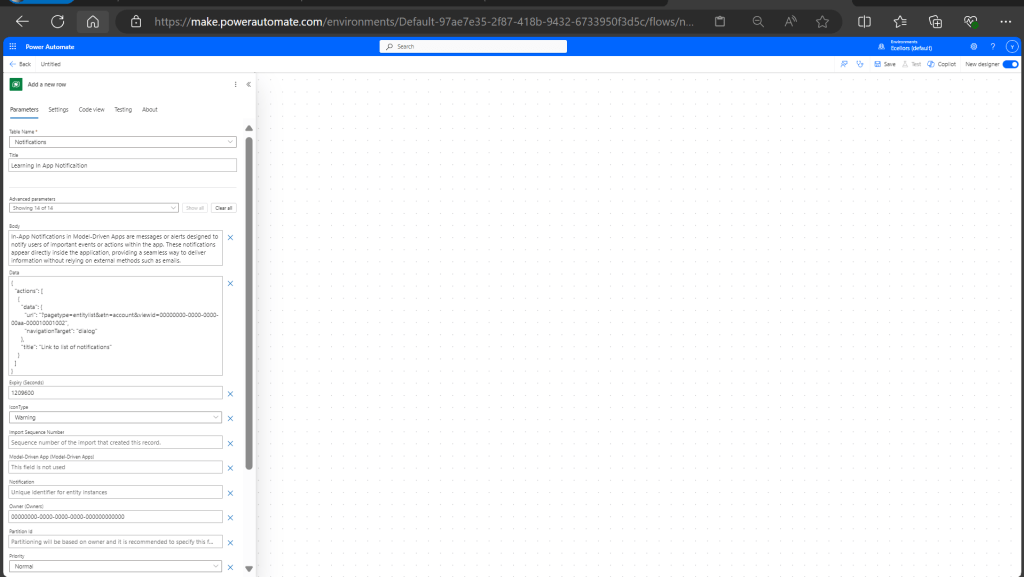
      Power Automate:

      You should design your Power Automate something like below to trigger a similar notification.

        Note: Currently In App Notification will be triggered for only Model Driven Apps.

        Reference:

        In App Notification Documentation

        Hope this saves some of your time…

        Cheers,

        PMDY