Power Platform..A trio..game changer…

Have u ever imagined that Microsoft will bring its all new diverse products covering Dynamics 365, Office 365 and standalone products under one roof making a Trio…to unlock the potential faster than you ever thought possible…if you were not aware…then this post is for you…

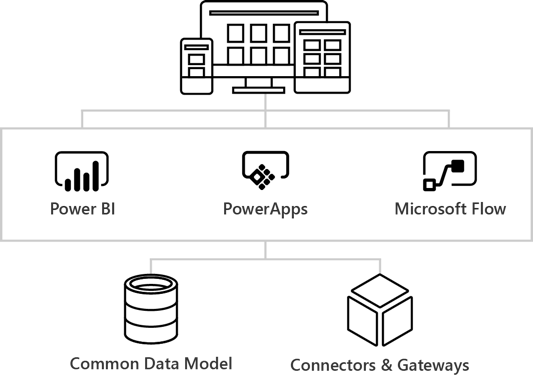
The main intention is to empower everyone with one connected app platform…Power Platform combines the robust power of PowerAppsPowerBI, and Microsoft Flow into one powerful business application platform –  providing quick and easy app building and data insights.

This is part one of 6 series blog posts helps you to understand the basics, in and out of this entire all new ecosystem. Upcoming blog posts will give you a deep insight on covering every individual aspect on this marvellous platform.
Power-platform-2

Common Data Model:

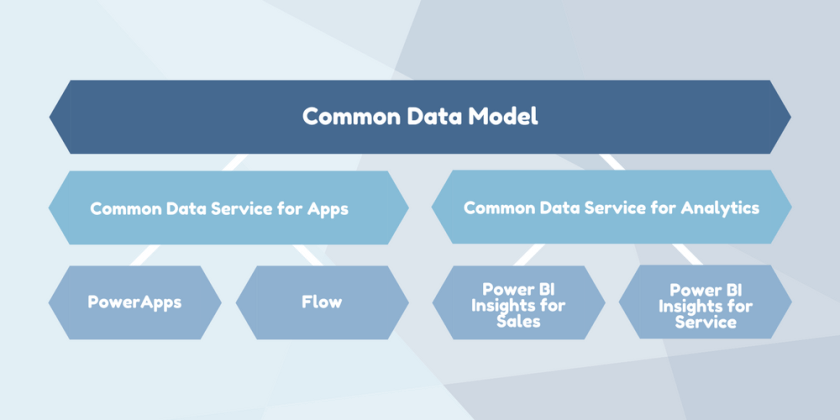
The Common Data Model (CDM) is the shared data language used by business and analytical applications. CDM bridges the gap between disjointed data repositories, granting easier cross-platform business reporting.
Copy-of-Copy-of-Common-data-service

It consists of a set of a standardised, extensible data schemas published by Microsoft and partners that enables consistency of data and its meaning across applications and business processes. This allows apps to integrate and share data with each other without the need for extensive, custom integration by providing a centralized point where systems can come together and connect.

The Common Data Model is a secure method for exposing Microsoft databases that allows developers to build custom connections with other databases.

Common Data service:

The heart of the Microsoft Power Platform is the Common Data Service for Apps(CDS). These applications handle your data through the use of Microsoft’s Common Data Service for Apps (CDS). CDS is a cloud-based tool hosted on Azure which allows you to securely store and manage your business data. Data within the CDS is stored within a set of entities, a standard set of entities are included, however custom entities can be created for specific requirements to your organization and populate them with data using Power Query. The CDS for Apps is built on the Common Data Model.

Dynamics 365 applications, like Dynamics 365 for Sales, Service or Talent also use the Common Data Service to store and secure data used by the applications. This enables you to build apps using PowerApps and the Common Data Service directly against your core business data already used within Dynamics 365 without the need for integration. You can think of Common Data service as a common store allows for an easier app building experience, and a single set of logic to maintain and operate over the data.

Power Apps:

Power Apps enables users fostering via No Code solutions which improves productivity and reduces the time for the delivery.

image15

PC Mag. had rated the power apps as the best low code solutions available in the market..if you haven’t gone through this..read this article..

PowerApps at its core is a Platform as a Service. It allows you to create Mobile Apps that run on Android, iOS, Windows (Modern Apps) – and with almost any Internet browser..Read more about Power Apps in the upcoming blog post here

Microsoft Flow:

Microsoft Flow is an online workflow service that automates actions across the most common apps and services and a trigger based system.microsoft-flow-templates
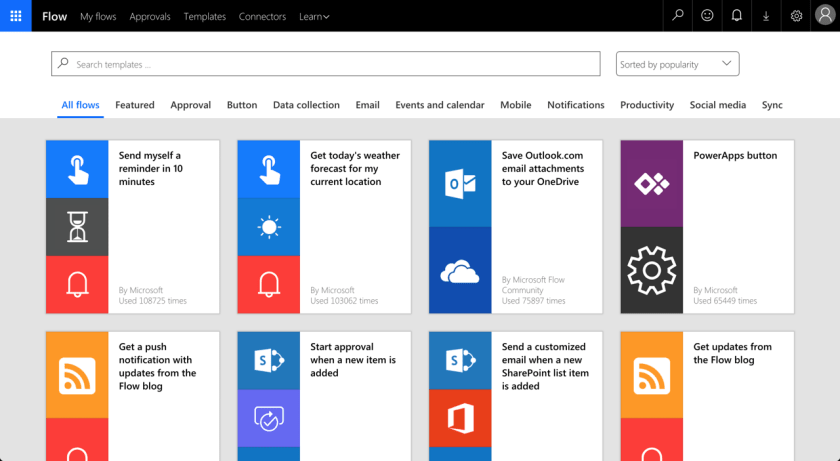
In total there are connectors for 323 applications and protocols at the time of writing, and you can write your own if you need a different one. You can read more about Flow and automating your business processes here…

Power BI:

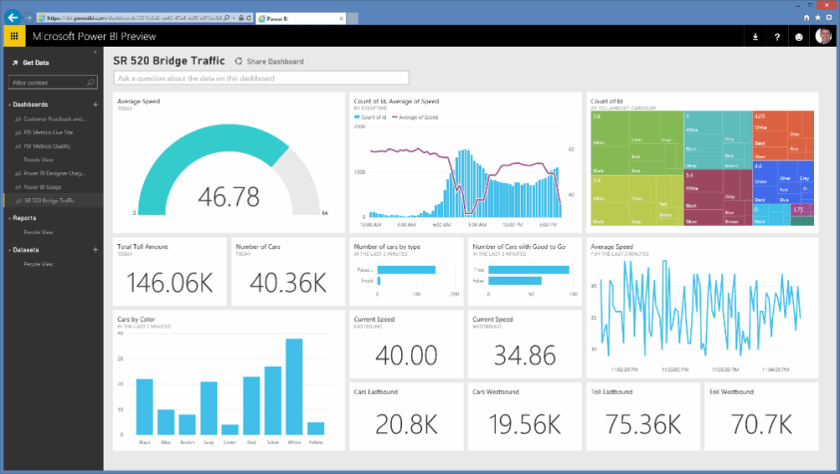
Microsoft Power BI is a collection of software services, apps, and connectors that work together to turn your unrelated sources of data into coherent, visually immersive, and interactive insights. Power BI can be simple and fast, capable of creating quick insights from an Excel workbook or a local database.
sCM_Power-BI-Preview

At the users flexibility….we can use…Windows desktop application called Power BI Desktop, an online SaaS (Software as a Service) service called the Power BI service, and mobile Power BI apps that are available on Windows phones and tablets, and also on Apple iOS and Google Android devices.

These three elements—Desktop, the service, and Mobile apps—are designed to let people create, share, and consume business insights in the way that serves them, or their role, most effectively.

Read more capabilities of Power BI here…

Connectors & Gateways:

Nevertheless we discussed all the other components as part of this framework, connectors and gateways plays a major role…Connectors are essentially proxy wrappers around the APIs provided by services that allow Microsoft Flow, PowerApps and Logic Apps to easily interact with the service. You can read more about connectors and gateways and much more in upcoming post…

That’s it for today…thank you for reading…

Cheers,

PMDY
[Quick Tip] – Error is usually caused by custom plug-ins that ignore errors from service calls and continue processing in Dynamics 365

Hi CRM Folks,

While we were working on Dynamics 365  On Premise 8.2 Version, we found this issue which is occurring on create of custom entity records in one of our environments. However we see the same customizations in both the environments.

After investigation by observing event logs, we found that this issue is caused due to some security issue. Later we identified that the plugins steps registered on create were running security context of user.

We were able to resolve this issue with the help of impersonation to run Plugins with higher privileges. For detailed info, see below reference.

Reference

Cheers,

PMDY


Cannot obtain value of the local variable or argument because it is not available at this instruction pointer, possibly because it has been optimized away in Visual studio 2017

Hi,

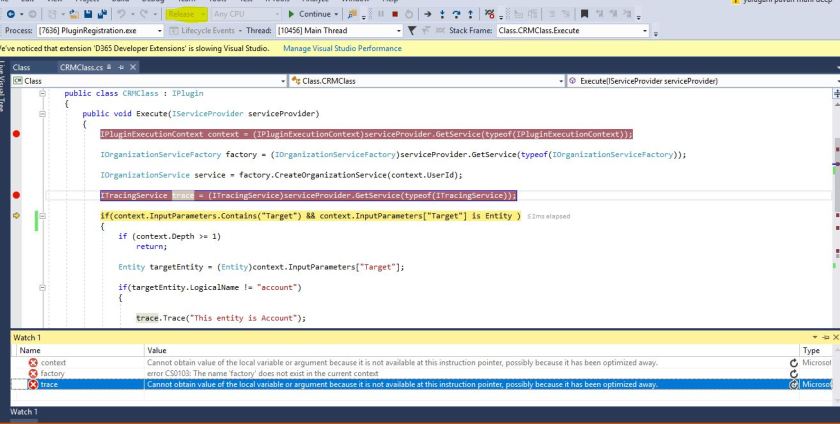
Recently we were debugging a D365 plugin in Visual studio 2017, able to hit the debugger but unable to get values to any of the variables. Getting the above error while debugging with the solution being in Release mode.

Capture.JPG

Changed from the release mode to debug mode, deployed the solution and then able to debug and get the values.

Please refer to below posts  for more information.

Cannot obtain value of local variable

Blog from Microsoft

Hope this helps someone…

Cheers,

PMDY


No Plugins selected message in Plugin registration tool

Hi Folks,

When we were working on a plugin for D365 Online, faced the below mentioned error message in Plugin registration tool where it was not showing up the newly added the class to assembly.

However we were using the latest Plugin registration tool.

Capture.JPG

Making the class as Public solved the issue.

Capture.JPG

Hope this helps…

Thank you.

PMDY

Deep insight – All about adding Indexes and monitoring performance in Dynamics CRM

Hello,

Have you had a situation in Dynamics CRM where you need to delete some particular entity records satisfying some conditions using advanced find.

We have experienced a similar issue where in we were unable to delete records created in a Custom entity added into system created few mins. back. Even we were unable to find much complex relationships with other entities too. However the new records created were too not getting deleted using advanced find, even deletes from form also.

Verified and came to know that there weren’t any indexes available on that particular table. We added indexes on the columns on which we were retrieving data in advanced find and this solved our problem to delete the records created.

So here are few more tips about adding indexes in MS CRM. Don’t worry adding indexes on tables, columns or views is completely supported customization. However removing OOB indexes is not supported.

See this for more info.

Please check the below link to verify the system jobs which would run on a timely basis in Ms CRM on premise versions. These are configured during installation and are designed to optimize the database and reduce fragmentation. It’s good practice to re-configure these jobs to run out-of-hours.

Check the job editor available for versions starting with 2011 till 2016.

This job goes directly to the MSCRM_CONFIG database to update ScaleGroupOrganizationMaintenanceJobs table.

OOB jobs in Onpremise 

Check by running below queries

Verify if you need these jobs to run more often, you can monitor fragmentation with the following queries:

SELECT OBJECT_NAME(OBJECT_ID), index_id,index_type_desc,index_level,
avg_fragmentation_in_percent,avg_page_space_used_in_percent,page_count
FROM sys.dm_db_index_physical_stats
(DB_ID(N'ORG_MSCRM'), NULLNULLNULL 'SAMPLED')
ORDER BY avg_fragmentation_in_percent DESC

Or you can be more specific at the table level

SELECT avg_fragmentation_in_percent,* FROM
sys.dm_db_index_physical_stats ( db_id('ORG_MSCRM'),
OBJECT_ID('PrincipalObjectAccess'), NULLNULL'DETAILED')

Utilize DMV(Data Management views):

Dynamic management views store SQL transactional information which can be used to monitor health, performance and diagnose problems. There are a number of DMV’s to retrieve a different number of metrics for different purposes; we will be looking in particular at the Index related and Execution DMV’s:

  • Index
    • sys.dm_db_index_operational_stats
    • sys.dm_db_index_physical_stats
    • sys.dm_db_index_usage_stats
    • sys.dm_db_missing_index_columns
    • sys.dm_db_missing_index_details
    • sys.dm_db_missing_index_group_stats
    • sys.dm_db_missing_index_groups
  • Execution
    • sys.dm_exec_query_stats
    • sys.dm_exec_requests

Index Usage
It’s important you check for Index usage because indexes consume memory and disk I/O resources when they need to be rebuild to keep the most up to date data.

To check for index usage run the following query, it’s important you check for Index usage because indexes consume memory and disk I/O resources when they need to be rebuild to keep the most up to date data.

select OBJECT_NAME(a.object_id),b.name,a.user_seeks,a.user_scans,a.*
from sys.dm_db_index_usage_stats a join ORG_MSCRM.sys.indexes b on
a.object_id = b.object_id
and a.index_id = b.index_id
where
a.database_id = DB_ID('ORG_MSCRM')
and b.name like 'myIndex%'
order by
b.name asc

The output of this query would be something like:

 Jump

From the above screenshot is clear that _DMV_09 has not been used since it was created and therefore should be deleted.

Finding missing indexes:

Below a nice script you could use with references to missing indexes DMV’s

SELECT   migs.avg_total_user_cost * (migs.avg_user_impact / 100.0) * (migs.user_seeks + migs.user_scans) AS improvement_measure,   'CREATE INDEX [myIndex_' + CONVERT (varchar, mig.index_group_handle) + '_' + CONVERT (varchar, mid.index_handle)   + '_' + LEFT (PARSENAME(mid.statement, 1), 32) + ']'   + ' ON ' + mid.statement   + ' (' + ISNULL (mid.equality_columns,'')     + CASE WHEN mid.equality_columns IS NOT NULL AND mid.inequality_columns IS NOT NULL THEN ',' ELSE '' END     + ISNULL (mid.inequality_columns, '')   + ')'   + ISNULL (' INCLUDE (' + mid.included_columns + ')', '') AS create_index_statement,   migs.*, mid.database_id, mid.[object_id] FROM sys.dm_db_missing_index_groups mig INNER JOIN sys.dm_db_missing_index_group_stats migs ON migs.group_handle = mig.index_group_handle INNER JOIN sys.dm_db_missing_index_details mid ON mig.index_handle = mid.index_handle WHERE migs.avg_total_user_cost * (migs.avg_user_impact / 100.0) * (migs.user_seeks + migs.user_scans) > 10 ORDER BY migs.avg_total_user_cost * migs.avg_user_impact * (migs.user_seeks + migs.user_scans) DESC
Hope this helps someone figuring out to add indexes into their MS CRM table to improve the performance.
That’s it for today…hope you had enjoyed reading the blog…please share feedback on this…will come up with another interesting article next time.
Cheers,
PMDY

Transaction aware batch processing using ‘ExecuteMultipleRequest’

Rajeev Pentyala – Dynamics 365 Blog:

In this article, I am going to discuss about transaction aware batch processing in ExecuteMultipleRequest using ExecuteTransactionRequest.

Is ‘ExecuteMultipleRequest’ not a transaction aware?

  • By design, ‘ExecuteMultipleRequest’ is non-transactional.
  • Which means ‘Request’ objects added to ‘ExecuteMultipleRequest’ are independent of each other and if any exception occurred in any of the ‘Request’ will not roll back previously committed ‘Requests’.
  • However you have an option to stop the batch (i.e., By setting ContinueOnError = false), if any exception occurs.
  • Important to note is that, this behavior is not a transaction aware and ‘Requests’ executed prior to the error, will still be committed.

How can we achieve ‘Transaction’ in Batch execution?

  • Using ExecuteTransactionRequest, we can achieve ‘Transaction’ (i.e., Commit and Rollback) in Batch execution
  • ExecuteTransactionRequest will execute the all the ‘Requests’ in a single transaction.
  • If any exception occurred in any of the ‘Request’ execution, will roll back all the previously…

View Original Post

Hope this helps…

Happy CRM’ng.

Cheers,

PMDY

Issue configuring Data export service – Unable to connect to the Destination mentioned in the Keyvault URL

After knowing the wide advantages of reporting with the help of Data export service, I would like to share some tips and valuable resources for the same.

This Data export service in D365 by MVP Scott Durow is the first step to jump start your learning, people preferred to view instead video can better go through this Data export service blog content from MVP Nishant Rana.

Edit: 20 April, 2018: Suprizing what was Azure Key vault? Azure Key Vault helps safeguard cryptographic keys and secrets used by cloud applications and services.

Followed the steps mentioned, however I still used to receive error Unable to connect to the Destination mentioned in the Keyvault URL while configuring the data export service taken from the Secret Identifier in Azure obtained after running the Powershell script with all the details filled in.

I followed the fix provided in this Unable to connect with KeyVaultURL, but it didn’t help in my case.

Point to note for creation of this feature:

1.Don’t forget to create the login & username for the new Azure SQL Database, this is needed for the secret vault to communicate with the destination organization to load data.

2. After copying the Database connection string as mentioned, don’t forget to change the Username & Password in this string with details you had created in above step and don’t try with D365 login permissions.

Then I was able to validate the Keyvault URL successfully. Currently my Azure subscription is in South India, but still this data export feature works successfully.


Hope this helps someone trying to configure the Data export feature of Dynamics 365.

Happy CRM’ing.

Cheers,

PMDY


Change tracking solution for Dynamics 365

 Lets take a look at recently released feature for Dynamics 365 – Change tracking solution for Dynamics 365!!!

Large Microsoft Dynamics 365 organizations that synchronizes data with external systems uses change tracking. This feature was used to keep the integration system/data warehouse in Sync with CRM data.

Till now it would be difficult to find which System Administrators/System Customizers had made change to the system. It was difficult to track these details. However with this solution, which was built on Dynamics 365 and as works well on Dynamics CRM 2016 (Online/ On premises). Released to track data changes in a more efficient way.

This feature can track changes like who updated an entity, JavaScript, assemblies and processes along with the time of update. Changes made by System Adminstraors and Customizers will also be recorded.

How does Change tracking solution work?

This uses two plugins and batch job namely captures

  • Publish – User who had published the component, name and time of publish
  • Publish All – Captures when a set of components or solution was published
  • Assemblies & Workflows – This job runs every hour, capturing these changes and update in the change tracking entity.

Downloadable solution available at Change tracking solution for Developers. Please do note that this change tracking solution works for Dynamics 365 On Premise and Online Version both. However there is also an add on that can be installed on your instance using this link.

User guide for Admins

Change tracking user guide

Hope this helps…!!!

User Impersonation in Plugins, Workflow and Dialogs

Recently I was searching for knowledge base regarding impersonation in Plugins and here were some of my findings.

Impersonation in Plugins

The following grid shows the various user identities present for Plugins. ‘Triggering User’ refers to the logged in user who saves the record in Dynamics CRM and triggers a Plugin to fire. It’s also worth noting that offline plugins will fire once offline as shown and then *again* on the server.

Impersonation in Dialogs and Workflows

The following grid shows the various user identities present for Workflows and Dialogs. The interesting thing here is the difference between Parent and Child Automatic Workflows.

Hope it helps someone!!!

PMDY

Open source tools, Solutions available for Developers and Admins

So today, I would like to give you a list of most useful tools available till now for Dynamics CRM which increases the developer productivity and helps Admins.

Some great tools you should check out to see if they could work in your organization.
  1. Fiddler – web debugging proxy
  2. Task Workflow Tools – custom workflow steps to extend your workflows
  3. Mobile Task Flows – walk users through tasks in the mobile or phone app
  4. Ribbon Workbench – visually edit the ribbon
  5. CRM Bookmarklets – JavaScript saved as bookmarks to “hack” your CRM (edit read only fields, show hidden fields, etc.)
  6. XRM Toolbox – It was shipped with 20 84  plugins as of April 2018 to handle several administration, customization or configuration tasks. Wiki
    • Access Checker
    • Assembly Recovery Tool
    • Attribute Bulk Updater
    • Audit Center
    • FetchXml Tester
    • Bulk Form Attribute Manager
    • FLS Bulk Updater
    • Form Libraries Manager
    • Form Parameter Manager
    • Import/Export NN relationships
    • Iconator
    • Metadata Browser
    • Metadata Document Generator
    • Privileges Discovery
    • Role Updater
    • Script Finder
    • SiteMap Editor
    • Solution Components Mover
    • Solution Import
    • Solution Transfer Tool
    • Sync Filter Manager
    • Synchronous events execution order editor
    • Easy Translator
    • User Roles Manager
    • User Settings Utility
    • View Layout Replicator
    • View Transfer Tool
    • Web Resources Manager
  7. Metablast – visual utility for exporting metadata
  8. CRM Snoop – Plugin Troubleshooting tool
  9. LinqPad – Easily run .NET code
  10. CRM DevTools – Chrome extension visible in the F12 developer area with lots of helpful functions for admins. It is worth it just to remember the debug and diagnostic links
  11. KingswaySoft – SSIS Integration toolkit
  12. Developer tool kit – New developer tool kit which was officially released
  13. Microsoft Fakes framework to unit test your CRM Code  – Test your undeveloped CRM Custom code using Microsoft Fakes framework
  14. CRM JavaScript Web API Service Utility – Used to write the latest javascript code using Web API
  15. Link Buddy –  It’s useful for converting logging/tracing details from CRM plug-ins, custom apps, etc. into click-able links that open the CRM record for which the GUID represents.
  16. MS CRM Security Roles to Excel Export – A Tool to export CRM Security roles into a Excel workbook.
  17. FetchXML Tester Online – Allows you to test FetchXML queries online without importing any solution or downloading any separate application.
  18. ILMerge – a .NET tool/utility which merges a number of dll’s into one dll, which is useful for creating plugins for online CRM.
  19. Tool to track performance – Check the CRM latency and bandwidth at https://CRMUrl.com/tools/diagnostics/diag.aspx (make sure to replace CRMUrl.com with the actual CRM URL).
  20. Convert FetchXML to SQL query – people find difficulties in converting the fetch xml query created from advanced find to a SQL query to retrieve records from Backend, use this tool to help the same
  21. Convert SQL query to Fetch XML – Two way round, use this to convert your backend queries to fetch XML to use them in your Code to retrieve data and metadata.
  22. Diagnostics Tool for On premise – Helps CRM developers and administrators to enable trace and devErrors on CRM server. Whereas its name only mentions CRM 2011, it is compatible with CRM 2013 and 2015 too (OnPremise only)
  23. Fetch XML Formatter 1, Fetch XML Formatter 2– Two similar tools for the same functionality, use according to your convenience. These were lightweight windows application that tool will be help you when you are extensively working with FetchXML in Javascript / C# code to get desired result. Takes fetchXML from Advance Find as an input and convert that into desired format, which can be used into Javascript / C# for further coding.
  24. Local option set to Global optionset converter – It’s purpose is to automate the task of converting a Local Option Set (an option set that is defined by and specific to a single entity. e.g. a CRM 4.0 Picklist), into a Global Option Set.
  25. Win Merge – A great tool to compare customizations.xml files taken from solutions
  26. CRM Rest Builder – A tool for CRM 2011/2013/2015/2016 Online & On Premise to generate JavaScript code using the 2011 & Web API REST endpoints.
  27. CRM Visual Studio Code JS Snippets – JavaScript code snippets for Dynamics 365/CRM 2011 – 2016 (5.0 – 8.2)
  28. TableTools2 – Add on for only Mozilla firefox to improve the CRM Grids. You can use the addon in grids that don’t display a filter or just in general with any page that displays a table like structure.
  29. CRM Theme Generator – Use this tool to generate the feature and create themes in CRM, supporting latest versions
  30. Advanced Query outer Join – Plugin to enable outer join queries from Advanced Find. This plugin enabled you to do that. The plugin runs on pre-RetrieveMultiple and alter the query that gets sent to the pipeline, with the correct outer join conditions
  31. Easy VS Code in Action – Use this to work with JavaScript file types from your desktop itself and without opening visual studio
  32. Custom code validation tool – Between CRM 2015 and CRM 2016 there are no differences for the checking of unsupported customizations of Js code, so if you get results to fix with the 2015 custom code validation tool means that you need to fix as well for 2016
  33. CRM DevTools – from Sonoma Partners is a Chrome extension which quickly provides CRM record and environment information and makes troubleshooting and testing so much easier. Once it’s installed, you can access the features by going to the Chrome DevTools (F12 key) and clicking the CRM DevTools tab.
  34. Solution to Create “Does Not Have” Queries using Advanced Find – This solution allows you to create “does not have” or “does not exist” queries using the standard Advanced Find interface.
  35. Dynamics 365 developer extensions(tool kit) – Tool to search for CRM related MSDN content, and tooling to assist with managing and deploying web resources, plug-ins, and reports
  36. Network Visualisation tool – Visualize the relationships between accounts, contacts and activities in a network graph, refer to this video to get insights
  37. Level up for dynamics CRM – Works with Edge and Chrome only. Gives form helpers and Navigation helpers, an amazing tool
  38. Personal view to System view – use this to convert created personal view to system view
  39. Beautify your JS, JSON code – improve the readability of your JS code, even minify your code
  40. Ribbon workbench 2016 – Most user friendly and universally accepted tool to customize ribbon, note that this version don’t need Silverlight within your browser
  41. ilspy – Used to decompile your source code from your .NET DLL, helpful to find your source code from plugin DLL’s
  42. Autonumbering solution – free autonumbering solution used to generate a Unique Reference Number for new records so they can easily be tracked, and is also useful for integrations.
  43. ReSharper – on the fly code analysis, identifies problems and provides quick fixes, best addin to visual studio
  44. Integrate Microsoft Dynamics CRM – Find the ETL tools and other key useful integration tools supported from MSDN.
  45. Call workflows and actions using Javascript – Use this tool to call workflows and actions using JavaScript without much hassles without too much taking care of code.
  46. Scribe Insights – Good data migration platform to move data between two systems and create new records in MS CRM. Reasonably the best in terms of performance with such a kind of UI and easy to learn. Comes with one month free trial.
  47. SOAP UI – Most widely used tool for testing web services and other API’s without much hassles.
  48. DLL Extractor – Extract your plugin DLL’s located on your CRM Database, this applies only for On premise applications. Login to your Client network and specify the server and database name with Integrated security or SQL Authentication. Click on List Plugins which shows the assemblies registered and download the                    required ones.
  49. Portal Checker – Troubleshoot your Dynamics 365 portals
  50. Autonumber No Code solution – Autonumbering generation solution.
  51. Commander – is a pre-configured software package that provides you with an awesome terminal emulator, and best shell you’ll ever have on Windows
  52. GuidGen – GuidGen is Microsoft recommended tool which programmatically generates GUID’s.

Hope you found some tool which had increased your productivity developing CRM…

Cheers,

PMDY