Did u ever been asked in your project to update the User Personal Settings….possibly you could have resorted to User Settings Utility in XrmToolBox…may be you could have updated the settings manually for each user in list provided to you…
Do you know you could update them in bulk at one shot in a much easier way, so you don’t need to update it manually one by one. I could see many blog posts talking about updating through this tool, but this was missed in those.
Scenario:
You have newly added users to your Azure Active Directory, now you need to set up the user personal settings for them so see proper time zone in Dynamics.
There were two ways:
Use a view
Choose users from FXB(Fetch XML Builder)
The first approach is easiest of course…
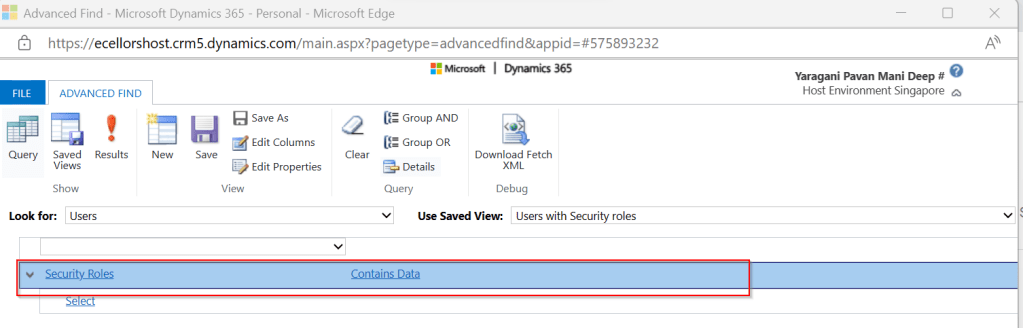
For this, lets create a view Users with Security in user entity as below…you know that you could only update settings for those who were having security role.
Mainly the user need prvReadUserSettings privilege to update the personal settings, the tool doesn’t allow if not.
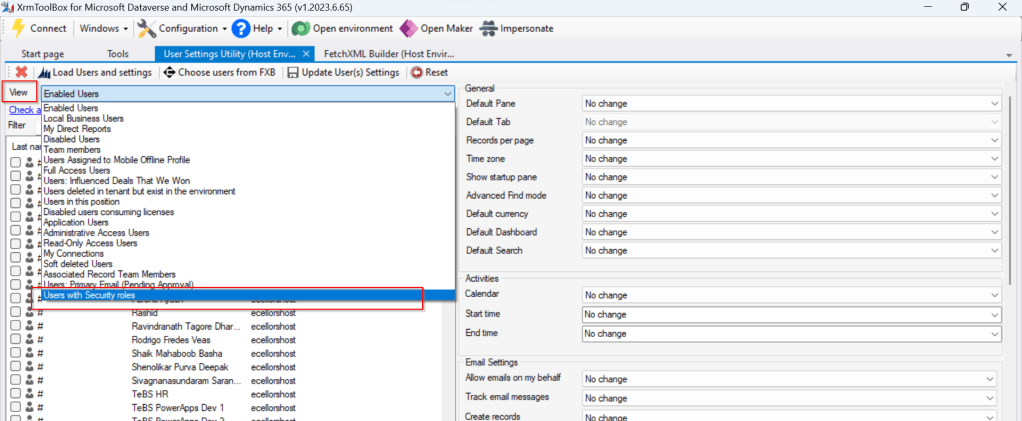
Once you have connected to the environment, click on Load Users and settings. Now just select the view which have created before…upon selecting the tool will list down all the active users satisfying the view criteria.
All you need is to click on Check all and there by selecting all the users satisfying your filter criteria, change the settings as per your needs on the right-hand side of the tool and click on Update User(s) Settings in one go.
Here I have 3 users in the view, all were updated in one shot…
Isn’t it easy, this trick will save you a lot of time if your user list grows…
In this blog post, let’s see how we can create a custom connector without leaving our own Visual Studio for building a custom connector. Ideally for building any custom connector, we need to create them in https://make.powerapps.com or https://make.powerautomate.com. Last month Microsoft Announced that Power Platform is now a connected service in Visual Studio 2022. In this blog, we will utilize its capability…
Before diving deeper, let’s see what are the prerequisites..
Visual Studio
ASP .NET Web API knowledge
Canvas Apps knowledge
Let’s get started..
Step 1:
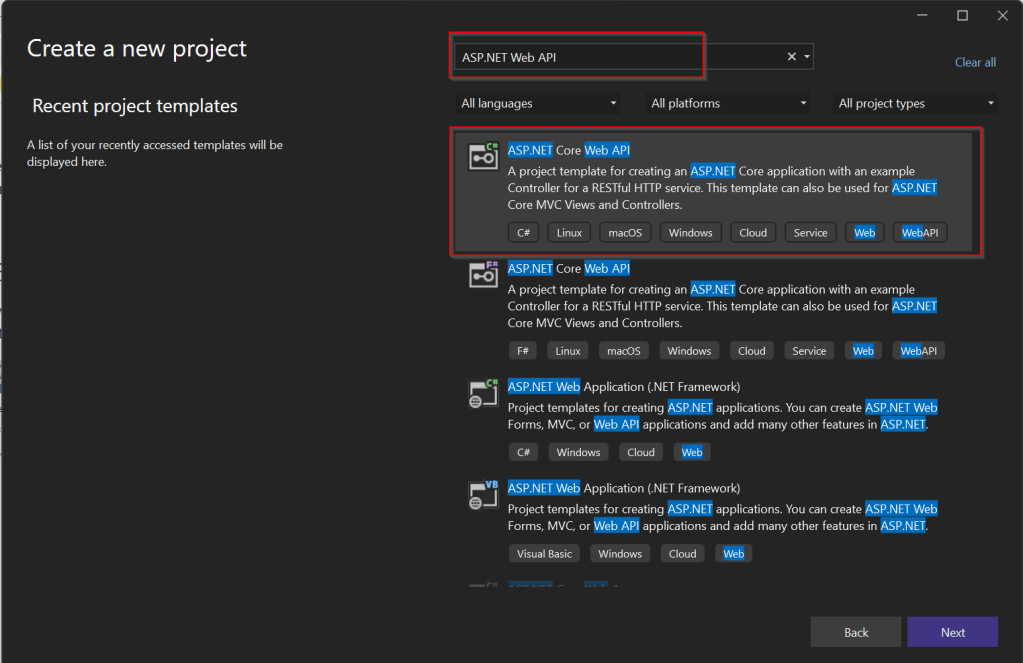
Create ASP.NET Web API Project in Visual Studio
Step 2:Choose your option as below and click on Next..
Step 3:
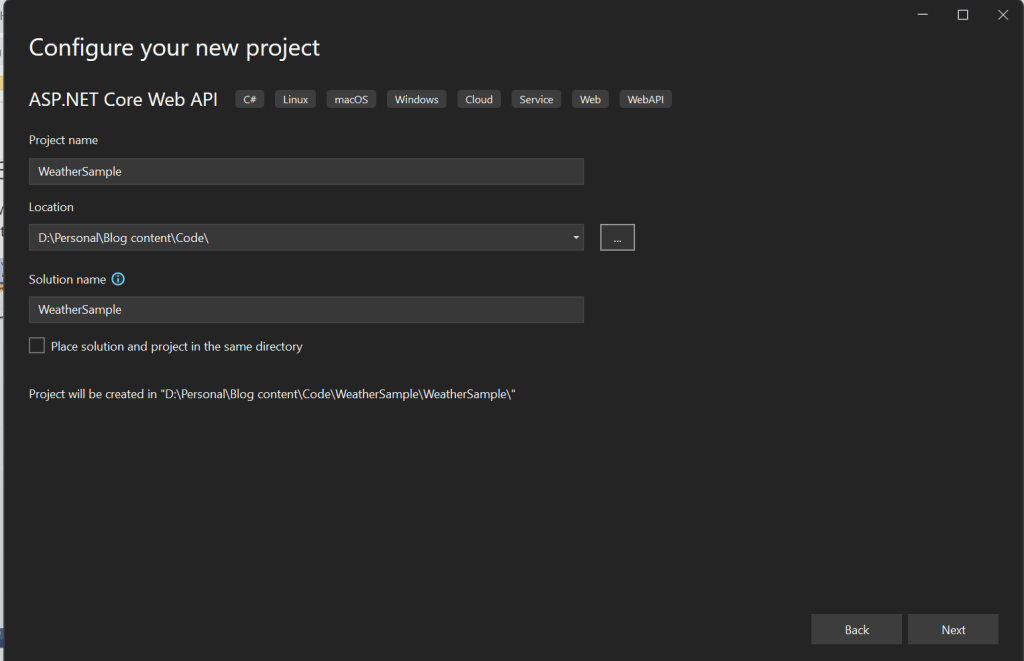
Choose your next steps as below and click on Next to proceed, make sure to choose authentication type as None
Step 4:
Create a ASP.NET Core Web API Project
Step 5:
By adding Power Platform as a service dependency, you can update an existing custom connector, or create a new one from your API.
If you want to expose your local running API to a public endpoint, I prefer using Dev Tunnels feature of Visual Studio…
That’s it, you have started running your API.
Step 6:
Now let’s create a Mobile App with Power Apps…with the same login you have used for the Visual Studio to create a custom connector..
Step 7:
First check if Custom Connector has been created in your tenant and authenticate the connection….navigate to https://make.powerapps.com and click on Discover at the left of the page….and then click on Custom Connectors, you should see a connector which we created from Visual Studio….nice isn’t it…
Step 8:
All you need to create a connection by clicking on the + sign available..
Once connected, now try creating a mobile Canvas App..
In the Canvas App, try adding data…and search for Weather Sample which you created, you should see something like below…
Step 9:
Once the web API is running in your development environment, you can debug in real time and even Hot Reload your code.
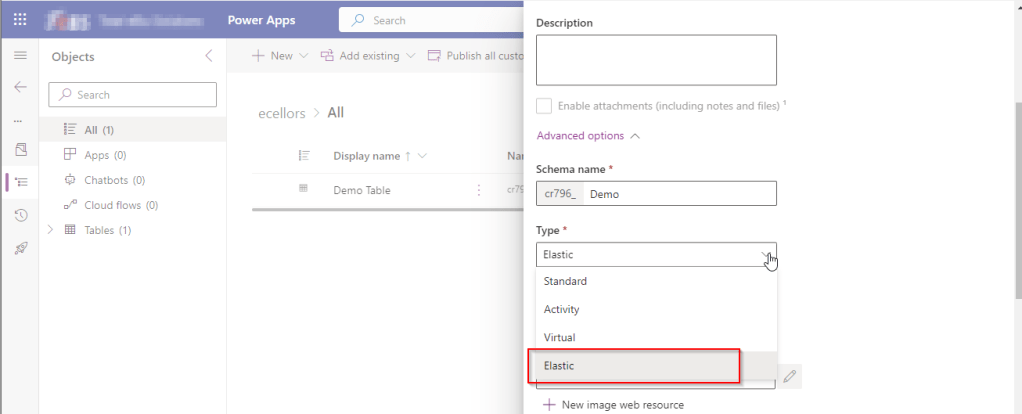
While you may have noticed this or not, but it’s real. Now Dynamics 365 CE existing table types have a new companion called Elastic, it is yet to be announced.
However let’s take a quick look of the table types showing up when you were trying to create a new one in Dataverse.
While everyone is aware about Standard, Activity, Virtual types in Model Driven Apps. Elastic tables are new tables which came in to Dataverse and probably it will be announced in the upcoming Microsoft Build 2023.
From my view, Elastic tables were
1. Built similar to the concept of Elastic Queries in Azure which is usually meant for the purposes of Data archiving needs.
2. You can scale out queries to large data tiers and visualize the results in business intelligence (BI) reports.
3. Elastic Query provides a complete T-SQL Database Querying capability on Azure SQL, possibly Dataverse.
Hope we get all the capabilities released with Elastic Queries of Azure SQL be released in Dataverse as well.
Do you know you can change the Data type of an Primary column between Single Line of Text and Autonumber even after creation of your entity specifying a defined Primary Name Column. There is a catch….
So let’s see…
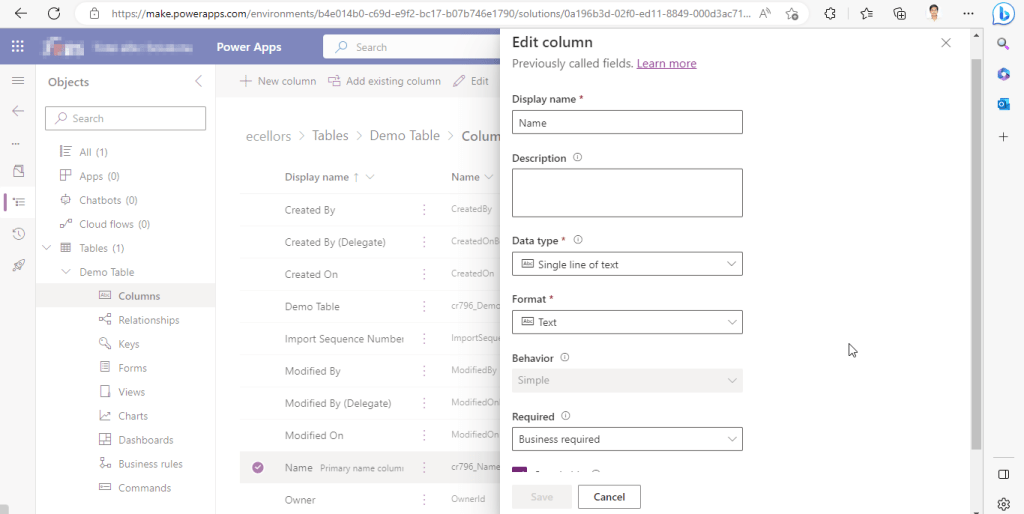
I first created a brand new Table called Demo Table and kept the Primary Column as Single Line of text. Earlier once the table is created, you will not be able to change the Primary name column if you wish to, the only way was to delete the table and re-create it with the correct type. But now you can change the type of the column at least to a unique autonumbering.
I want the Primary Name column to be unique, but when I look at the data in my table captured, I see many duplicates.
So let’s change the data type of the primary column data type to Autonumber.
The primary field look as below initially…
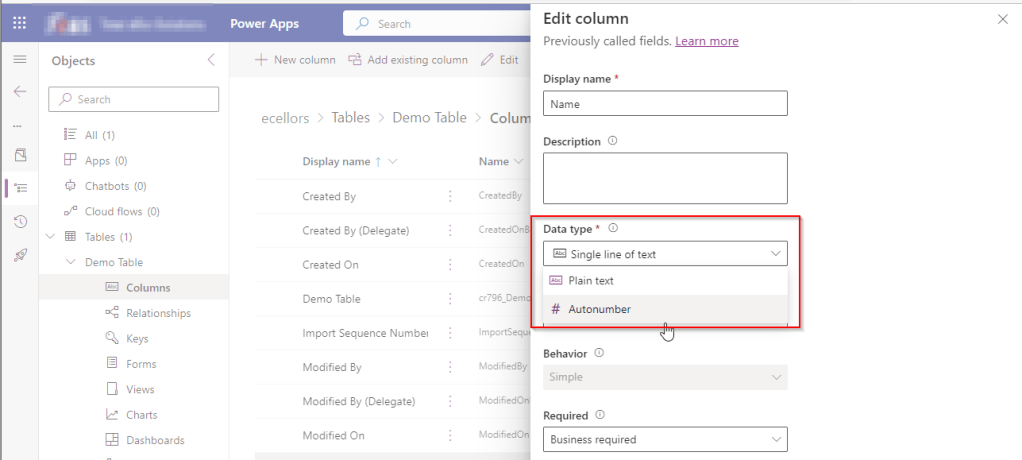
Select the Data Type available…
Now Select the Autonumber from the drop down available…you can optionally specify any custom prefix which you want for your Autonumber…and click Save and publish the customizations.
Now go back to your model driven app and then try creating a new record for the respective entity.
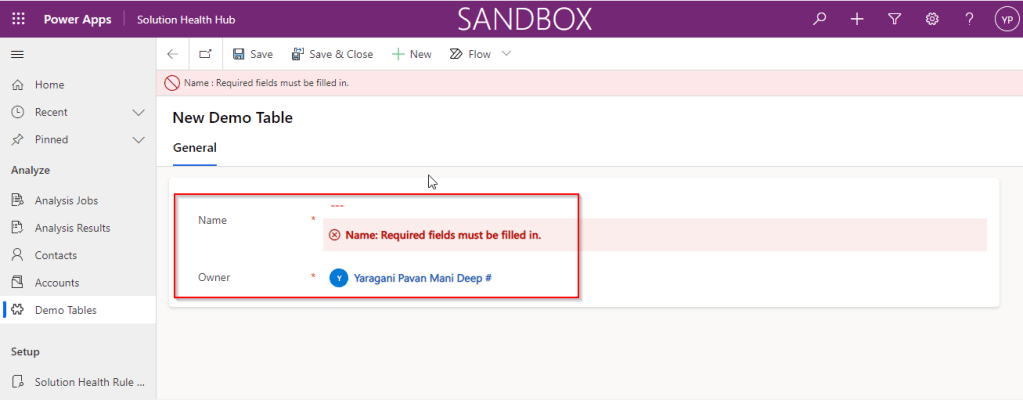
Since it was a primary field column, it is by default made mandatory…what’s up…the Autonumber column data type change is not reflecting….this is the same even if you check and publish the solution multiple times. Neither you can’t specify the field value because you already choose this to be an Autonumber and system should create it by itself.
If you were scratching your head, then this simple tip will help…
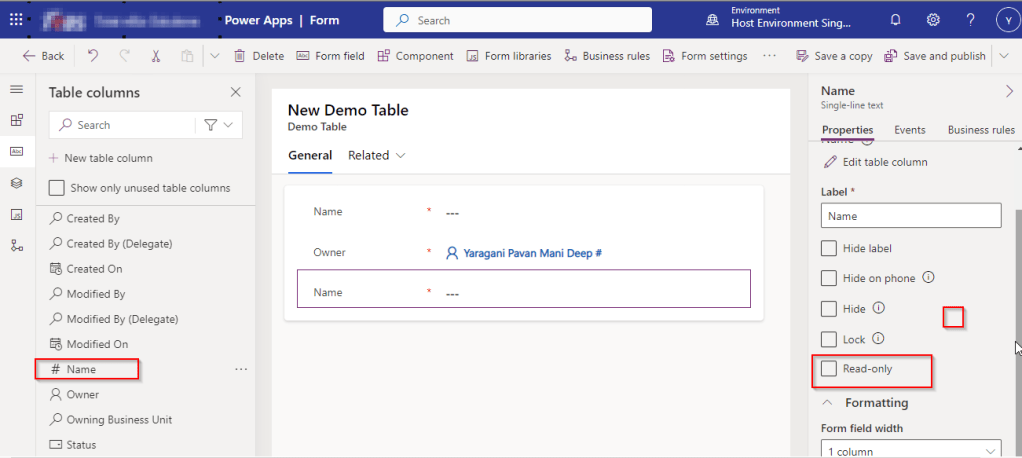
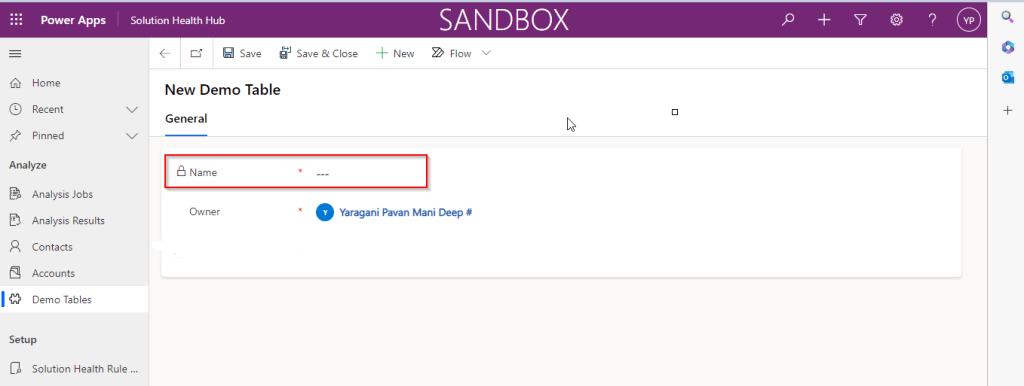
Just make the field read-only from the form where this field is being referred, so you don’t need to really enter value for it…then publish the customizations.
Once you have done…
Now try to save the record..
There you go, you can see an Autonumber being populated in the primary field…
Here is how I have quickly achieved the synchronous Retrieve multiple call using Web API and Promises with the help of JavaScript. I don’t want to make my post too detail, but I would like to share the approach.
All I want to do is to just Restrict saving the Contact creation if the Postal Code entered is not present in the system. But this call should be synchronous as the message should be shown immediately incase postal code is not found in the system and prevent saving the contact record. All you need to do is simple, just call the below function on change of Postal Code in Contacts.
Here in place of XMLHTTPRequest, I have used Xrm.WebAPI so that it won’t show a critial warning in Solution Checker.
This file contains hidden or bidirectional Unicode text that may be interpreted or compiled differently than what appears below. To review, open the file in an editor that reveals hidden Unicode characters.
Learn more about bidirectional Unicode characters
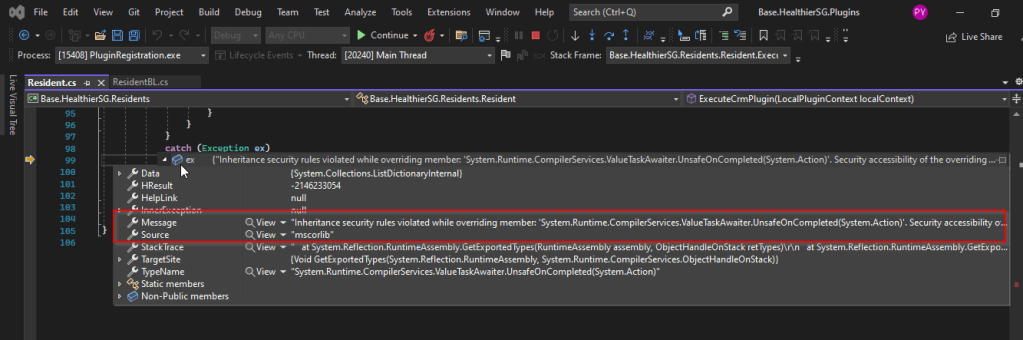
I recently came across the above error for one of my Dynamics 365 Plugins…this blog talks about applying a quick fix.
While debugging our Plugin logic line by line to understand why it’s not working, observed this error for messages like RetrieveMultiple, Retrieve when I use any Organization Service call.
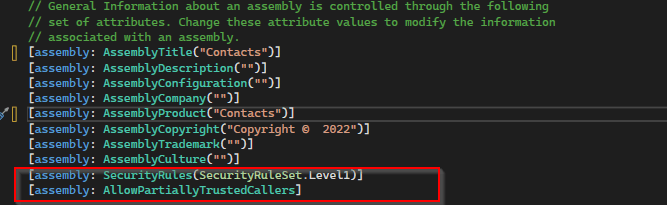
This was a .Net version downgrade issue caused by ILMerge as I downgraded one of the DLL to 4.6.2 version from 4.7.1. If you see this issue even without downgrading your DLL, you can use this fix.
After some research I came across this article and applied the same to my assembly which fixed the issue. Added these lines to my AssemblyInfo.cs class file..
This blog post is all about performance considerations for your Power Platform CE Projects and how you can plan to optimize application performance for your Power Apps. So I just want to take you through them…
Are you tired of creating solutions for longer durations and while at the end of the project or during UAT you end up facing performance issues for the solutions you have developed, one of the most important non-functional requirements for a project’s success is Performance. Satisfying performance requirements for your users can be a challenge. Poor performance may cause failures in user adoption of the system and lead to project failure, so you might need to be careful for every decision you take while you design your solutions in the below stages.
Let’s talk about them one by one..
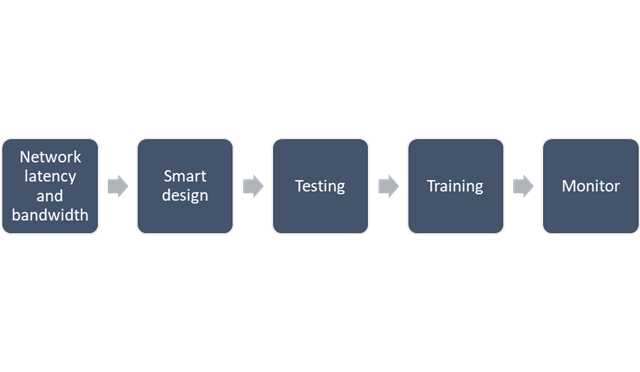
1. Network Latency and bandwidth
A main cause of poor performance of Dynamics 365 apps is the latency of the network over which the clients connect to the organization.
Bandwidth is the width or capacity of a specific communications channel.
Latency is the time required for a signal to travel from one point on a network to another and is a fixed cost between two points. And usually many of these “signals” travel for a single request.
Lower latencies (measured in milliseconds) generally provide better levels of performance. Even if the latency of a network connection is low, bandwidth can become a performance degradation factor if there are many resources sharing the network connection, for example, to download large files or send and receive email.
Dynamics 365 apps are designed to work best over networks that have the following elements:
Bandwidth greater than 50 KBps (400 kbps)
Latency under 150 ms
These values are recommendations and don’t guarantee satisfactory performance. The recommended values are based on systems using out-of-the box forms that aren’t customized.
If you significantly customize the out-of-box forms, it is recommend that you test the form response to understand bandwidth needs.
You can use the diagnostics tool to determine the latency and bandwidth:
On your computer or device, start a web browser, and sign in to an organization.
Also, to mitigate higher natural latency for global rollouts, customers should leverage Dynamics 365 Apps successfully by having smart design for their applications.
2.Smart Design for your application
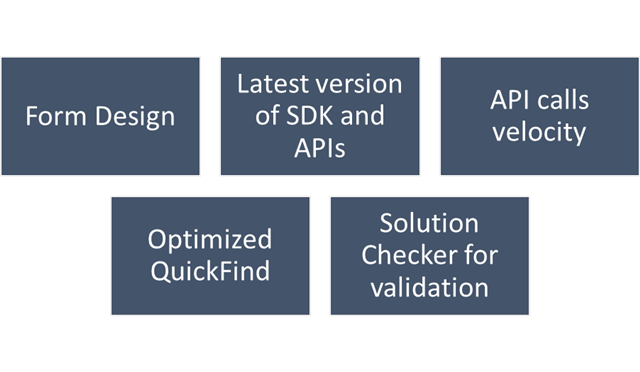
Form design
Keep the number of fields to a minimum. The more fields you have in a form, the more data that needs to be transferred over the internet or intranet to view each record. Think about the interaction the user will have with the form and the amount of data that must be displayed within it.
Avoid including unnecessary JavaScript web resource libraries. The more scripts you add to the form, the more time it will take to download them. Usually, scripts are cached in your browser after they are loaded the first time, but the performance the first time a form is viewed often creates a significant impression.
Avoid loading all scripts in the Onload event. If you have code that only supports OnChange events for fields or the OnSave event, make sure to set the script library with the event handler for those events instead of the OnLoad event. This way loading those libraries can be deferred and increase performance when the form loads.
Use tab events to defer loading web resources. Any code that is required to support web resources or IFRAMEs within collapsed tabs can use event handlers for the TabStateChange event and reduce code that might otherwise have to occur in the OnLoad event.
Set default visibility options. Avoid using form scripts in the OnLoad event that hide form elements. Instead set the default visibility options for form elements that might be hidden to not be visible by default when the form loads. Then, use scripts in the OnLoad event to show those form elements you want to display. If the form elements are never made visible, they should be removed from the form rather than hidden.
Avoid opening a new tab or window and do open the window in the main form dialog.
For Command Bar, keep the number of controls to a minimum. Within the command bar or the ribbon for the form, evaluate what controls are necessary and hide any that you don’t need. Every control that is displayed increases resources that need to be downloaded to the browser. Use asynchronous network requests in Custom Rules When using custom rules that make network requests in Unified Interface, use asynchronous rule evaluation.
Only the columns required for information or action should be included in API calls:
Retrieving all columns (*) creates significant overhead on the database engine when distributed across significant user load. Optimization of call velocity is key to avoid “chatty” forms that unnecessarily make repeated calls for the same information in a single interaction.
You should avoid retrieving all columns in a query result because of the impact on a subsequent update of records. In an update, this will set all field values, even if they are unchanged, and often triggers cascaded updates to child records. Leverage the most efficient connection mechanism (WebAPI vs SDK) and reference this doc site for guidance on the appropriate approach.
You should continue to use the ITracingService.Trace to write to the Plug-in Trace Log table when needed. If your plug-in code uses the ILogger interface and the organization does not have Application Insights integration enabled, nothing will be written. So, it is important to continue to use the ITracingService Trace method in your plug-ins. Plug-in trace logs continue to be an important way to capture data while developing and debugging plug-ins, but they were never intended to provide telemetry data.
For organizations using Application Insights, you should use ILogger because it will allow for telemetry about what happens within a plug-in to be integrated with the larger scope of data captured with the Application Insights integration. The Application Insights integration will tell you when a plug-in executes, how long it takes to run and whether it makes any external http requests. Learn more about tracing in plugins Logging and tracing (Microsoft Dataverse) – Power Apps | Microsoft Learn.
Use Solution Checker to analyze solution components
Best practice is to run Solution Checker for all application code and include it as mandatory step while you design solutions or check when you complete developing your custom logic.
Quick Find
For an optimal search experience for your users consider the next:
All columns you expect to return results in a quick find search need to be included in the view or your results will not load as expected.
It is recommended to not use option sets in quick find columns. Try using the view filtering for these.
Minimize the number of fields used and avoid using composite fields as searchable columns. E.g., use first and last name as searchable vs full name.
Avoid using multiple lines of text fields as search or find columns.
Evaluate Dataverse search vs using leading wildcard search
3. Training
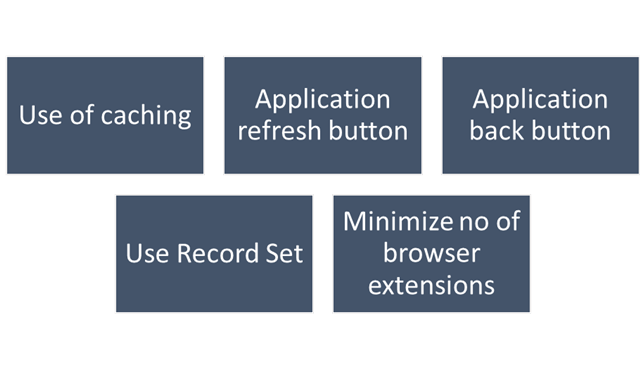
This step should be done during user training or during UAT. To ensure optimal performance of Dynamics 365, ensure that users are properly leveraging browser caching. Without caching, users can experience cold loads which have lower performance than partially (or fully) warm loads.
Train users to not clear the browser cache manually.
Check if devices have enough space allocated for browser cache.
Make sure to train users to:
Use application inline refresh over browser refresh (should not use F5)
Use application inline back button instead browser’s back button.
Avoid InPrivate/Incognito modes in browser which causes cold loads.
Make users aware that running applications which consumes lot of bandwidth (like video streaming) may affect performance.
Do not install browser extensions unless they are necessary (this might be also blocked via policy)
Do use ‘Record Set’ to navigate records quickly without switching from form back to the list.
4. Testing
For business processes where performance is critical or processes having complex customizations with very high volumes, it is strongly recommended to plan for performance testing. Consider reviewing the below technical talk series describing important performance considerations, as well as sharing practical examples of how to set up and execute performance testing, and analyze and mitigate performance issues. Reference: Performance Testing in Microsoft Dynamics 365 TechTalk Series – Microsoft Dynamics Blog
5. Monitoring
You should define a monitoring strategy and might consider using any of the below tools based on your convenience.
Monitor Dynamic 365 connectivity from remote locations continuously using network monitoring tools like Azure Network Performance Monitor or 3rd party tools. These tools help identify any network related problems proactively and drastically reduce troubleshooting time of any potential issue.
Application Insights, a feature of Azure Monitor, is widely used within the enterprise landscape formonitoring and diagnostics. Data that has already been collected from a specific tenant or environment is pushed to your own Application Insights environment. The data is stored in Azure Monitor logs by Application Insights, and visualized in Performance and Failures panels under Investigate on the left pane. The data is exported to your Application Insights environment in the standard schema defined by Application Insights. The support, developer, and admin personas can use this feature to triage and resolve Telemetry events for Microsoft Dataverse – Power Platform | Microsoft Learn
Dataverse and PowerApps analytics in the Power Platform Admin Centre. Through the Plug-in dashboard in the Power Platform Admin Center you can view metrics such as average execution time, failures, most active plug-ins, and more.
Dynamics 365 apps include a basic diagnostic tool that analyzes the client-to-organization connectivity and produces a report.
Monitor is a tool that offers makers the ability to view a stream of events from a user’s session to diagnose and troubleshoot problems. Works both for model driven apps and canvas apps.
I hope this blog post had helped you learn or know something new…thank you for reading…
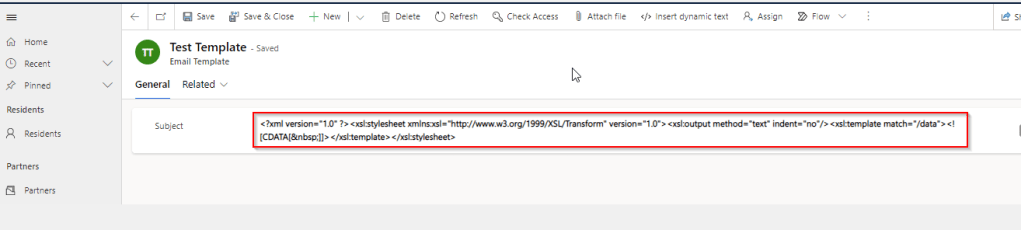
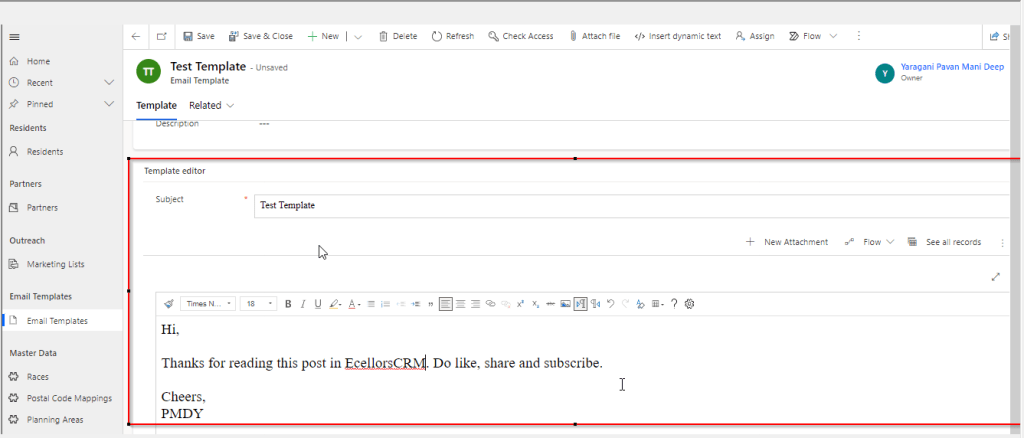
We recently came across a situation where the new and existing email templates keeps showing a xml as below.
This kept us annoying as already the existing ones are created using Rich Email Template editor. At first check, we verified in our Dev and SIT, badly we saw that this is same in both the environments. We double confirmed that no changes were made to the OOB Email template form, so we doubted that there was something wrong with our environment. Luckily we have one more environment where we able to see the email templates working fine. Then we confirmed that there is related to email template form related issue. Also when we tried to open the existing email templates in new designer from https://make.powerapps.com, they opened without any issue.
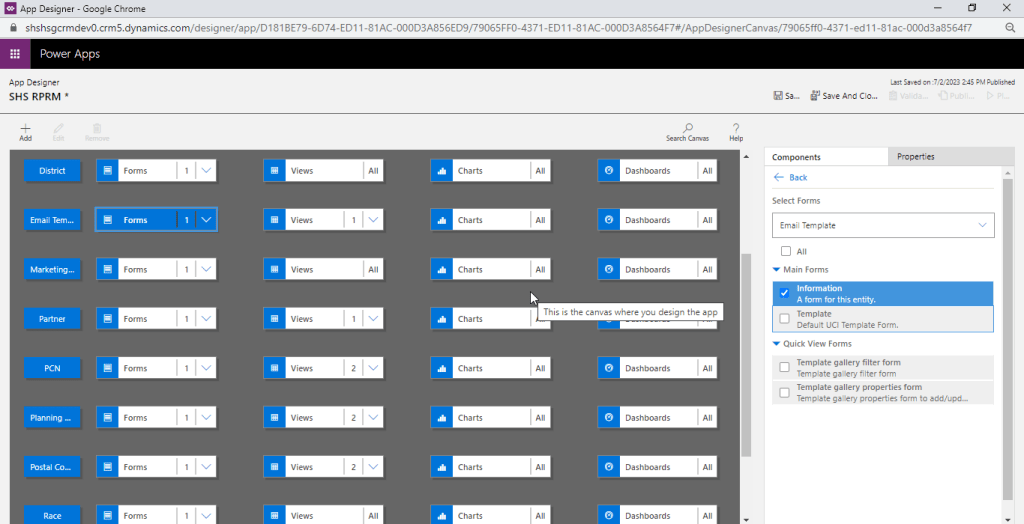
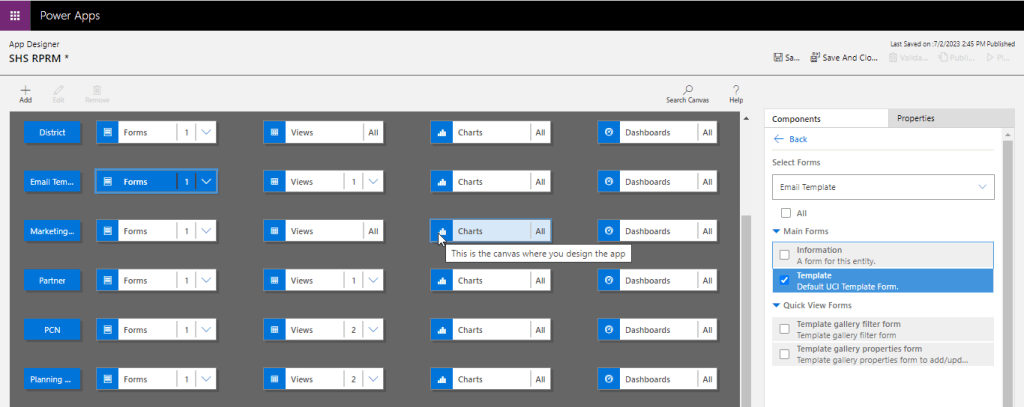
Fix: Open your model driven app in your custom solution created and launch it by double clicking on it. Just verify it the forms selected for Email Template entity….
The fix is quite obvious and there you are..inorder for email template to show properly, you should select Default UCI Template type form.
While its been quite sometime since Microsoft shipped the Solution checker and App checker, these tools can help a developer to validate all the solutions that was being built before moving to higher environments. It is always advisable to run solution checker once your solution is developed so this can help you achieve better performance following the Power Platform best practices. Previously we used to send for Code review to senior folks but now with this tool, even the junior developer working at the ground level can easily understand and can make the necessary tweaks in the solution.
Solution Checker serves as a static analysis tool for the developers to check any platform related issues.
The solution checker analyzes these solution components:
Dataverse custom workflow activities
Dataverse web resources (HTML and JavaScript)
Dataverse configurations, such as SDK message steps
Note: Solution checker won’t analyze plugins in solutions. Plugin validations are modernized and will eventually the focus is on the native plugin authoring time, which will help you detect and fix issues earlier. So if you were looking for improvements in Plugin code, this will not help you.
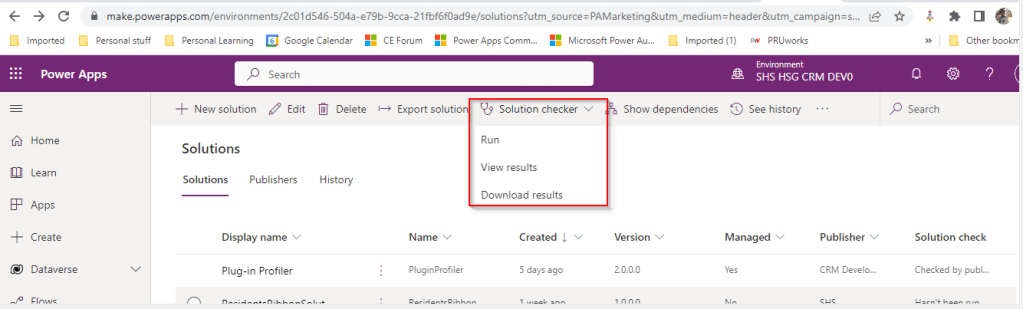
Once solution checker starts running, it will be shown as below with a loading symbol on solution checker
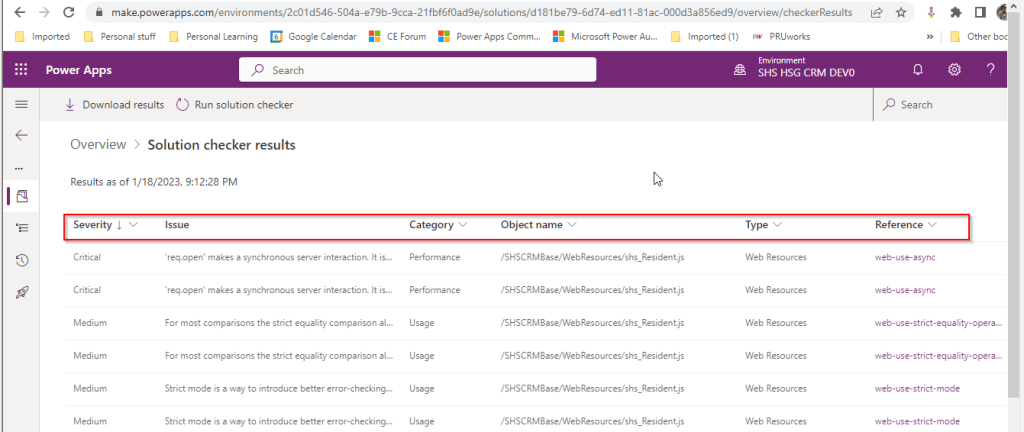
It would take a few minutes to complete the process and will be based on the size of the solution. Once this process is complete, you should be able to download the results or view the results like below
If we open the results file, it shows the potential issues or improvements along with their severity which helps us to prioritize the issues which we need to work upon.
The report can also be downloadable excel file with analysis shipped in Zip format.
Now that we have seen what is solution checker, let’s see what App checker is and its pro’s and con’s.
App Checker:
The App checker is now available to help provide a clear list of formula issues in your app, and to provide items to fix to make your app accessible
This helps to make debugging, performance and best practice decisions an easier and more guided experience.
This is an ideal way to check the formulas you wrote for your Canvas Apps.
There isn’t any possibility to download the app checker results but you can analyze the results on the fly in canvas apps.
To conclude you can think of Solution checker is a tool to check Model Driven Apps and App checker is a tool for Canvas Apps. Hope you will use this great features to improve your solutions and design according to best practices.
To start with this scenario, this is one of the most commonly asked functionalities when we talk about of adding members to marketing list using an excel import.
In this scenario, we will make use of Connections entity and associate the marketing list to the contacts on creation of the connection…ok…let us give it a try….we will make use of plugin here….which runs on Create and on Post operation and calls the below method…
 public void MarketingListImport()
        {
            Entity connectionER = (Entity)executionContext.InputParameters["Target"];
            Entity marketingList = new Entity();
            if (connectionER.Contains("record2id"))
            {
                EntityReference connectTo = connectionER.GetAttributeValue<EntityReference>("record2id");
                EntityReference connectFrom = connectionER.GetAttributeValue<EntityReference>("record1id");

                if (connectTo != null)
                {
                    marketingList = organizationService.Retrieve(connectTo.LogicalName, connectTo.Id, new ColumnSet("type", "createdfromcode"));
                }

                if (connectTo.LogicalName == "list")//Marketing list
                {
                    if (marketingList.Contains("type") && marketingList.GetAttributeValue<bool>("type") == false)
                    {

                        if (connectFrom.LogicalName == "contact" && marketingList.Contains("createdfromcode") && marketingList.GetAttributeValue<OptionSetValue>("createdfromcode").Value == 2)//Resident
                        {
                            // Add a list of contacts to the marketing list.
                            var addMemberListReq = new AddListMembersListRequest
                            {
                                MemberIds = new[] { connectFrom.Id },
                                ListId = connectTo.Id
                            };

                            organizationService.Execute(addMemberListReq);

                            tracingService.Trace("Contacts with GUIDs \r\n\t{{{0}}} is added to the list.",
                                connectFrom.Id);
                        }

                        else
                        {
                            throw new InvalidPluginExecutionException("Marketing list should be targeted at contact and contacts can be imported");
                        }
                    }

                    else
                    {
                        throw new InvalidPluginExecutionException("Members cannot be imported into a Dynamic Marketing list, please select a static marketing list and try again");
                    }
                }
            }
        }
    }
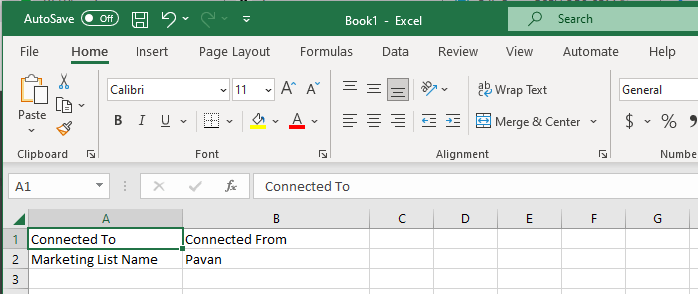
Once you were done writing the code, next step is to test the functionality…for this we will use the following template.
Import this template from the imports area under settings in your Dynamics 365…boom….the contacts in the template will be added to your Static Marketing List.
















 ECELLORS CRM Blog