Power Platform Tools | Developer Toolkit for Visual Studio 2019

Rajeev Pentyala's avatarRajeev Pentyala – Technical Blog on Power Platform, Azure and AI

Power Platform Tools for Visual Studio supports the rapid creation, debugging, and deployment of plug-ins.

You may note that Power Platform Tools for Visual Studio is similar in appearance and function to the Developer Toolkit for Microsoft Dynamics CRM 2013.

While Power Platform Tools for Visual Studio is similar in appearance and function to the Developer Toolkit for Microsoft Dynamics CRM 2013, Power Platform Tools is a new product and completely independent of the Developer Toolkit.

Power Platform Tools is not directly compatible with any templates or projects from the Developer Toolkit and vice versa.

Steps to enable ‘Power Platform Tools’ extension in VS 2019:

  • From the Visual Studio 2019, click on ‘Extensions -> Manage Extensions’.
  • Expand the left navigation panel node Online > Visual Studio Marketplace. Search for “Power Platform Tools”, then click on ‘Download’.
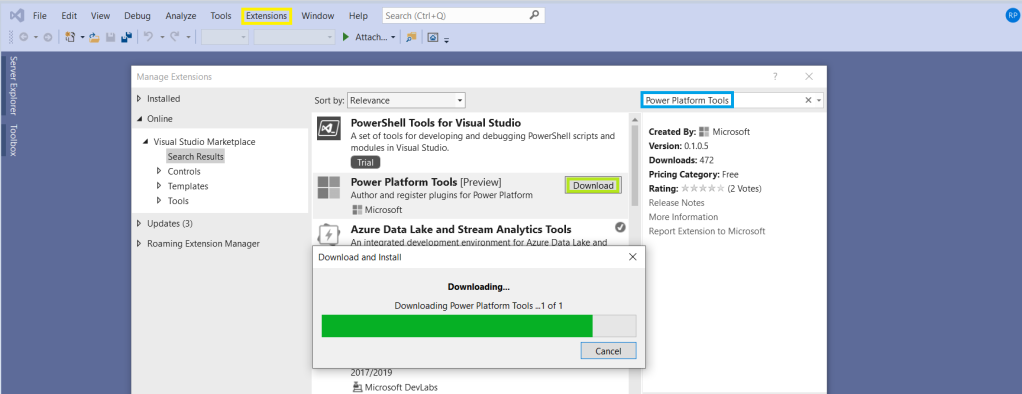
  • Post Download, close all the Visual Studio instances and wait for few seconds…

View original post 112 more words

Missing Index – A factor to review before implementing performance changes

Hi,

Have u ever faced any performance issue with any of your REST API hosted out in the internet. So here’s the background, our client has a Custom Asp.Net Portal(remembering the old day school of using Asp’s, interesting…??) which is built on using the REST API.

So this REST API was having some performance issues, this is where we got to check on the newly created entity for our API Implementation…after couple of hours of research, we found that few indexes are missing.

You should be knowing how it’s difficult to read a book without indexes, so in the same way, the C# code was finding it difficult to retrieve the data without any indexes and after adding them, the peformance had been improved and with a bit of code improvisation, we got a significant improvement in the performance.

For those trying to search for missing indexes, please try out the below code…

SELECT DISTINCT

       CONVERT(decimal(18,2), user_seeks * avg_total_user_cost * (avg_user_impact * 0.01)) AS [index_advantage],

       migs.last_user_seek,

       OBJECT_NAME(mid.[object_id]) AS [table_name],

       mid.equality_columns,

       mid.inequality_columns,

       mid.included_columns,

       migs.unique_compiles,

       migs.user_seeks,

       migs.avg_total_user_cost,

       migs.avg_user_impact,

       p.rows AS [table_rows],

       mid.[statement] AS [DatabaseSchemaTable],

         GETDATE() QueryExecustionTime

FROM sys.dm_db_missing_index_group_stats AS migs WITH (NOLOCK)

INNER JOIN sys.dm_db_missing_index_groups AS mig WITH (NOLOCK)

ON migs.group_handle = mig.index_group_handle

INNER JOIN sys.dm_db_missing_index_details AS mid WITH (NOLOCK)

ON mig.index_handle = mid.index_handle

INNER JOIN sys.partitions AS p WITH (NOLOCK)

ON p.[object_id] = mid.[object_id]

WHERE mid.database_id = DB_ID(‘Starbucks_MSCRM’) –CHANGE DB NAME HERE –Starbucks_MSCRM

–AND mid.[object_id] = OBJECT_ID(‘dbo.ign_transactionbase’) –CHNAGE TABLE NAME HERE

ORDER BY index_advantage DESC OPTION (RECOMPILE);

GO

Hope you found some interesting scenario to deal with your performance issues.

Cheers,

PMDY