Xrm.WebAPI with Promise for synchronous calls in Javascript

Hi Folks,

Here is how I have quickly achieved the synchronous Retrieve multiple call using Web API and Promises with the help of JavaScript. I don’t want to make my post too detail, but I would like to share the approach.

All I want to do is to just Restrict saving the Contact creation if the Postal Code entered is not present in the system. But this call should be synchronous as the message should be shown immediately incase postal code is not found in the system and prevent saving the contact record. All you need to do is simple, just call the below function on change of Postal Code in Contacts.

Here in place of XMLHTTPRequest, I have used Xrm.WebAPI so that it won’t show a critial warning in Solution Checker.

ValidatePostalCode: function (executionContext) {
"use strict";
var formContext = executionContext.getFormContext();
var postalcode = formContext.getAttribute(Resident.Fields.address1_postalcode).getValue();
var message = "Please enter a valid Postal code; Refer to Postal Code Mappings"
var uniqueId = "cnt_postalcodenotpresent";
return new Promise(function (resolve, reject) {
Xrm.WebApi.retrieveMultipleRecords("new_postalcodes", "?$select=new_postalcode&$filter=hsg_postalcode eq '" + postalcode + "' ").then(
function success(result) {
var isNotFound = false;
if(result !== undefined)
isNotFound = result.entities.length === 0 ? true : false;
if (isNotFound) {
var errorMessage = "Postal Code Mapping is not present for the given postal code"
formContext.ui.setFormNotification(errorMessage, "ERROR", uniqueId);
}
else {
Resident.isValidationNeeded = false;
formContext.ui.clearFormNotification(uniqueId);
formContext.data.entity.save();
}
// return true or false
resolve(isNotFound);
},
function (error) {
reject(error.message);
//console.log(error.message);
}
);
});
}

References:

What is Promise?

Web API Retrieve Multiple

Action based on Async Operation

Cheers,

PMDY
Simple Approval Design For Model-Driven Apps

temmyraharjo's avatarTemmy Wahyu Raharjo

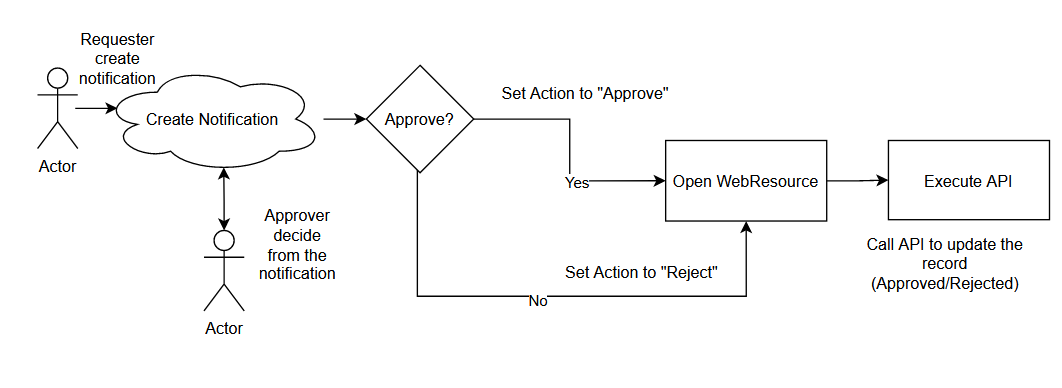
Do you know the In-App Notification feature from Model Driven Apps? This feature can create a notification that targeted a specific User. We also can add action to the notification so the User can also interact with multiple actions (now is limited to just an open URL). In short, this feature is very useful for creating the Approval process. Without further ado, let’s go to my proposed solution! 😎

The Necessary Part

I created the below table for this demonstration purpose:

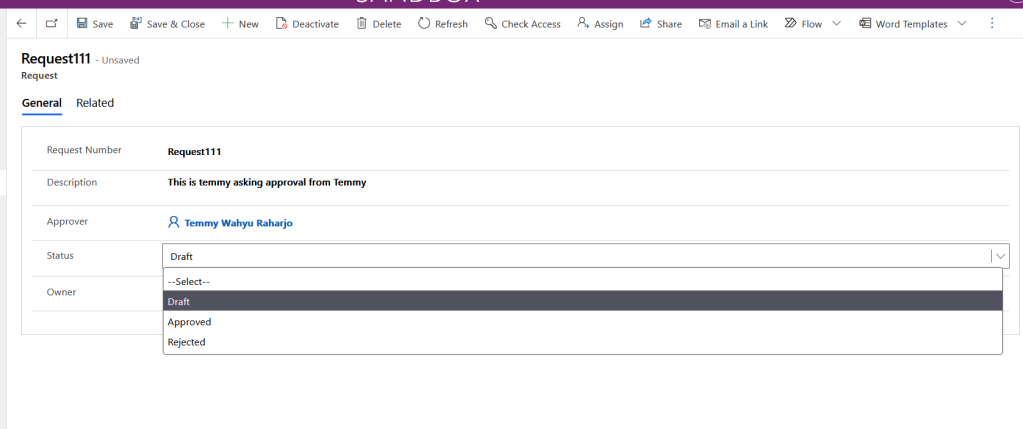
Request Table

As you can see, the User will fill in the Approver that needs to approve the request. Then in the status field, there are 3 options which are Draft, Approved, or Rejected.

For the next one, you need to create a Model-Driven App. The reason for it is because we need to turn on the feature from the Settings (in top-left from the App > go…

View original post 631 more words