Last few weeks was very busy for me, I missed interacting with the community.
Here I would like to share one tip which can greatly help your debugging…
Just to give a little background, I was working with the Plugins for Dynamics 365 recently where I was working with API, the Plugin seem to work fine when debugged using Profiler, I tested the piece of the Plugin Code in Console, it worked either, but Plugin is not working when the respective action which triggers the Plugin is being fired. I scratched my head, what is the problem…
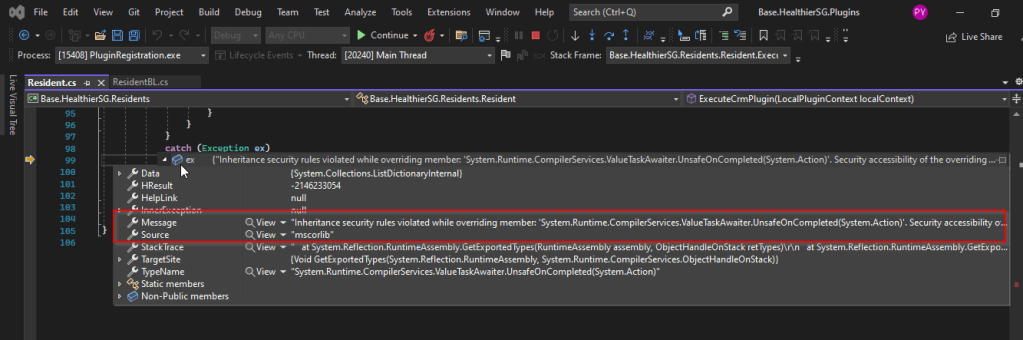
Just then, I tried using the below block of code, replaced the catch block of Plugin Code with below code.
This file contains hidden or bidirectional Unicode text that may be interpreted or compiled differently than what appears below. To review, open the file in an editor that reveals hidden Unicode characters.
Learn more about bidirectional Unicode characters
Soon, I observed from the detailed error message above function posted, it is failing because of version problem of the referenced DLL and current DLL version was not supported with my assembly.
Soon I was able to reference my Plugin with correct DLL version which fixed the issue. No further debugging was needed.
Well, this could be a very interesting post as we talk about optimizing the Dataverse performance using bulk operation messages and too using Dataverse plugin customizations but wait, this post is not complete because of an issue which I will talk later in the blog. First let’s dig into this feature by actually trying out. Generally, every business wants improved performance for any logic tagged out to out of box messages and so developers try to optimize their code in various ways when using Dataverse messages.
Firstly, before diving deeper into this article, let’s first understand the differences between Standard and Elastic tables, if you want to know a bit of introduction to elastic tables which were newly introduced last year, you can refer to my previous post on elastic tables here.
The type of table you choose to store your data has the greatest impact on how much throughput you can expect with bulk operations. You can choose out of two types of tables in Dataverse, below are some key differences you can refer to:
Standard Tables
Elastic Tables
Data Structure
Defined Schema
Flexible Schema
Stores data in Azure SQL
Stores data in Azure Cosmos DB
Data Integrity
Ensured
Less Strict
Relationship model
Supported
Limited
Performance
Predictable
Variable, preferred for unpredictable and spiky workloads
Agility
Limited
High
Personalization
Limited
Extensive
Standard and Elastic Table Differences
Plugins:
With Bulk Operation messages, the APIs being introduced are Create Multiple, UpdateMultiple,DeleteMultiple (only for Elastic tables), Upsert Request(preview). As of now you’re not required to migrate your plug-ins to use CreateMultiple and Update Multiple instead of Create and Update messages. Your logic for Create and Update continues to be applied when applications use CreateMultiple or UpdateMultiple.
This is mainly done to prevent two separate business logics for short running and long duration activities. So, it means Microsoft have merged the message processing pipelines for these messages (Create, Create Multiple; Update, Update Multiple) that means Create, Update messages continue to trigger for your existing implemented scenarios, when you update to use Create Multiple, Update Multiple still the Create, Update will behave.
Few points for consideration:
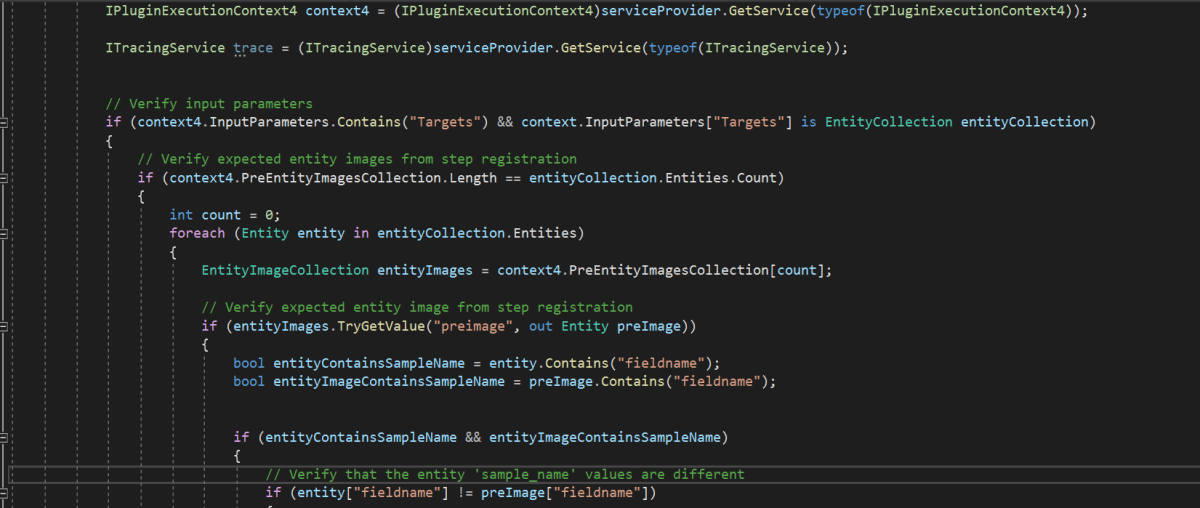
While I have tested and still could see IPluginExecutionContext only provides the information and still I have noted Microsoft Documentation suggests using IPluginExecutionContext4 for Bulk Messages in Plugins where it is being shown as null yet.
While you were working with Create, Update, Delete, you could have used Target property to get the input parameters collection, while working with Bulk Operation messages, you need to use Targets instead of Target.
Instead of checking whether the target is Entity you need to use Entity Collection, we need to loop through and perform our desired business logic
Coming to Images in plugin, these will be retrieved only when you have used IPluginExecutionContext4.
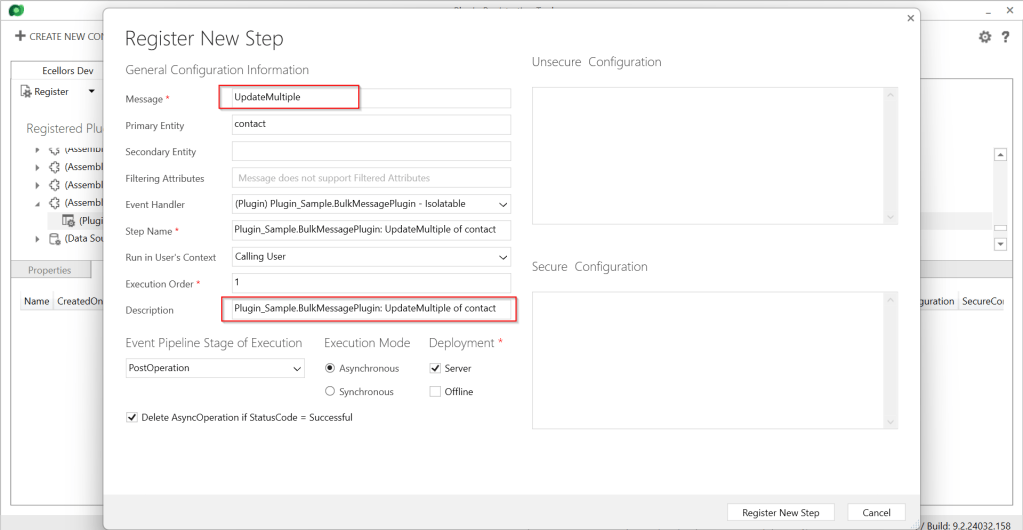
Below is the image from Plugin Registration Tool to refer(e.g. I have taken UpdateMultiple as reference, you can utilize any of the bulk operation messages)
Sample:
Below is the sample, how your Bulk operation message plugin can look like…you don’t need to use all the contexts, I have used to just check that out.
This file contains hidden or bidirectional Unicode text that may be interpreted or compiled differently than what appears below. To review, open the file in an editor that reveals hidden Unicode characters.
Learn more about bidirectional Unicode characters
I have posted this question to Microsoft regarding the same to know more details on this why the IPluginExecutionContext4 is null , while still I am not sure if this is not deployed to my region, my environment is in India.
Recommendations for Plugins:
Don’t try to introduce CreateMultiple, UpdateMultiple, UpsertMultiple in a separate step as it would trigger the logic to be fired twice one for Create operation and another for CreateMultiple.
Don’t use batch request types such as ExecuteMultipleRequest, ExecuteTransactionRequest, CreateMultipleRequest, UpdateMultipleRequest, UpsertMultipleRequest in Plugins as user experiences are degraded and timeout errors can occur.
Instead use Bulk operation messages like CreateMultipleRequest, UpdateMultipleRequest, UpsertMultipleRequest
No need to use ExecuteTransactionRequest in Synchronous Plugins as already they will be executed in the transaction.
Hope this guidance will help someone trying to customize their Power Platform solutions using Plugins.
I will write another blog post on using Bulk operation messages for Client Applications…
This blog post deals about what you need to do for your client applications in specific to use Dataverse Client API instead of existing CrmServiceClient(Core Assemblies) API.
Below were 3 reasons cited by Microsoft and why we need to just be aware of this move.
1.Cross Platform Application Support: With the introduction of Microsoft.PowerPlatform.Dataverse.Client, the new Dataverse Service Client supports Cross Platform Support.
3. Performance and functional benefits: We can have one authentication handler per web service connection instead of just one per process. The Dataverse Service Client class supports a smaller interface surface, inline authentication by instance, and Microsoft.Extensions.Logging.ILogger.
What’s the impact?
Plug-ins or custom workflow activities – no changes
New or existing online applications – changes are needed but not immediately…
On-premises applications – this article is not for you, yet
So, meaning it impacts Online Client applications only. While you really don’t need to worry much about this the class member signatures of ServiceClient and CrmServiceClient are the same, except for the class names themselves being slightly different. Application code should not need any significant changes.
As of now, no changes to your code are required, but it is better to keep in mind that in the future the CRM 2011 Service End Point would be deprecated, and this change would be made mandatory.
So, what should you do to incorporate this change?
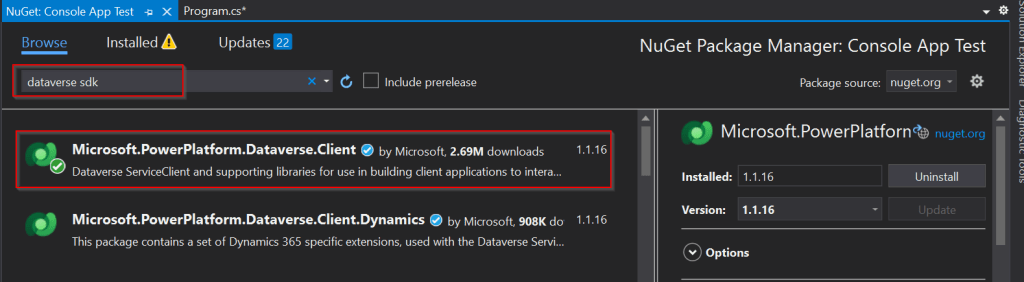
Use the following assemblies from Nuget instead of CrmSdk.CoreAssemblies
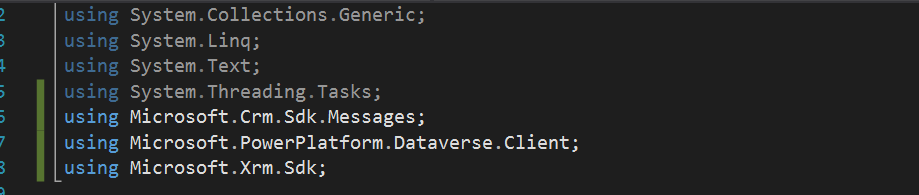
Add the below using statement to use Microsoft.PowerPlatform.Dataverse.Client
Use ServiceClient instead of CrmServiceClient, ServiceClient would return your OrganizationService.
In today’s no code world and AI, while most of the Apps are developed using low code approach, sometimes we have to go with the traditional way of development to handle any integrations with other systems.
When we give anyone Command Line script and ask them to execute, the other person would immediately open Search bar at the bottom available in Windows and start entering cmd. Immediately command prompt window appears and will be able to execute the same command.
But what if we ask to execute command line Commands from C# code…? So, in this blog post, I will show you how easily you can call command line commands with a simple example. Let’s get started…
Here in order to showcase, I will just use a basic command line command and run it from C#.
Everyone knows how to find the ipconfig command right, which just shows the internet protocol configuration when entered in command line like below.
In order to execute it from Console Application using C#, we would need to utilize the System. Diagnostics. You can utilize the below C# code.
This file contains hidden or bidirectional Unicode text that may be interpreted or compiled differently than what appears below. To review, open the file in an editor that reveals hidden Unicode characters.
Learn more about bidirectional Unicode characters
When we execute this command, it shows exactly same as what we saw above with Command Line.
In the same way we can call any Command Line Commands from C#. I have to use this approach for my Power Platform Implementation integration to decrypt encrypted messages using PGP and I found it to be very helpful and thought of sharing with all of you. If you were looking for a program to decrypt, you can check out for previous blog post here.
Thank you for vising my blog today…I believe many of the Consultants or Power Platform professionals out there didn’t know about the HashSet available in .Net since version 3.5.
By the way, what is HashSet..here is a brief about it?
HashSet is a data structure which we mightn’t have come across, neither me until implementing one of my requirements. It offers several benefits compared to other data structures for specific use cases. HashSet is preferred and advantageous, here is a use case where HashSet can be useful than other Data Structures available…followed by Advantages and disadvantages.
Scenario: I have a requirement where I need to send an email to the owners of the record using Custom workflow when record is updated, I see many numbers of records are having same owner and hence same email addresses are being added to the To activity party which I want to prevent, it is then, I searched and found of this HashSet.
This file contains hidden or bidirectional Unicode text that may be interpreted or compiled differently than what appears below. To review, open the file in an editor that reveals hidden Unicode characters.
Learn more about bidirectional Unicode characters
In this way, you can get the owner of the record and add to the HashSet as shown above in the diagram. Also Hash Set can help prevent adding duplicate records making it an ideal way to deal in certain scenarios.
Advantages:
Fast Lookup: It is efficient for tasks that involve frequent lookups, such as membership checks.
Uniqueness: All elements are unique. It automatically handles duplicates and maintains a collection of distinct values. This is useful when you need to eliminate duplicates from a collection.
No Order: It does not maintain any specific order of elements. If the order of elements doesn’t matter for your use case, using a HashSet can be more efficient than other data structures like lists or arrays, which need to maintain a specific order.
Set Operations: It supports set operations like union, intersection, and difference efficiently and beneficial when you need to compare or combine sets of data, as it can help avoid nested loops and improve performance.
Hashing: It relies on hashing to store and retrieve elements. Hashing allows for quick data access and is suitable for applications where fast data retrieval is crucial.
Scalability: It typically scales well with a large number of elements, as long as the hash function is well-distributed, and collisions are minimal.
Limitations include:
Lack of order: It you need to maintain the order of elements, then this is a good candidate for your implementation.
Space usage: It is memory intensive and is not recommended when memory optimization is being considered.
Limited Metadata: It primarily stores keys (or elements), which means you have limited access to associated metadata or values. If you need to associate additional data with keys, you might consider other data structures like HashMap or custom classes.
I hope this gives an overview on using HashSet…however you can’t use Hash Set in all scenarios, it actually depends on your use case, please check the disadvantages too before using it… if you have any questions, don’t hesitate to ask…
I am a big fan of Power Automate…but this post is not about flows but features about Custom Workflow in Dynamics 365 CE.
Did you ever come across this problem where you were not able to debug custom workflow extension. I had come across this and this blog post is all about it…I successfully registered my Custom workflow, but it is not triggering at all.
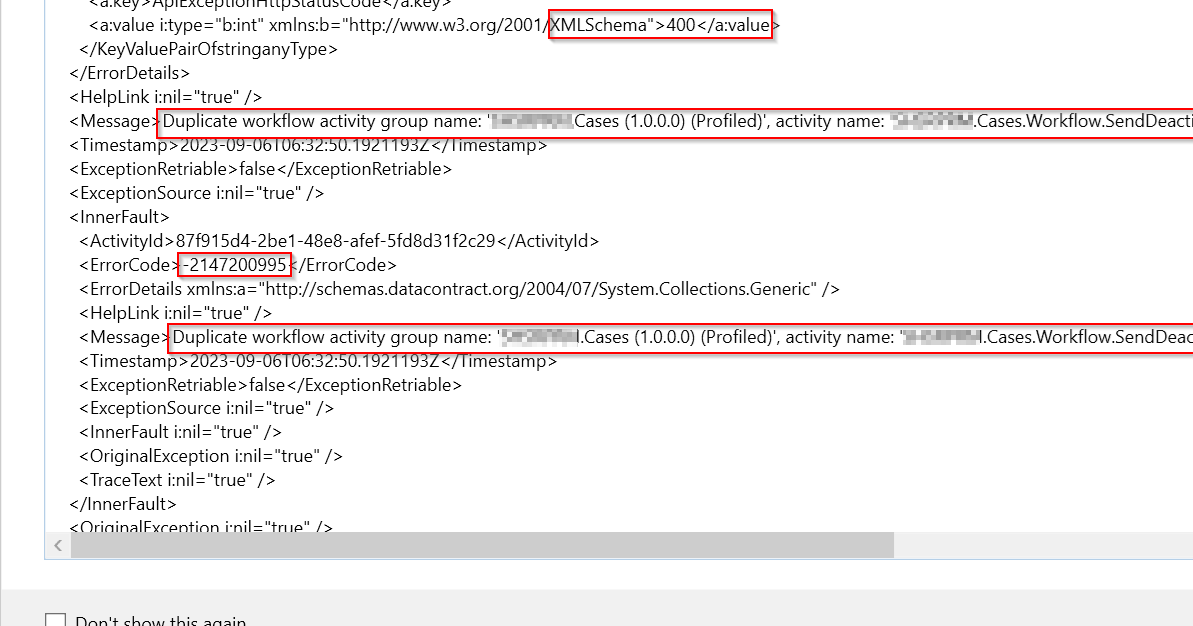
So, I need to debug it to see what the exact issue was…as I am encounter this error.
Error message says Duplicate workflow activity group name: ‘EcellorsDemo.Cases(1.0.0.0) (Profiled)‘. So, I tried to check my code, plugin steps and any activated plugins but couldn’t find any duplicates.
Usually while debugging your custom workflow using profiler, your workflow will go into draft mode and another copy of the same workflow gets created with name of (Profiled) attached to the name. However, in my case, I didn’t see the same behavior and at the same time, I was unable to use Profiler after the first profiling session and it gave me error shown above.
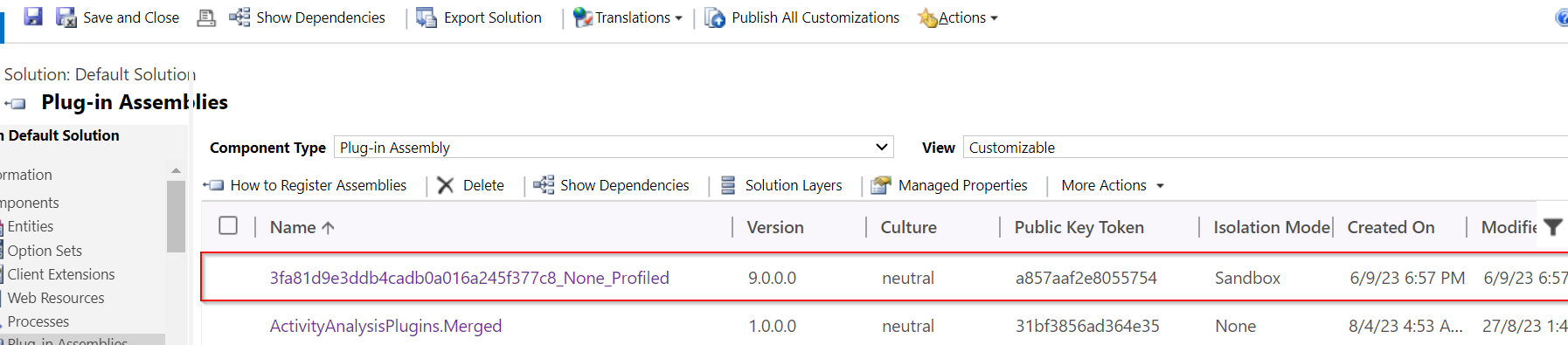
In order to resolve, this just delete the Plugin Assemblies which could find in the default solution like highlighted below…
Once you have deleted this, try to debug the custom workflow and voila!!!
Hope this helps someone troubleshooting Custom workflow…!
In the Dynamics 365 world, it’s all about efficiently handling the user requests. Whenever you add any user to the environment, the system will update the default personal settings for the user. Maybe you could have some processes in your system which is dependent on the user time zone. So, setting the time zone is very important. It is tedious to update the personal settings manually going to the user profile and updating it manually every time.
Of course, you have a wonderful tool in XrmToolBox from which we will be able to set the User Personal Settings in bulk so that we can update to all the users in one go. What if we want to automate this process, i.e. whenever you add a new user to the Dynamics 365 environment, you want to set that person time zone automatically without any manual intervention.
There you go…this post is for you then…you can do it simply using Plugin or Power Automate. In this blog post, we will see how we can utilize the Plugin as it is more effective approach.
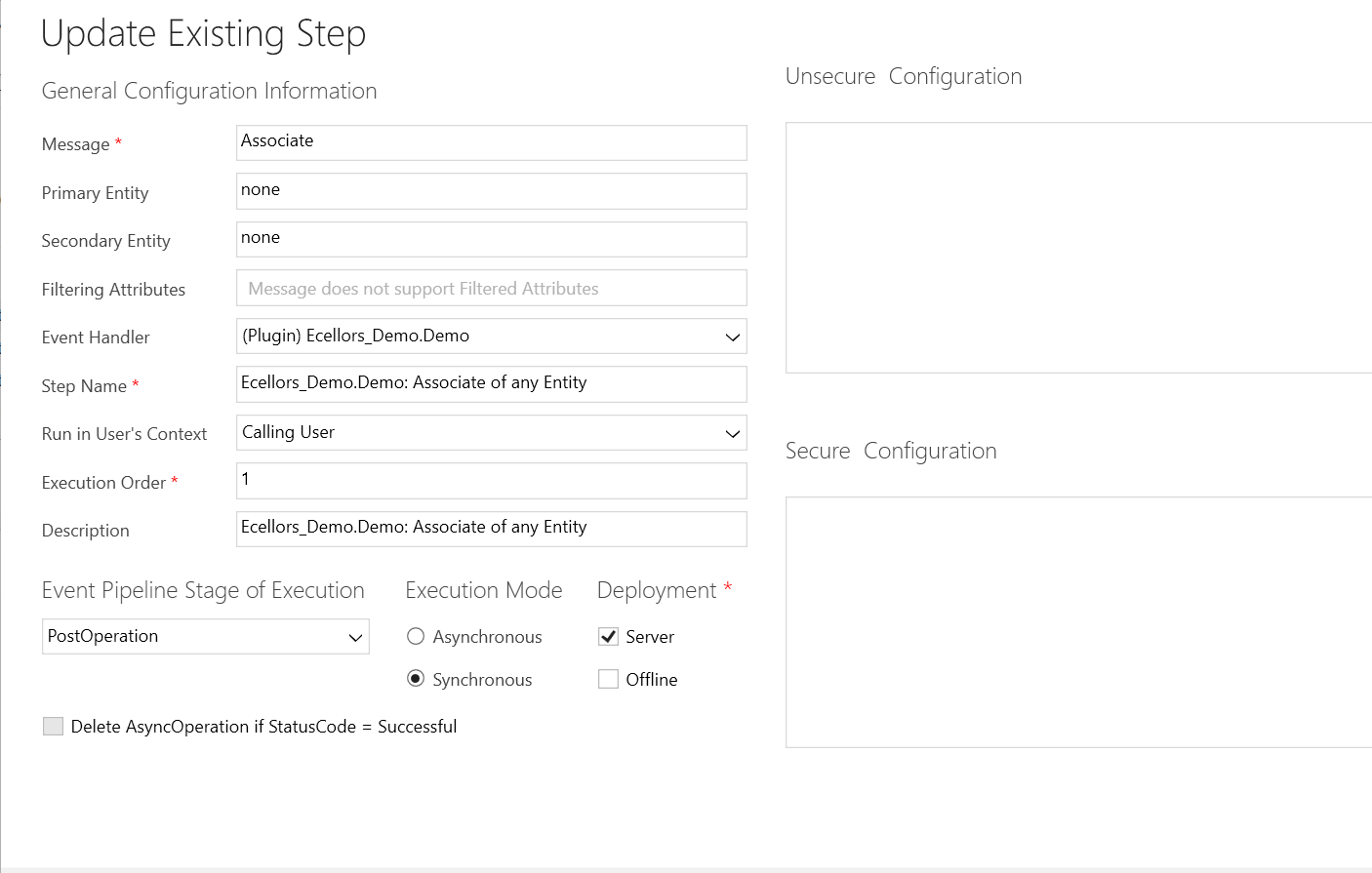
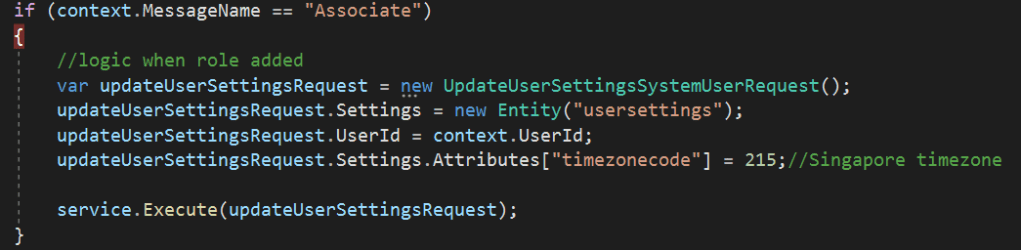
You need to write a Plugin on Associate Message.
Just use this piece of code to set Personal settings…
This file contains hidden or bidirectional Unicode text that may be interpreted or compiled differently than what appears below. To review, open the file in an editor that reveals hidden Unicode characters.
Learn more about bidirectional Unicode characters
Update the personal settings as per your needs in this request. You can find all the attributes of the user settings table by using Fetch Xml Builder easily.
I recently came across the above error for one of my Dynamics 365 Plugins…this blog talks about applying a quick fix.
While debugging our Plugin logic line by line to understand why it’s not working, observed this error for messages like RetrieveMultiple, Retrieve when I use any Organization Service call.
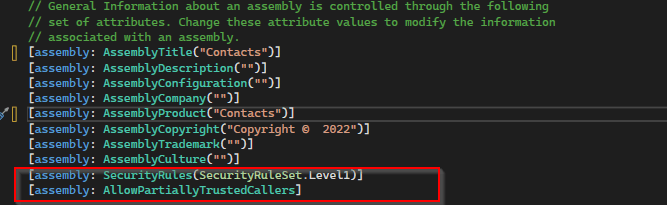
This was a .Net version downgrade issue caused by ILMerge as I downgraded one of the DLL to 4.6.2 version from 4.7.1. If you see this issue even without downgrading your DLL, you can use this fix.
After some research I came across this article and applied the same to my assembly which fixed the issue. Added these lines to my AssemblyInfo.cs class file..
To start with this scenario, this is one of the most commonly asked functionalities when we talk about of adding members to marketing list using an excel import.
In this scenario, we will make use of Connections entity and associate the marketing list to the contacts on creation of the connection…ok…let us give it a try….we will make use of plugin here….which runs on Create and on Post operation and calls the below method…
 public void MarketingListImport()
        {
            Entity connectionER = (Entity)executionContext.InputParameters["Target"];
            Entity marketingList = new Entity();
            if (connectionER.Contains("record2id"))
            {
                EntityReference connectTo = connectionER.GetAttributeValue<EntityReference>("record2id");
                EntityReference connectFrom = connectionER.GetAttributeValue<EntityReference>("record1id");

                if (connectTo != null)
                {
                    marketingList = organizationService.Retrieve(connectTo.LogicalName, connectTo.Id, new ColumnSet("type", "createdfromcode"));
                }

                if (connectTo.LogicalName == "list")//Marketing list
                {
                    if (marketingList.Contains("type") && marketingList.GetAttributeValue<bool>("type") == false)
                    {

                        if (connectFrom.LogicalName == "contact" && marketingList.Contains("createdfromcode") && marketingList.GetAttributeValue<OptionSetValue>("createdfromcode").Value == 2)//Resident
                        {
                            // Add a list of contacts to the marketing list.
                            var addMemberListReq = new AddListMembersListRequest
                            {
                                MemberIds = new[] { connectFrom.Id },
                                ListId = connectTo.Id
                            };

                            organizationService.Execute(addMemberListReq);

                            tracingService.Trace("Contacts with GUIDs \r\n\t{{{0}}} is added to the list.",
                                connectFrom.Id);
                        }

                        else
                        {
                            throw new InvalidPluginExecutionException("Marketing list should be targeted at contact and contacts can be imported");
                        }
                    }

                    else
                    {
                        throw new InvalidPluginExecutionException("Members cannot be imported into a Dynamic Marketing list, please select a static marketing list and try again");
                    }
                }
            }
        }
    }
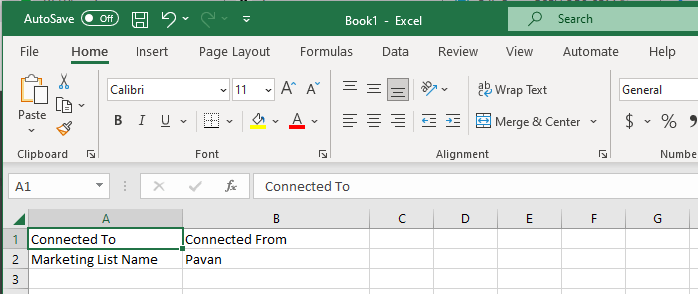
Once you were done writing the code, next step is to test the functionality…for this we will use the following template.
Import this template from the imports area under settings in your Dynamics 365…boom….the contacts in the template will be added to your Static Marketing List.







 ECELLORS CRM Blog