Power Fx Fomula Data type – your new companion in addition to Calculated fields in Dataverse [Insight]

Hello Folks,

I believe ever Power Platform professional working on Dataverse had one or other time got a chance to work on calculated fields. Actually it provides an easy way to perform any calculations for the supported data types since it has been introduced with CRM Version 2015 update 1.

Here is a very simple example of simple calculation to get your Fx data type up and running in few seconds….follow along….

Navigate to https://make.powerapps.com/

Open your solution, navigate to the columns in any table….for simplicity I am taking example of Accounts table…
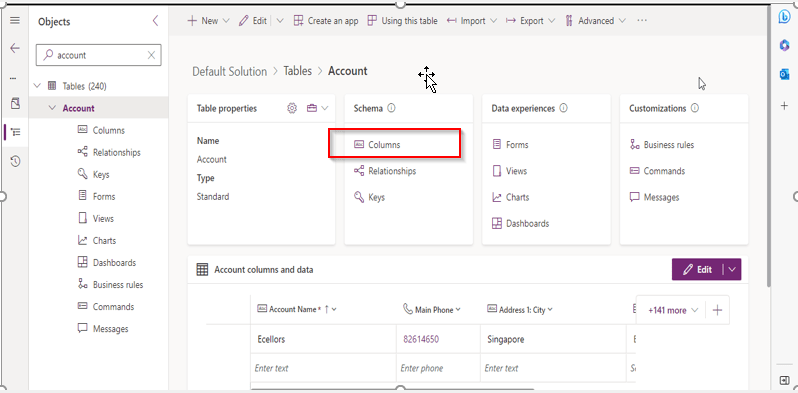
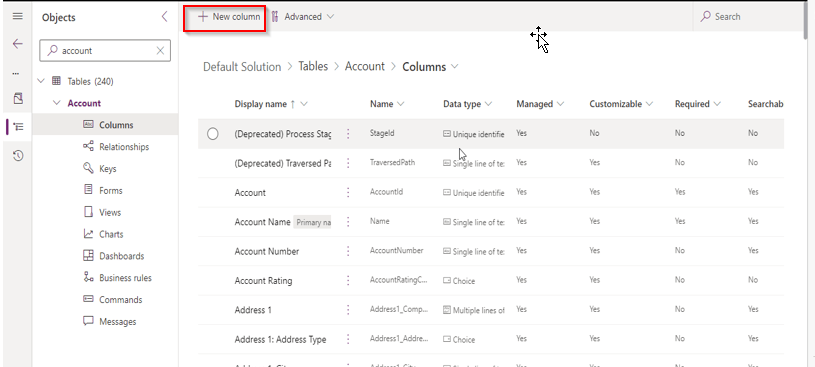
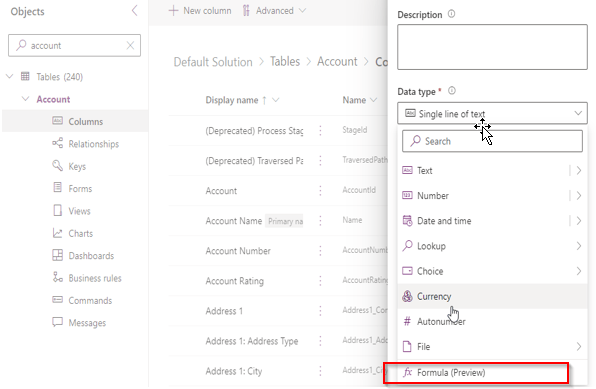
Now create new column as below
Key values for the field, make a note that the data type (Fx) is selected
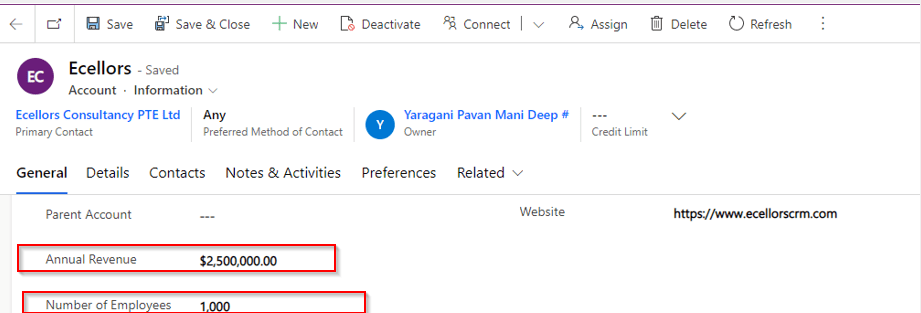
I already have two fields as below already on the form for calculating the Annual revenue per Employee from Annual Revenue of the company…
So now let’s write a simple Power Fx formula to calculate the Annual Revenue per Employee…the expression goes as below…
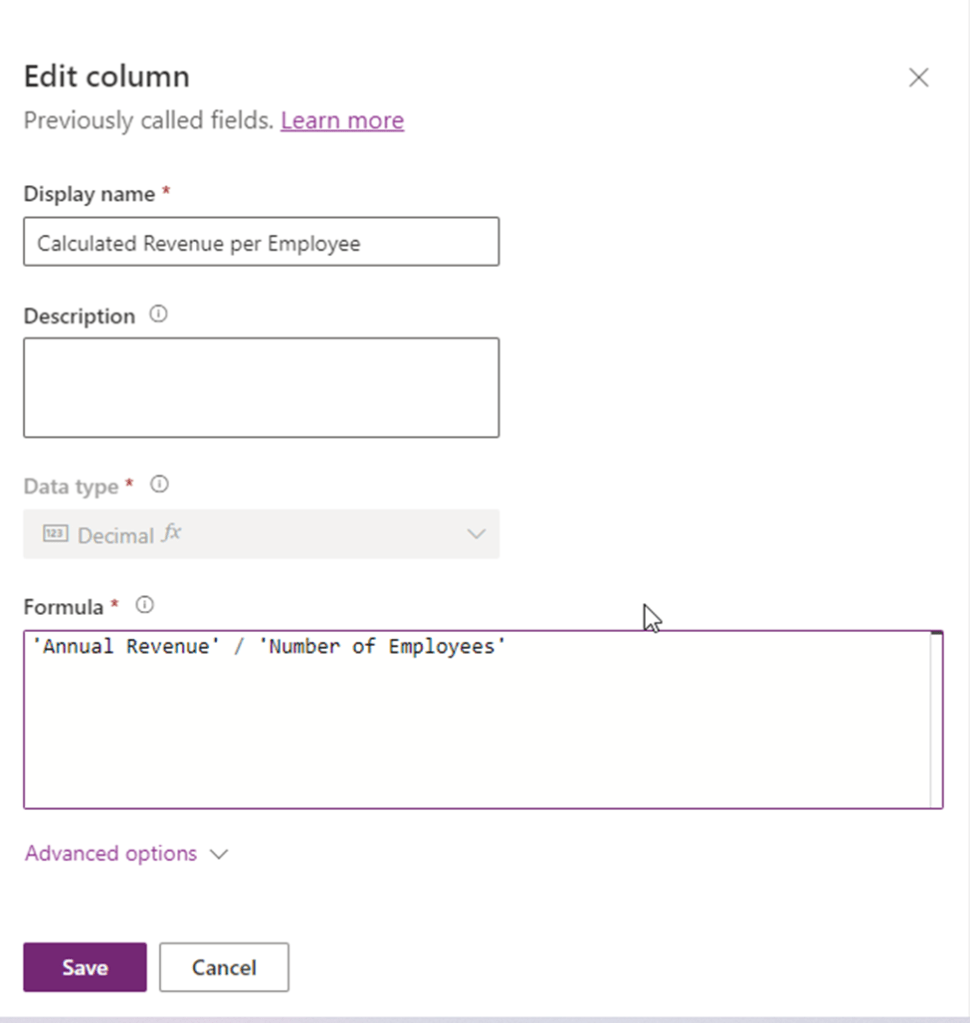
Annual Revenue is a currency field and Number of Employees field is single line of text. As soon as you save, system automatically identifies the data type as Decimal Number as shown above, click on save and publish the form…

Let’s see the actual use in the form…as soon as you enter the values for Annual Revenue and Number of Employees and save, the value for Calculated Revenue for the Employee field value will be calculated by the Power Fx expression.

Hope this will be useful in future for your implementations…

Points to keep in view:

  1. This formula column is in preview right now at the time of writing this blog post.
  2. And currently, formula columns can’t be used in roll-up fields or with plugins.
  3. You can use the following operators in a formula column:
    +, -, *, /, %, ^, in, exactin, &
  4. Microsoft Documentation says that the Currency data type isn’t currently supported but it works actually.
  5. The Text and Value functions only work with whole numbers, where no decimal separator is involved

Ref: Formula Column

Cheers,

PMDY

What is Solution Checker and App Checker in Power Apps – Quick recap

Hi Folks,

While its been quite sometime since Microsoft shipped the Solution checker and App checker, these tools can help a developer to validate all the solutions that was being built before moving to higher environments. It is always advisable to run solution checker once your solution is developed so this can help you achieve better performance following the Power Platform best practices. Previously we used to send for Code review to senior folks but now with this tool, even the junior developer working at the ground level can easily understand and can make the necessary tweaks in the solution.

Solution Checker serves as a static analysis tool for the developers to check any platform related issues.

The solution checker analyzes these solution components:

  • Dataverse custom workflow activities
  • Dataverse web resources (HTML and JavaScript)
  • Dataverse configurations, such as SDK message steps

Note: Solution checker won’t analyze plugins in solutions. Plugin validations are modernized and will eventually the focus is on the native plugin authoring time, which will help you detect and fix issues earlier. So if you were looking for improvements in Plugin code, this will not help you.

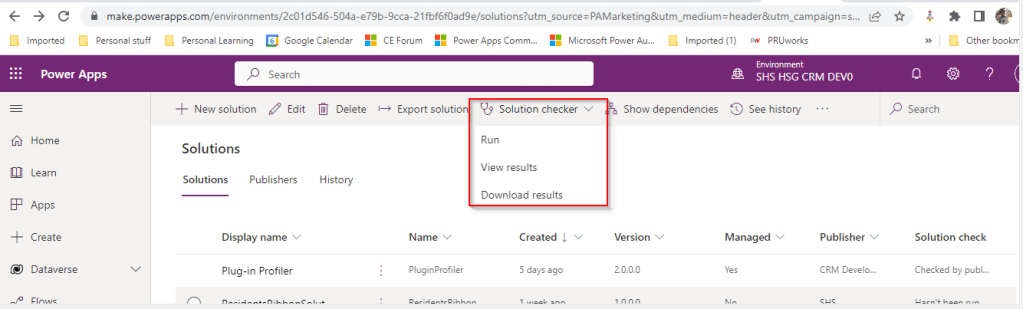
Once solution checker starts running, it will be shown as below with a loading symbol on solution checker

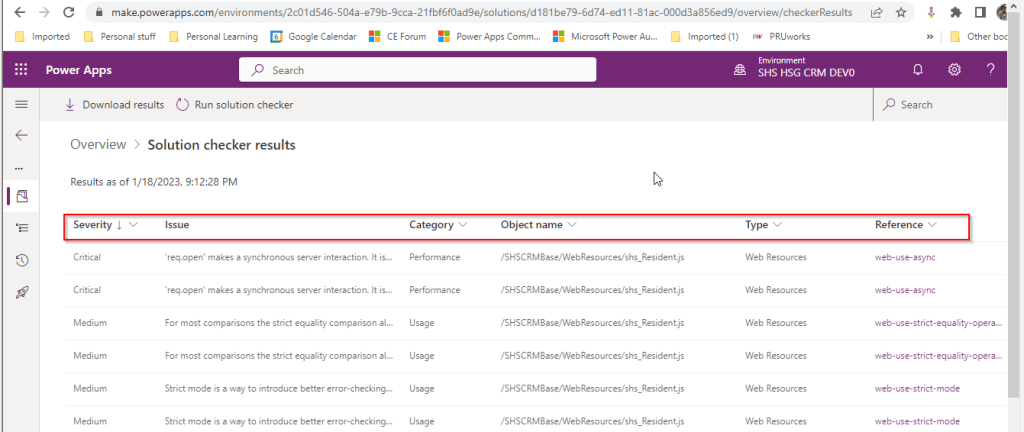
It would take a few minutes to complete the process and will be based on the size of the solution. Once this process is complete, you should be able to download the results or view the results like below

If we open the results file, it shows the potential issues or improvements along with their severity which helps us to prioritize the issues which we need to work upon.

The report can also be downloadable excel file with analysis shipped in Zip format.

Now that we have seen what is solution checker, let’s see what App checker is and its pro’s and con’s.

App Checker:

  1. The App checker is now available to help provide a clear list of formula issues in your app, and to provide items to fix to make your app accessible
  2. This helps to make debugging, performance and best practice decisions an easier and more guided experience.  
  3. This is an ideal way to check the formulas you wrote for your Canvas Apps.
  4. There isn’t any possibility to download the app checker results but you can analyze the results on the fly in canvas apps.

To conclude you can think of Solution checker is a tool to check Model Driven Apps and App checker is a tool for Canvas Apps. Hope you will use this great features to improve your solutions and design according to best practices.

Reference:

Solution checker from MS Learn

Apps checker from MS Learn

Cheers,

PMDY

Top Picks for Power Apps

Top Picks for Power Automate

Top Picks for Microsoft Azure