Orphan Flows in Power Automate??

If you are a Dynamics CE Consultant, you should have heard of orphan records. Do you know Orphan flows do exist in Power Automate in a similar way….

A flow is considered to be an Orphaned flow when it don’t have a valid owner anymore. This can possibly happen when the creator or owner of the flow has left the organization and there is no co-owner or the owner for the flow. If the flow uses connections that require authentication, then it may start failing because the user identity is not valid anymore.

Admins can maintain continuity on the business process automated by the flow by adding one or more co-owners to it. Co-owners basically have full control over the flow just like the original owner, and can fix authentication for connections if any and enable the flow if it has been disabled.

Please note that only privileged users can view flows that do not have any valid owners. On the environment page from Flow Admin Center (https://admin.flow.microsoft.com/environments), go to “Resources” tab and then open the “Flow” list. Orphaned flows display “None” as their owner.  Click “Load more” to load the next set of flows so as to ensure you have looked through all flows that might be orphaned.

How will you solve this problem?

  1. Manually you can add the flow a owner which will resolve the issue when the number of flows are in reasonably small in number. But if the number of Orphaned flows are in large number, you should look for next approach presented.
  2. Code way…using Power Automate cmdlets: Make sure you follow the instructions for setting this up.

Reference: How to manage orphan flows when the owner leaves the organization

Cheers,

PMDY

Power Automate Cookbook

Hey Power Automate Fans!!,

Have u ever tried to checkout some of the cool examples and recipes developed by Power Automate Community.

If not, please check this out at this link

Check out this link to submit your flow to the Community cookbook….

Cheers,

PMDY

How to create an app to Scan Receipts

Hi Folks,

Have u ever tried creating an App using Azure Cognitive Services.

Here is an excellent video tutorial on how to create an app to Scan Receipts using Azure Cognitive Services Form Recognizer API from MVP @Vivek Bhavishi..

Additional Resources:
Form Recognizer API Docs – https://docs.microsoft.com/en-us/azure/cognitive-services/form-recognizer/

Form Recognizer API Reference – https://westus2.dev.cognitive.microsoft.com/docs/services/form-recognizer-api-v2-preview/operations/AnalyzeReceiptAsync

Hope you will find it useful…

Cheers,

PMDY

New Experimental Features in Power Automate

Aaron Back's avatarDynamics Back Page

Power Automate has introduced some exciting new features that have been long-awaited. These are small changes, but will make creating flows much easier.

Turning on the experimental features

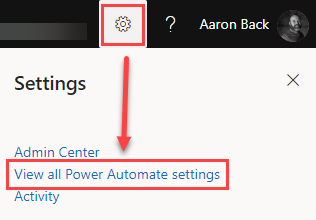
First, you need to make sure you turn on these features. This is done by logging into https://flow.microsoft.com. Then click the gear icon in the upper-right corner and select “View all Power Automate settings”.

Power Automate Experimental Features navigation

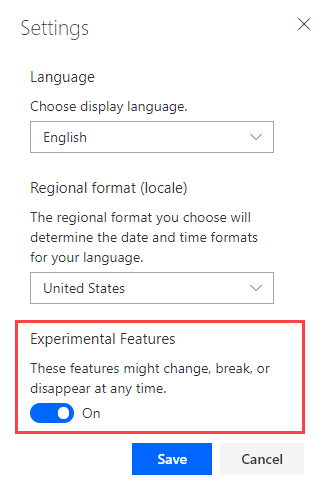
Once you select this option you will see a small Settings window pop up. From here, you need to toggle on the “Experimental Features” and then click “Save”.

Power Automate Experimental Features settings

Note: These are experimental features. As noted in the screen shot above, these features could change, break, or disappear. So, there are no guarantees.

What are the new features?

Once you have the experimental features enabled, you will notice a couple of awesome new features.

First, you will notice the labels and field inputs have a different layout…

View original post 326 more words