Invalid subscription key error when connecting Azure cognitive services Face API

saurabh nijhawan's avatarSaurabh nijhawan's weblog

Recently during an integration scenario with D365 Field services in order to identify if the person making a change to the Customer asset is an employee or not we spinned up an Azure Face API service and on trying to connect it from an Azure function we were getting Invalid key exception.

We were using the Face API client library which defaults to west US endpoint of the service but our service was in EastUS.

Default endpoint:https://westus.api.cognitive.microsoft.com/face/v1.0/

The solution is to override the endpoint tohttps://eastus.api.cognitive.microsoft.com/face/v1.0/ which can be done by using another constructor of the FaceServiceClient class

FaceServiceAPIClient = new FaceServiceClient("Face API subscription key", "https://eastus.api.cognitive.microsoft.com/face/v1.0");

View original post

Power Apps – Canvas Apps – Unable to obtain access token for resource ‘https://gov.service.powerapps.us/’. A silent sign-in request was sent but no user is signed in. The cookies used to represent the user’s session were not sent in the request to Azure AD

Sachin Bansal's avatarBansal Blogs - Dynamics 365, PowerApps, Microsoft Flows, Power BI

Access1

Power Apps recently introduced sharing capabilities with Guest Users. Upon sharing users were not able to access app because of error “Unable to obtain access token for resource ‘https://gov.service.powerapps.us/’. A silent sign-in request was sent but no user is signed in. The cookies used to represent the user’s session were not sent in the request to Azure AD”.

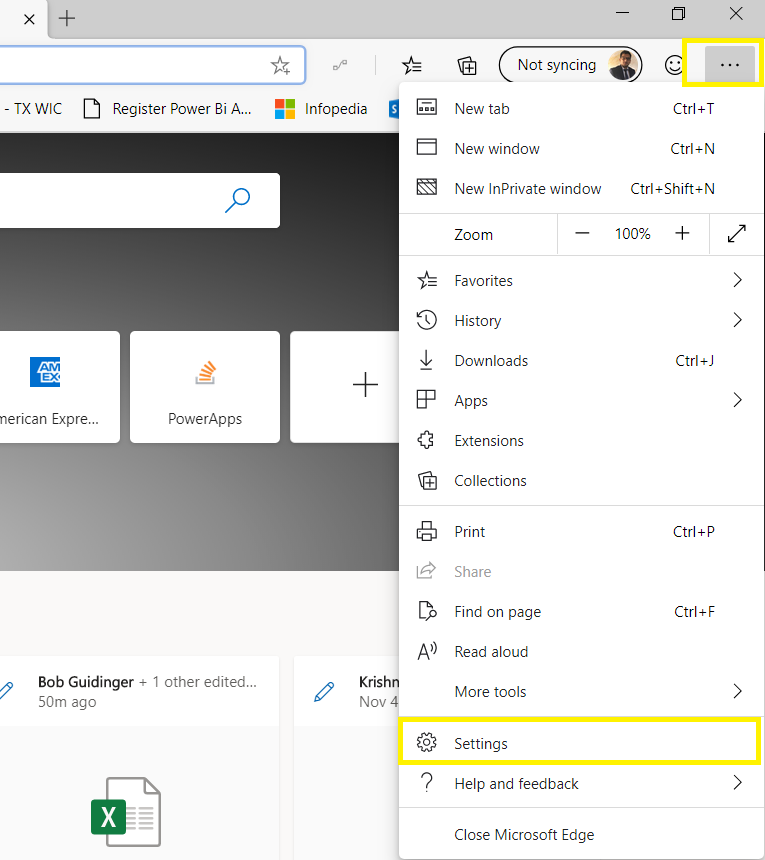
As we were investigating this issue and reaching out to Microsoft support team, we came to know this is not just for Guest users and because of browser cookie settings. Make sure third-party cookies are not blocked and enabled. You can refer below steps to enable third party cookies:

Microsoft Edge:

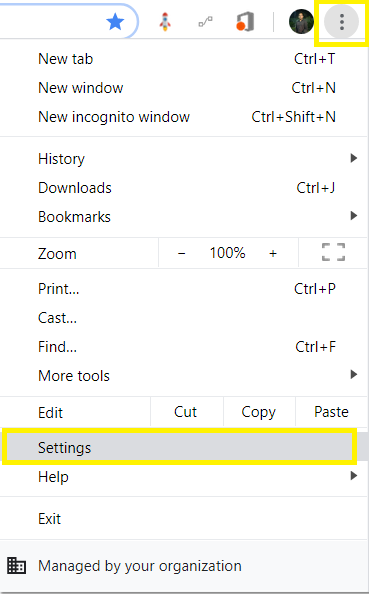
  • Go to Settings from right side navigation

Access2

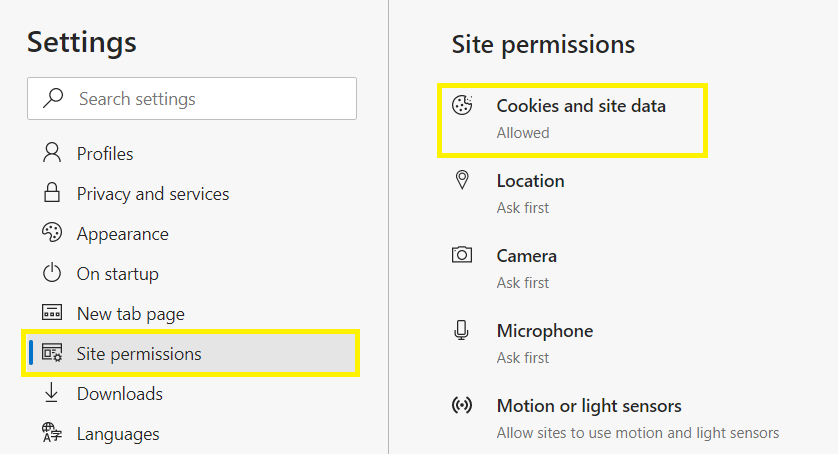
  • Click on Site Permissions in Left side navigation and select Cookies and site data

Access3

  • Make sure options are enabled and disabled as shown below

Access4Chrome:

  • Go to Settings from right side navigation

Access5

  • Expand Advanced…

View original post 42 more words

Log Canvas Power App telemetry data in Azure Application Insights | Power Apps

priyeshwagh777's avatarD365 Demystified

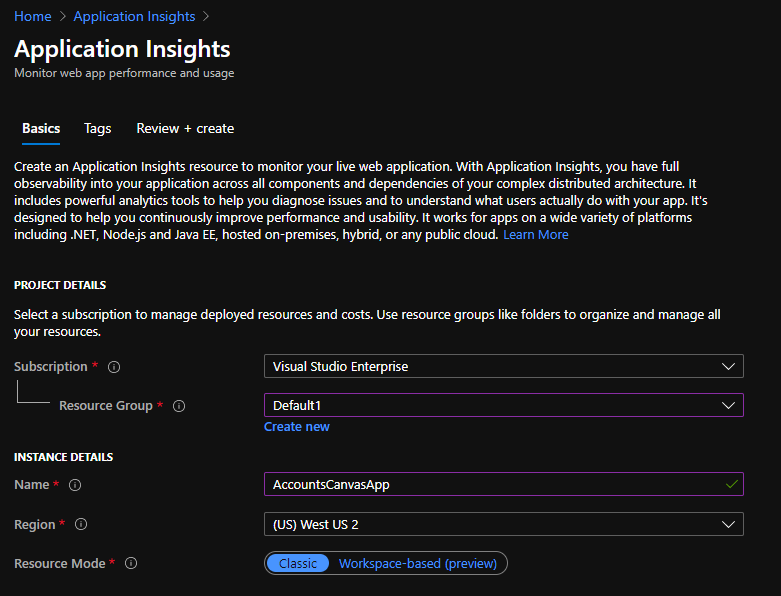
Here’s how you can register your Canvas Power App in your Azure’s Application Insights and log telemetry data into Azure.

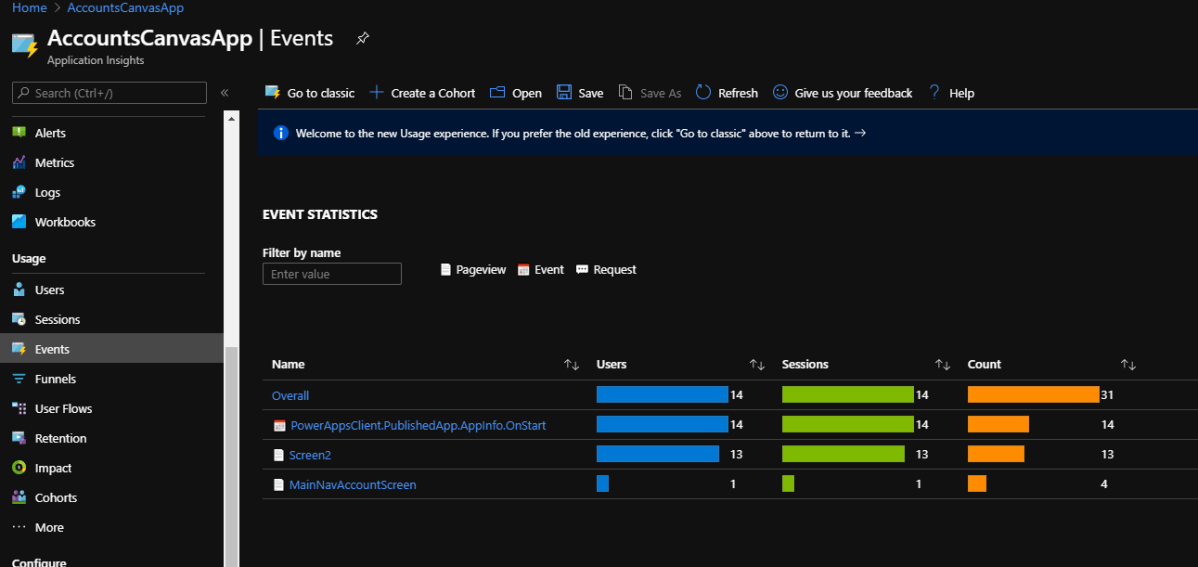
Some basic info about what all you can see in Application Insights is –

  1. Count of Users who used the app
  2. Events logged, Sessions logged
  3. Device info
  4. Region info

It’s quite simple to set it up! Let’s take a look –

Registering in Application Insights in Azure

First, make sure you do have an Azure Subscription. Let’s look at how you can register an Application Insight record.

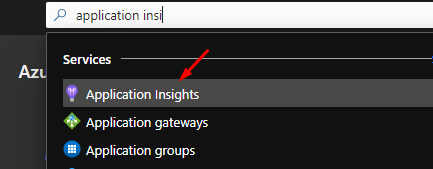
  1. Look for Application Insights in Azure in the search bar
  2. Then, among other records, you can register a new one which will identify with your Canvas Power App
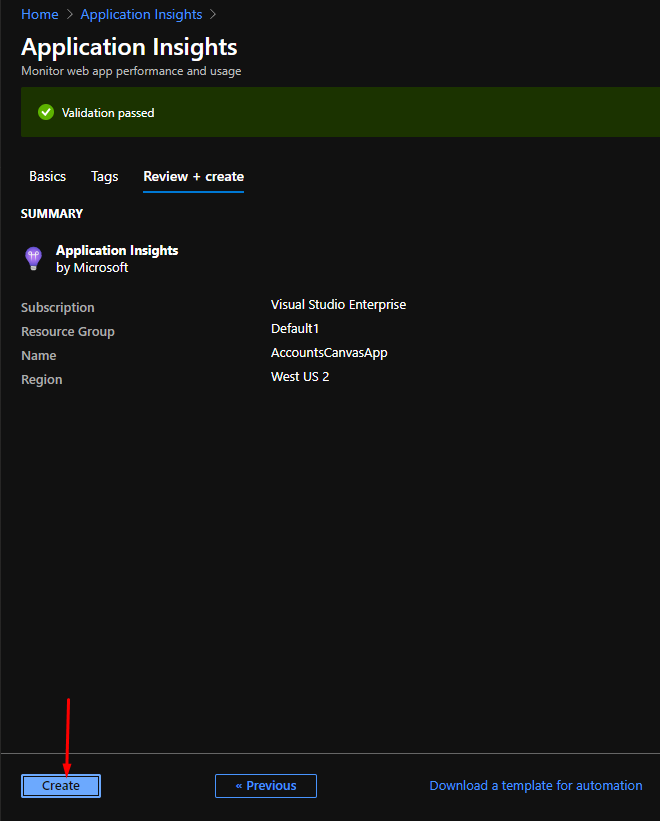
  3. Review all that you entered and move ahead
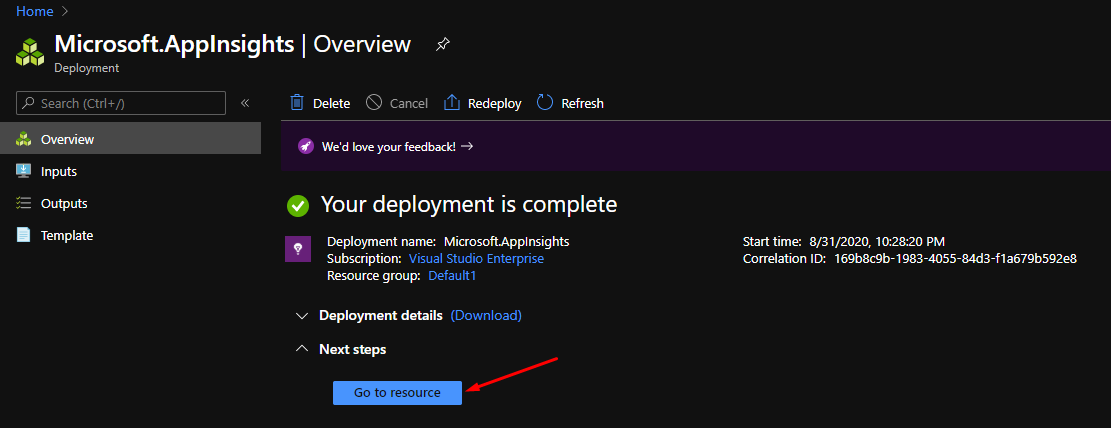
  4. It’ll be deployed pretty quickly within a few minutes unlike some heavy Azure resources
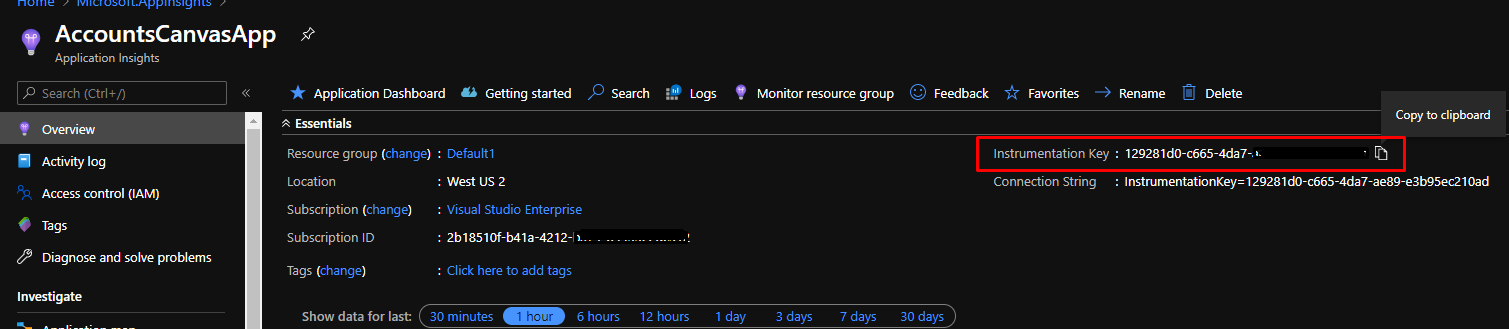
  5. Upon completion, you can navigate to the resource and see the details

    Zoomed…

View original post 374 more words

Power Automate Cookbook

Hey Power Automate Fans!!,

Have u ever tried to checkout some of the cool examples and recipes developed by Power Automate Community.

If not, please check this out at this link

Check out this link to submit your flow to the Community cookbook….

Cheers,

PMDY

How to create an app to Scan Receipts

Hi Folks,

Have u ever tried creating an App using Azure Cognitive Services.

Here is an excellent video tutorial on how to create an app to Scan Receipts using Azure Cognitive Services Form Recognizer API from MVP @Vivek Bhavishi..

Additional Resources:
Form Recognizer API Docs – https://docs.microsoft.com/en-us/azure/cognitive-services/form-recognizer/

Form Recognizer API Reference – https://westus2.dev.cognitive.microsoft.com/docs/services/form-recognizer-api-v2-preview/operations/AnalyzeReceiptAsync

Hope you will find it useful…

Cheers,

PMDY

Are you still using WS-Trust Auth and OrganizationServiceProxy…then it is time to change …

Hi Folks,

Microsoft had recently announced on docs.microsoft.com that using WS-Trust authentication security protocol to connect to your Common Data Service had been deprecated.

So what does this mean??

Firstly you need to note that this only applies to client applications that connect to CDS.

It does not impact your custom plug-ins, workflow activities, or on-premises/IFD service connections.

Below are the places where you need to replace them…

If your code uses Username & Password for authenticating with Common Data Service or an application, you are likely using the WS-Trust security protocol.

  • If you are using the OrganizationServiceProxy  class at all in your code, you are using WS-Trust.
  • If you are using CrmServiceClient.OrganizationServiceProxy  in your code, you are using WS-Trust.

Check the following:

  1. If your client applications using Microsoft.Xrm.Sdk.Client.OrganizationServiceProxy:

         Action Required:

        Replace all occurrences of the type OrganizationServiceProxy with  the IOrganizationService interface

      2.                            using CrmServiceClient with the “Office365” authentication type:

          Action Required:

          Switch over to using an OAuth based connection string, Note that LoginPrompt can be set to “never” to simulate the way that the Office 365 behavior worked. Please note that the App ID and Redirect URI should be created in AAD in your tenant.

Few points to note before we conclude:

  • An update to Microsoft.CrmSdk.XrmTooling.CoreAssembly is available for download through NuGet package that includes auto redirect support. This library will redirect an authentication type of Office365 to OAuth.
  • If you were not able to login even using OAuth, check if MultiFactor Authentication/conditional access is enabled, if so consider registering application user (Service Principal) in Azure Active Directory.


References:

CDS/CRM SDK – WS-Trust auth and OrganizationServiceProxy Deprecated

Use of Office365 authentication with the WS-Trust security protocol


If you still have issue, don’t hesitate to comment here…or reach to community using this link…

Cheers,

PMDY


New Experimental Features in Power Automate

Aaron Back's avatarDynamics Back Page

Power Automate has introduced some exciting new features that have been long-awaited. These are small changes, but will make creating flows much easier.

Turning on the experimental features

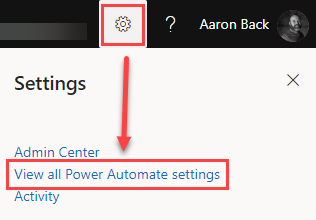
First, you need to make sure you turn on these features. This is done by logging into https://flow.microsoft.com. Then click the gear icon in the upper-right corner and select “View all Power Automate settings”.

Power Automate Experimental Features navigation

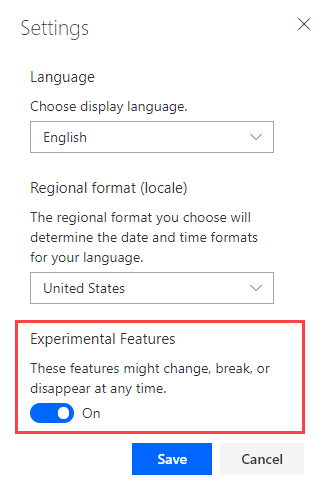
Once you select this option you will see a small Settings window pop up. From here, you need to toggle on the “Experimental Features” and then click “Save”.

Power Automate Experimental Features settings

Note: These are experimental features. As noted in the screen shot above, these features could change, break, or disappear. So, there are no guarantees.

What are the new features?

Once you have the experimental features enabled, you will notice a couple of awesome new features.

First, you will notice the labels and field inputs have a different layout…

View original post 326 more words

Top 100 CRM blogs on the Planet for the year 2020

Hi Folks,

I am extremely happy to share that my blog is 75th in the list of best CRM blogs on the planet ranked by Feed spot.

Thank you for the readers and I will continue to contribute to the community through my blog going ahead.

https://blog.feedspot.com/crm_blogs/

Top 100 image from feedspot

Cheers,

PMDY

Change the Time Zone in Azure VM

Hi,

We recently had to spin up a new Azure VM to run some of our Batch jobs where we need to schedule them to run at specific times in Singapore Time Zone.

But surprisingly when when we VM is provisioned and started…we see the default time zone is set to UTC. Usually by default, every time this would be set to UTC.

In our case, we need to change it to SGT(Singapore Time Zone). The usual way of changing the time zone from Settings–> Time & Language was not possible as this is disabled in our case. But even though it is enabled and changed here, it would be reverted back to UTC when we allocate & deallocate the VM.

So you can use Power Shell Scripts to make this thing work for you. Use below to get all time zones.

Get-TimeZone -ListAvailable

If you want to filter the list, you can do so like

Get-TimeZone -ListAvailable | where ({$_.Id -like “Singapore*”})

Finally for setting the timezone, you can use this cmdlet

Set-TimeZone -Id “Singapore Standard Time”

Hope this helps…

Thank you.

Cheers,
PMDY

Fix : Could not load file or assembly ‘Microsoft.IdentityModel.Clients.ActiveDirectory..The system cannot find the file specified.”:”Microsoft.IdentityModel.Clients.ActiveDirectory..

Hi Folks,

Recently I came across this problem with one my console applications while working with ADAL library. After debugging for a while, came to know that this DLL referenced had been updated and I strangely note that error popping up.

Then I came to know that there was an assembly binding defined with a different version from the DLL present in the bin folder. So I tried to understand a bit about assembly binding and what assembly binding redirect is all about.

Why are binding redirects needed at all?

Suppose you have application A that references library B, and also library C of version 1.1.2.5. Library B in turn also references library C, but of version 1.1.1.0. Now we have a conflict, because you cannot load different versions of the same assembly at runtime. To resolve this conflict you might use binding redirect, usually to the new version (but can be to the old too). You can do that by adding the following to app.config file of application A, under configuration>runtime>assemblyBinding section (see here for an example of full config file):

<dependentAssembly>
    <assemblyIdentity name="C"  
                      publicKeyToken="32ab4ba45e0a69a1"  
                      culture="en-us" />  
    <bindingRedirect oldVersion="1.1.1.0" newVersion="1.1.2.5" />  
</dependentAssembly>

You can also specify a range of versions to map:

<bindingRedirect oldVersion="0.0.0.0-1.1.1.0" newVersion="1.1.2.5" />  

Now library B, which was compiled with reference to C of version 1.1.1.0 will use C of version 1.1.2.5 at runtime. Of course, you better ensure that library C is backwards compatible or this might lead to unexpected results.

You can redirect any versions of libraries, not just major ones.

If you want to know more about assembly binding, redirects. Please refer to below post.

https://www.codeproject.com/Articles/12215/Assemblies-locating-binding-and-deploying

Finally I was able to resolve this issue by commenting this section in App.config. The fix seem to be easy.

Hope this helps.

Cheers,

PMDY