[Quick Tip] – Error is usually caused by custom plug-ins that ignore errors from service calls and continue processing in Dynamics 365

Hi CRM Folks,

While we were working on Dynamics 365  On Premise 8.2 Version, we found this issue which is occurring on create of custom entity records in one of our environments. However we see the same customizations in both the environments.

After investigation by observing event logs, we found that this issue is caused due to some security issue. Later we identified that the plugins steps registered on create were running security context of user.

We were able to resolve this issue with the help of impersonation to run Plugins with higher privileges. For detailed info, see below reference.

Reference

Cheers,

PMDY


Unlock the lookup fields in a business process flow in D365

Problem statement:

Recently while working on issue in Dynamics 365, found that all the lookup fields included in a stage in the Business process flow are locked out and not able to edit and we were not able to move to next stage since these fields are mandatory. We modified to show the stage owner properly, but even though when that stage owner logged in these lookup fields used in the Business process flow are locked.

Solution:

Give Append and AppendTo privileges to the other entity so that these fields would be unlocked and at the same time you need to give read privileges on the related entity so that user could see this lookup field without any permission issue, you need to give write privileges too in order to edit and write data in to that field.

Hope this helps someone…

Cheers,

PMDY

{Advanced Customization Tip} Disable Advanced find for Non Admin users in Dynamics 365

deepeshsomani2013's avatarMSDYNAMICSBLOG BY DEEPESH

Requirement: In one of the recent queries that came across to me, Advanced find needed to be disabled for all the users in the Dynamics 365 except for System Administrator.

Solution: There are multiple possible solution one may think and apply. The best practice will be to try to convince the customer against such a customization and utilize Read privileges for restricting access to entities as needed on the basis of Security roles. However, if still there is client requirement like this we can achieve it as below:

1. Add Application ribbon under Client extensions in a solution and then open this solution in XRMToolbox, Ribbon Work bench 2016:

clip_image001

2. Add results_16 and results_32 png images as web resources and keep them ready as follows in the solution:

clip_image003

3. Add a new button into the application ribbon and give it label as Result and under command put the command name…

View original post 148 more words

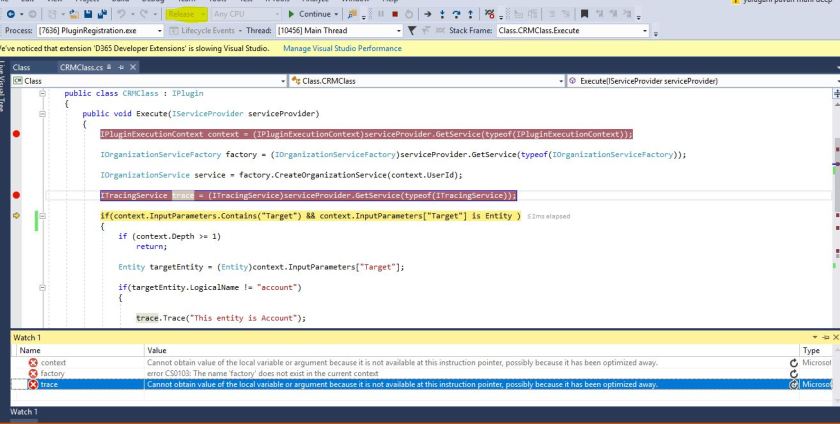
Cannot obtain value of the local variable or argument because it is not available at this instruction pointer, possibly because it has been optimized away in Visual studio 2017

Hi,

Recently we were debugging a D365 plugin in Visual studio 2017, able to hit the debugger but unable to get values to any of the variables. Getting the above error while debugging with the solution being in Release mode.

Capture.JPG

Changed from the release mode to debug mode, deployed the solution and then able to debug and get the values.

Please refer to below posts  for more information.

Cannot obtain value of local variable

Blog from Microsoft

Hope this helps someone…

Cheers,

PMDY


No Plugins selected message in Plugin registration tool

Hi Folks,

When we were working on a plugin for D365 Online, faced the below mentioned error message in Plugin registration tool where it was not showing up the newly added the class to assembly.

However we were using the latest Plugin registration tool.

Capture.JPG

Making the class as Public solved the issue.

Capture.JPG

Hope this helps…

Thank you.

PMDY

Retrieve Multiple Plugin

Reblogged on ecellorscrm blog

muralikrishnasabbavarapublog's avatarMurali Sabbavarapu CRM Blog

Scenario:

  1. Users have organization level read access on Competitor entity in CRM.
  2. Competitor and system user entity have N:1 relationship and User lookup (Business Require) available in Competitor entity form

Have a requirement that the User should see “Competitor records” for which the respective user is tagged to and this should be applicable in all CRM areas (like  Advanced find, Lockups, Views…)

This can be achieved through Plug in with “RetrieveMultiple” message

Initially when the user logged in the system, he has access to all the Competitor records which are not tagged to him. (advanced find)

ret3

Below is the plugin code to achieve the above mentioned requirement.

public void Execute(IServiceProvider serviceProvider)

{

try

{

IPluginExecutionContext context = (IPluginExecutionContext)serviceProvider.GetService(typeof(Microsoft.Xrm.Sdk.IPluginExecutionContext));

IOrganizationServiceFactory serviceFactory = (IOrganizationServiceFactory)serviceProvider.GetService(typeof(IOrganizationServiceFactory));

IOrganizationService service = serviceFactory.CreateOrganizationService(context.UserId);

if (context.Depth > 1)

return;

WhoAmIRequest whoReq = new WhoAmIRequest();// To know the user who logged in

WhoAmIResponse whoResp = (WhoAmIResponse)service.Execute(whoReq);

Guid userid…

View original post 229 more words

Deep insight – All about adding Indexes and monitoring performance in Dynamics CRM

Hello,

Have you had a situation in Dynamics CRM where you need to delete some particular entity records satisfying some conditions using advanced find.

We have experienced a similar issue where in we were unable to delete records created in a Custom entity added into system created few mins. back. Even we were unable to find much complex relationships with other entities too. However the new records created were too not getting deleted using advanced find, even deletes from form also.

Verified and came to know that there weren’t any indexes available on that particular table. We added indexes on the columns on which we were retrieving data in advanced find and this solved our problem to delete the records created.

So here are few more tips about adding indexes in MS CRM. Don’t worry adding indexes on tables, columns or views is completely supported customization. However removing OOB indexes is not supported.

See this for more info.

Please check the below link to verify the system jobs which would run on a timely basis in Ms CRM on premise versions. These are configured during installation and are designed to optimize the database and reduce fragmentation. It’s good practice to re-configure these jobs to run out-of-hours.

Check the job editor available for versions starting with 2011 till 2016.

This job goes directly to the MSCRM_CONFIG database to update ScaleGroupOrganizationMaintenanceJobs table.

OOB jobs in Onpremise 

Check by running below queries

Verify if you need these jobs to run more often, you can monitor fragmentation with the following queries:

SELECT OBJECT_NAME(OBJECT_ID), index_id,index_type_desc,index_level,
avg_fragmentation_in_percent,avg_page_space_used_in_percent,page_count
FROM sys.dm_db_index_physical_stats
(DB_ID(N'ORG_MSCRM'), NULLNULLNULL 'SAMPLED')
ORDER BY avg_fragmentation_in_percent DESC

Or you can be more specific at the table level

SELECT avg_fragmentation_in_percent,* FROM
sys.dm_db_index_physical_stats ( db_id('ORG_MSCRM'),
OBJECT_ID('PrincipalObjectAccess'), NULLNULL'DETAILED')

Utilize DMV(Data Management views):

Dynamic management views store SQL transactional information which can be used to monitor health, performance and diagnose problems. There are a number of DMV’s to retrieve a different number of metrics for different purposes; we will be looking in particular at the Index related and Execution DMV’s:

  • Index
    • sys.dm_db_index_operational_stats
    • sys.dm_db_index_physical_stats
    • sys.dm_db_index_usage_stats
    • sys.dm_db_missing_index_columns
    • sys.dm_db_missing_index_details
    • sys.dm_db_missing_index_group_stats
    • sys.dm_db_missing_index_groups
  • Execution
    • sys.dm_exec_query_stats
    • sys.dm_exec_requests

Index Usage
It’s important you check for Index usage because indexes consume memory and disk I/O resources when they need to be rebuild to keep the most up to date data.

To check for index usage run the following query, it’s important you check for Index usage because indexes consume memory and disk I/O resources when they need to be rebuild to keep the most up to date data.

select OBJECT_NAME(a.object_id),b.name,a.user_seeks,a.user_scans,a.*
from sys.dm_db_index_usage_stats a join ORG_MSCRM.sys.indexes b on
a.object_id = b.object_id
and a.index_id = b.index_id
where
a.database_id = DB_ID('ORG_MSCRM')
and b.name like 'myIndex%'
order by
b.name asc

The output of this query would be something like:

 Jump

From the above screenshot is clear that _DMV_09 has not been used since it was created and therefore should be deleted.

Finding missing indexes:

Below a nice script you could use with references to missing indexes DMV’s

SELECT   migs.avg_total_user_cost * (migs.avg_user_impact / 100.0) * (migs.user_seeks + migs.user_scans) AS improvement_measure,   'CREATE INDEX [myIndex_' + CONVERT (varchar, mig.index_group_handle) + '_' + CONVERT (varchar, mid.index_handle)   + '_' + LEFT (PARSENAME(mid.statement, 1), 32) + ']'   + ' ON ' + mid.statement   + ' (' + ISNULL (mid.equality_columns,'')     + CASE WHEN mid.equality_columns IS NOT NULL AND mid.inequality_columns IS NOT NULL THEN ',' ELSE '' END     + ISNULL (mid.inequality_columns, '')   + ')'   + ISNULL (' INCLUDE (' + mid.included_columns + ')', '') AS create_index_statement,   migs.*, mid.database_id, mid.[object_id] FROM sys.dm_db_missing_index_groups mig INNER JOIN sys.dm_db_missing_index_group_stats migs ON migs.group_handle = mig.index_group_handle INNER JOIN sys.dm_db_missing_index_details mid ON mig.index_handle = mid.index_handle WHERE migs.avg_total_user_cost * (migs.avg_user_impact / 100.0) * (migs.user_seeks + migs.user_scans) > 10 ORDER BY migs.avg_total_user_cost * migs.avg_user_impact * (migs.user_seeks + migs.user_scans) DESC
Hope this helps someone figuring out to add indexes into their MS CRM table to improve the performance.
That’s it for today…hope you had enjoyed reading the blog…please share feedback on this…will come up with another interesting article next time.
Cheers,
PMDY

Transaction aware batch processing using ‘ExecuteMultipleRequest’

Rajeev Pentyala – Dynamics 365 Blog:

In this article, I am going to discuss about transaction aware batch processing in ExecuteMultipleRequest using ExecuteTransactionRequest.

Is ‘ExecuteMultipleRequest’ not a transaction aware?

  • By design, ‘ExecuteMultipleRequest’ is non-transactional.
  • Which means ‘Request’ objects added to ‘ExecuteMultipleRequest’ are independent of each other and if any exception occurred in any of the ‘Request’ will not roll back previously committed ‘Requests’.
  • However you have an option to stop the batch (i.e., By setting ContinueOnError = false), if any exception occurs.
  • Important to note is that, this behavior is not a transaction aware and ‘Requests’ executed prior to the error, will still be committed.

How can we achieve ‘Transaction’ in Batch execution?

  • Using ExecuteTransactionRequest, we can achieve ‘Transaction’ (i.e., Commit and Rollback) in Batch execution
  • ExecuteTransactionRequest will execute the all the ‘Requests’ in a single transaction.
  • If any exception occurred in any of the ‘Request’ execution, will roll back all the previously…

View Original Post

Hope this helps…

Happy CRM’ng.

Cheers,

PMDY

Issue configuring Data export service – Unable to connect to the Destination mentioned in the Keyvault URL

After knowing the wide advantages of reporting with the help of Data export service, I would like to share some tips and valuable resources for the same.

This Data export service in D365 by MVP Scott Durow is the first step to jump start your learning, people preferred to view instead video can better go through this Data export service blog content from MVP Nishant Rana.

Edit: 20 April, 2018: Suprizing what was Azure Key vault? Azure Key Vault helps safeguard cryptographic keys and secrets used by cloud applications and services.

Followed the steps mentioned, however I still used to receive error Unable to connect to the Destination mentioned in the Keyvault URL while configuring the data export service taken from the Secret Identifier in Azure obtained after running the Powershell script with all the details filled in.

I followed the fix provided in this Unable to connect with KeyVaultURL, but it didn’t help in my case.

Point to note for creation of this feature:

1.Don’t forget to create the login & username for the new Azure SQL Database, this is needed for the secret vault to communicate with the destination organization to load data.

2. After copying the Database connection string as mentioned, don’t forget to change the Username & Password in this string with details you had created in above step and don’t try with D365 login permissions.

Then I was able to validate the Keyvault URL successfully. Currently my Azure subscription is in South India, but still this data export feature works successfully.


Hope this helps someone trying to configure the Data export feature of Dynamics 365.

Happy CRM’ing.

Cheers,

PMDY


Change tracking solution for Dynamics 365

 Lets take a look at recently released feature for Dynamics 365 – Change tracking solution for Dynamics 365!!!

Large Microsoft Dynamics 365 organizations that synchronizes data with external systems uses change tracking. This feature was used to keep the integration system/data warehouse in Sync with CRM data.

Till now it would be difficult to find which System Administrators/System Customizers had made change to the system. It was difficult to track these details. However with this solution, which was built on Dynamics 365 and as works well on Dynamics CRM 2016 (Online/ On premises). Released to track data changes in a more efficient way.

This feature can track changes like who updated an entity, JavaScript, assemblies and processes along with the time of update. Changes made by System Adminstraors and Customizers will also be recorded.

How does Change tracking solution work?

This uses two plugins and batch job namely captures

  • Publish – User who had published the component, name and time of publish
  • Publish All – Captures when a set of components or solution was published
  • Assemblies & Workflows – This job runs every hour, capturing these changes and update in the change tracking entity.

Downloadable solution available at Change tracking solution for Developers. Please do note that this change tracking solution works for Dynamics 365 On Premise and Online Version both. However there is also an add on that can be installed on your instance using this link.

User guide for Admins

Change tracking user guide

Hope this helps…!!!