
Hi Folks,
I will keep this blog post short…the few days back I have installed local SQL Server from this link in my laptop, I was able to connect to it then.
But later in less than a week, I was unable to connect to the same SQL Server from SSMS and gives me the below error.

To check this, firstly you need to see if such SQL Server is uninstalled and then check if it was running.
In my case, as I could already see the name of the Server in the SSMS, the next step is to check whether it is in running state. So, for this all you need to do was, just open the SQL Server Configuration Manager in your machine whenever you want to configure the network protocols which gets installed by default whenever you try to install the SQL Server and it actually shows up all the SQL Related Configurations.
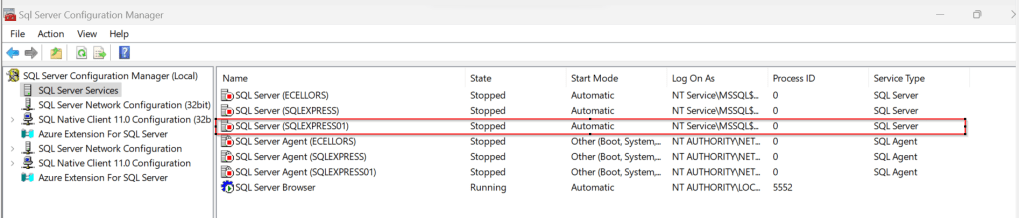
Just locate the SQL Server you were trying to connect and restart the same by right clicking on it…

Then try connecting to SQL Server, you should be able to connect to it…

That’s it…in the upcoming blog posts, we will see how we can work with On-premises Data Gateway to work with Dataflows in order to push the data to cloud and how you can show the data in Power BI.
Cheers,
PMDY
 ECELLORS CRM Blog