Python + Dataverse Series – #07: Running a Linear Normalization Algorithm on Dataverse Data Using Python

This is continuation in this series of Dataverse SDK for Python, if you haven’t checked out earlier articles, I would encourage to start from the beginning of this series.

Machine learning often begins with one essential step: data preprocessing. Before models can learn patterns, the raw data must be cleaned, scaled, and transformed into a form suitable for analysis. In this example, let me demonstrate how to retrieve numerical data from Microsoft Dataverse and apply a linear normalization algorithm using Python.

Normalization is a fundamental algorithm in machine learning pipelines. It rescales numeric values into a consistent range—typically between 0 and 1—making them easier for algorithms to interpret and compare.

1. Retrieving Data from Dataverse

Using the DataverseClient and Interactive Browser authentication, we connect to Dataverse and fetch the revenue field from the Account table. This gives us a small dataset to run our algorithm on.

from azure.identity import InteractiveBrowserCredential
from PowerPlatform.Dataverse.client import DataverseClient
credential = InteractiveBrowserCredential()
client = DataverseClient("https://ecellorsdev.crm8.dynamics.com", credential)
account_batches = client.get(
"account",
select=["accountid", "revenue"],
top=10,
)

We then extract the revenue values into a NumPy array.

2. Implementing the Linear Normalization Algorithm

The algorithm used here is min–max normalization, defined mathematically as:normalized=xmin(x)max(x)min(x)This algorithm ensures:

  • the smallest value becomes 0
  • the largest becomes 1
  • all other values fall proportionally in between

Here’s the implementation:

import numpy as np
revenues = np.array(revenues)
min_rev = np.min(revenues)
max_rev = np.max(revenues)
normalized_revenues = (revenues - min_rev) / (max_rev - min_rev)

This is a classic preprocessing algorithm used in machine learning pipelines before feeding data into models such as regression, clustering, or neural networks.

3. Visualizing the Normalized Output

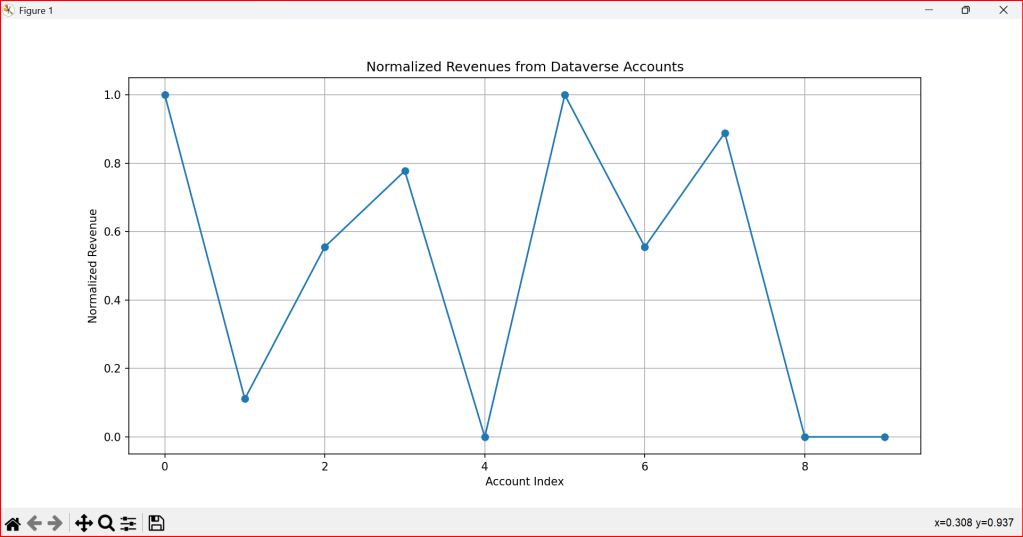
To better understand the effect of the algorithm, we plot the normalized values:

import matplotlib.pyplot as plt
plt.plot(normalized_revenues, marker='o')
plt.title('Normalized Revenues from Dataverse Accounts')
plt.xlabel('Account Index')
plt.ylabel('Normalized Revenue')
plt.grid()
plt.show()

The visualization highlights how the algorithm compresses the original revenue values into a uniform scale.

4. Why Normalization Matters

Normalization is not just a mathematical trick—it’s a crucial algorithmic step that:

  • prevents large values from dominating smaller ones
  • improves convergence in optimization-based models
  • enhances the stability of distance‑based algorithms
  • makes datasets comparable across different ranges
#Running Machine Learning Algorithm on data retrieved from Dataverse to run a linear normalization
from azure.identity import InteractiveBrowserCredential
from PowerPlatform.Dataverse.client import DataverseClient
import numpy as np
# Connect to Dataverse
credential = InteractiveBrowserCredential()
client = DataverseClient("https://ecellorsdev.crm8.dynamics.com", credential)
# Fetch account data as paged batches
account_batches = client.get(
"account",
select=["accountid", "revenue"],
top=10,
)
revenues = []
for batch in account_batches:
for account in batch:
if "revenue" in account and account["revenue"] is not None:
revenues.append(account["revenue"])
revenues = np.array(revenues)
# Apply a simple linear algorithm: Normalize the revenues
if len(revenues) > 0:
min_rev = np.min(revenues)
max_rev = np.max(revenues)
normalized_revenues = (revenues – min_rev) / (max_rev – min_rev)
print("Normalized Revenues:", normalized_revenues)
#visualize the result
import matplotlib.pyplot as plt
plt.plot(normalized_revenues, marker='o')
plt.title('Normalized Revenues from Dataverse Accounts')
plt.xlabel('Account Index')
plt.ylabel('Normalized Revenue')
plt.grid()
plt.show()

The use of this code is to transform raw Dataverse revenue data into normalized, machine‑learning‑ready values that can be analyzed, compared, and visualized effectively.

You can download the Python Notebook below if you want to work with VS Code

https://github.com/pavanmanideep/DataverseSDK_PythonSamples/blob/main/Python-RetrieveData-ApplyLinearAlgorithm.ipynb

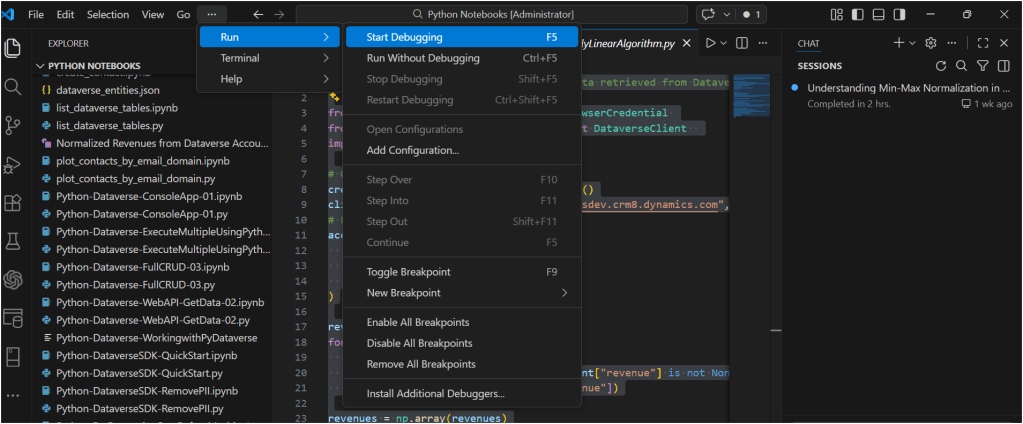
Once you have opened the Python notebook, you can start to run the code as below

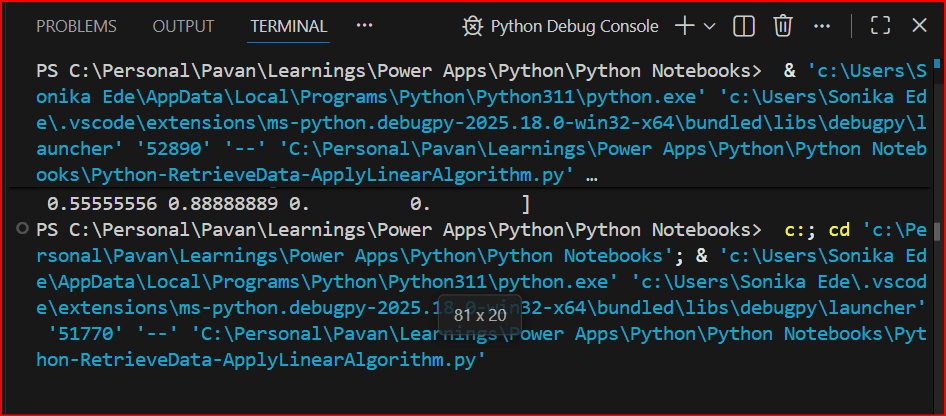
You should see something like below

For authentication in another browser tab, once authenticated, you should be able to see the

Hope you found this useful…it’s going to be interesting, stay tuned for upcoming articles.

Cheers,

PMDY

Python + Dataverse Series – #05: Remove PII

Hi Folks,

This is in continuation in the Python + Dataverse series, it is worth checking out from the start of this series here.

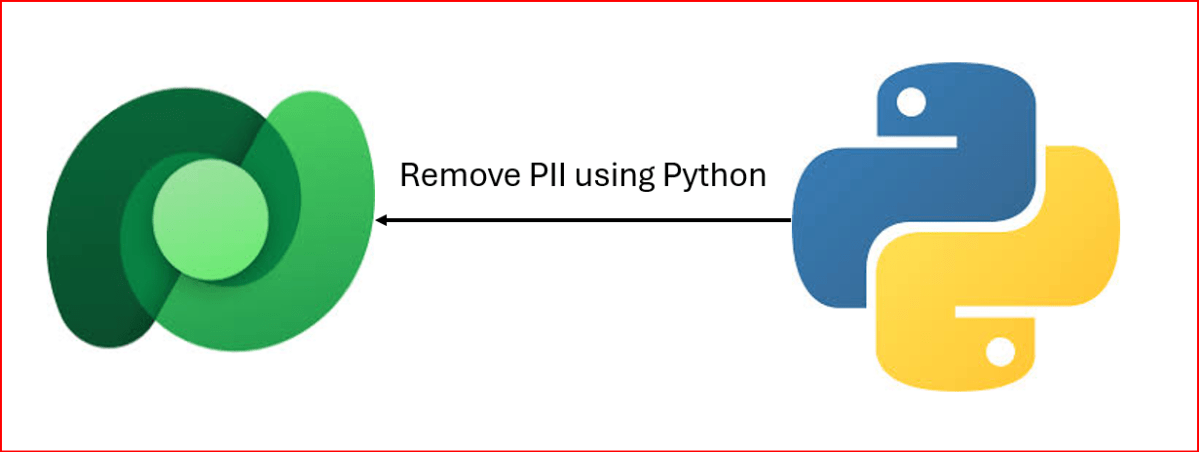
At times, there will be a need to remove PII(Personally Identifiable Information) present in the Dataverse Environments, for this one time task, you can easily run Python script below, let’s take example of removing PII from Contact fields in the below example.

from azure.identity import InteractiveBrowserCredential
from PowerPlatform.Dataverse.client import DataverseClient
# Connect to Dataverse
credential = InteractiveBrowserCredential()
client = DataverseClient("https://ecellorsdev.crm8.dynamics.com", credential)
#use AI to remove PII data from the dataverse records, let's say contact records
def remove_pii_from_contact(contact):
pii_fields = ['emailaddress1', 'telephone1', 'mobilephone', 'address1_line1', 'address1_city', 'address1_postalcode']
for field in pii_fields:
if field in contact:
contact[field] = '[REDACTED]'
return contact
# Fetch contacts with PII (Dataverse client returns paged batches)
contact_batches = client.get(
"contact",
select=[
"contactid",
"fullname",
"emailaddress1",
"telephone1",
"mobilephone",
"address1_line1",
"address1_city",
"address1_postalcode",
],
top=10,
)
# Remove PII and update contacts
for batch in contact_batches:
for contact in batch:
contact_id = contact.get("contactid")
sanitized_contact = remove_pii_from_contact(contact)
# Prepare update data (exclude contactid)
update_data = {key: value for key, value in sanitized_contact.items() if key != "contactid"}
# Update the contact in Dataverse
client.update("contact", contact_id, update_data)
print(f"Contact {contact_id} updated with sanitized data: {sanitized_contact}")

If you want to work on this, download the Python Notebook to use in VS Code…

https://github.com/pavanmanideep/DataverseSDK_PythonSamples/blob/main/Python-DataverseSDK-RemovePII.ipynb

Cheers,

PMDY

Understanding MIME Types in Power Platform – Quick Review

While many people doesn’t know the significance of MIME Type, this post is to give brief knowledge about the same before moving to understand security concepts in Power Platform in my upcoming articles.

In the Microsoft Power Platform, MIME types (Multipurpose Internet Mail Extensions) are standardized labels used to identify the format of data files. They are critical for ensuring that applications like Power Apps, Power Automate, and Power Pages can correctly process, display, or transmit files. 

Core Functions in Power Platform

  • Dataverse Storage: Tables such as ActivityMimeAttachment and Annotation (Notes) use a dedicated MimeType column to store the format of attached files alongside their Base64-encoded content.
  • Security & Governance: Administrators can use the Power Platform Admin Center to block specific “dangerous” MIME types (e.g., executables) from being uploaded as attachments to protect the environment.
  • Power Automate Approvals: You can configure approval flows to fail if they contain blocked file types, providing an extra layer of security for email notifications.
  • Power Pages (Web Templates): When creating custom web templates, the MIME type field controls how the server responds to a browser. For example, templates generating JSON must be set to application/json to be parsed correctly.
  • Email Operations: When using connectors like Office 365 Outlook, you must specify the MIME type for attachments (e.g., application/pdf for PDFs) so the recipient’s client can open them properly. 

Common MIME Types Used

File Extension MIME Type
.pdfapplication/pdf
.docxapplication/vnd.openxmlformats-officedocument.wordprocessingml.document
.xlsxapplication/vnd.openxmlformats-officedocument.spreadsheetml.sheet
.png / .jpgimage/png / image/jpeg
.jsonapplication/json
Unknownapplication/octet-stream (used for generic binary files)

Implementing MIME type handling and file restrictions ensures your Power Platform solutions are both functional and secure.

1. Programmatically Setting MIME Types in Power Automate 

When working with file content in Power Automate, you often need to define the MIME type within a JSON object so connectors (like Outlook or HTTP) understand how to process the data. 

  • Structure: Use a Compose action to build a file object with the $content-type (MIME type) and $content (Base64 data).json
  • Dynamic Mapping: If you don’t know the file type in advance, you can use an expression to map extensions to MIME types or use connectors like Cloudmersive to automatically detect document type information. 

2. Restricting File Types in Power Apps

The Attachment control in Power Apps does not have a built-in “allowed types” property, so you must use Power Fx formulas to validate files after they are added. 

  • Validation on Add: Use the OnAddFile property of the attachment control to check the extension and notify the user if it’s invalid in PowerApps
  • Submit Button Logic: For added security, set the DisplayMode of your Submit button to Disabled if any attachment in the list doesn’t match your criteria. 

3. Global Restrictions (Admin Center)

To enforce security across the entire environment, administrators can navigate to the Power Platform Admin Center to manage blocked MIME types. Adding an extension to the blocked file extensions list prevents users from uploading those file types to Dataverse tables like Notes or email attachments. 

Hope this helps…in next post, I will be talking about Content Security Policy and how Power Platform can be secured using different sets of configuration.

Cheers,

PMDY

Agentic AI Business Solutions Architect Exam -AB 100 Experience

Hi Folks,

On 14 November, 2025, I took the AB 100 Exam, this post is to share my experience about this exam.

The exam doesn’t look difficult or tricky to me, it feels like a lot to read in short amount of time. Most of the questions revolved around Copilot Studio, Azure AI Foundry, Azure Services for tracking telemetry, Copilot, Dynamics 365 Customer Engagement, Finance and Operations, Supply Chain Management.

While there is nitty-gritty on using Prebuilt agents and Custom Agents using Azure AI Foundry and Agent Governance, choosing right agent for the need but note that no question came up from AI Builder, Licensing as well.

However there were also scenario based questions on strategy using right tool for the need to build agent e.x. Azure Cloud Adoption Framework, Power Platform Well Architected Framework.

As per Exam NDA, exact exam questions may not be shared publicly, I am sharing my experience so that someone preparing for this exam can use this while preparing for taking this exam.

If you want to learn further, you can go through the below link which was recently created by Microsoft….go take a look…

AB 100 Collection

Hope it helps..

Cheers,

PMDY

Python + Dataverse Series – #04: Create records in batch using Execute Multiple

Hi Folks,

This is continuation in this Python with Dataverse Series, in this blog post, we will see how can we create multiple records in a single batch using ExecuteMultiple in Python.

Please use the below code for the same…to make any calls using ExecuteMultiple…

import pyodbc
import msal
import requests
import json
import re
import time
# Azure AD details
client_id = '0e1c58b1-3d9a-4618-8889-6c6505288d3c'
client_secret = 'qlU8Q~dmhKFfdL1ph2YsLK9URbhIPn~qWmfr1ceL'
tenant_id = '97ae7e35-2f87-418b-9432-6733950f3d5c'
authority = f'https://login.microsoftonline.com/{tenant_id}'
resource = 'https://ecellorsdev.crm8.dynamics.com'
# SQL endpoint
sql_server = 'ecellorsdev.crm8.dynamics.com'
database = 'ecellorsdev'
# Get token with error handling
try:
print(f"Attempting to authenticate with tenant: {tenant_id}")
print(f"Authority URL: {authority}")
app = msal.ConfidentialClientApplication(client_id, authority=authority, client_credential=client_secret)
print("Acquiring token…")
token_response = app.acquire_token_for_client(scopes=[f'{resource}/.default'])
if 'error' in token_response:
print(f"Token acquisition failed: {token_response['error']}")
print(f"Error description: {token_response.get('error_description', 'No description available')}")
else:
access_token = token_response['access_token']
print("Token acquired successfully and your token is!"+access_token)
print(f"Token length: {len(access_token)} characters")
except ValueError as e:
print(f"Configuration Error: {e}")
except Exception as e:
print(f"Unexpected error: {e}")
#Get 5 contacts from Dataverse using Web API
import requests
import json
try:
#Full CRUD Operations – Create, Read, Update, Delete a contact in Dataverse
print("Making Web API request to perform CRUD operations on contacts…")
# Dataverse Web API endpoint for contacts
web_api_url = f"{resource}/api/data/v9.2/contacts"
# Base headers with authorization token
headers = {
'Authorization': f'Bearer {access_token}',
'OData-MaxVersion': '4.0',
'OData-Version': '4.0',
'Accept': 'application/json',
'Content-Type': 'application/json'
}
# Simple approach: create multiple contacts sequentially
# generate 100 contacts with different last names
contacts_to_create = [
{"firstname": "Ecellors", "lastname": f"Test{str(i).zfill(3)}"}
for i in range(1, 101)
]
create_headers = headers.copy()
create_headers['Prefer'] = 'return=representation'
created_ids = []
print("Creating contacts sequentially…")
for i, body in enumerate(contacts_to_create, start=1):
try:
resp = requests.post(web_api_url, headers=create_headers, json=body, timeout=15)
except requests.exceptions.RequestException as e:
print(f"Request error creating contact #{i}: {e}")
continue
if resp.status_code in (200, 201):
try:
j = resp.json()
cid = j.get('contactid')
except ValueError:
cid = None
if cid:
created_ids.append(cid)
print(f"Created contact #{i} with id: {cid}")
else:
print(f"Created contact #{i} but response body missing id. Response headers: {resp.headers}")
elif resp.status_code == 204:
# try to extract id from headers
entity_url = resp.headers.get('OData-EntityId') or resp.headers.get('Location')
if entity_url:
m = re.search(r"([0-9a-fA-F\-]{36})", entity_url)
if m:
cid = m.group(1)
created_ids.append(cid)
print(f"Created contact #{i} (204) with id: {cid}")
else:
print(f"Created contact #{i} (204) but couldn't parse id from headers: {resp.headers}")
else:
print(f"Created contact #{i} (204) but no entity header present: {resp.headers}")
else:
print(f"Failed to create contact #{i}. Status code: {resp.status_code}, Response: {resp.text}")
# small pause to reduce chance of throttling/rate limits
time.sleep(0.2)
if created_ids:
print("Created contact ids:")
for cid in created_ids:
print(cid)
except Exception as e:
print(f"Unexpected error during Execute Multiple: {e}")
print("Failed to extract Contact ID from headers.")

Please download this Jupyter notebook to work on it easily using VS Code.

https://github.com/pavanmanideep/DataverseSDK_PythonSamples/blob/main/Python-Dataverse-ExecuteMultipleUsingPython.ipynb

If you want to continue reading this series, follow along

Hope this helps..

Cheers,

PMDY

Want to check if you have added metadata to the entity in Power Apps – Table Segmentation properties?

Hi Folks,

After a break, I am back with my next blog post, this is a very short one.

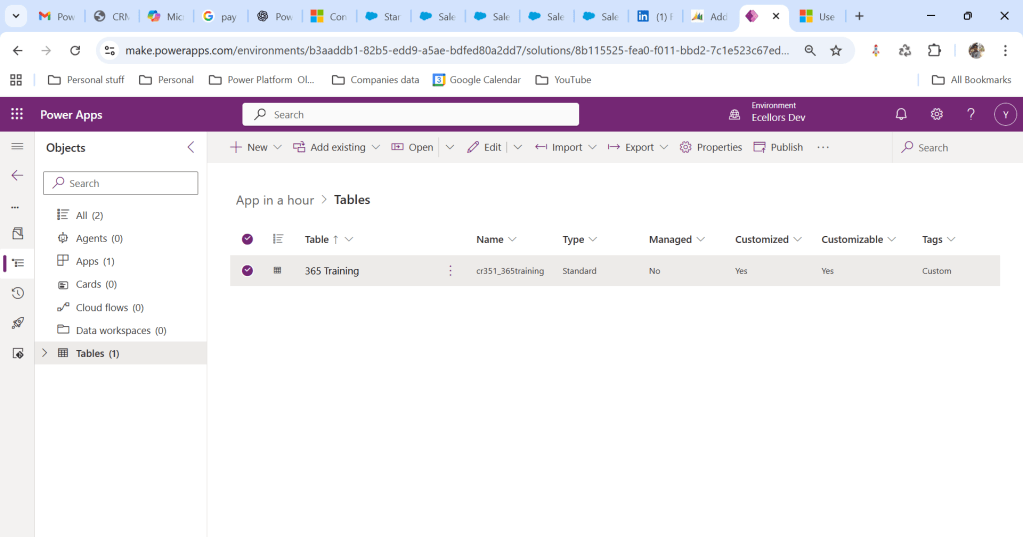
Whenever you were working on any implementation, you could have added entity assets to the solution, many people miss adding metadata for the entity, since they don’t have a way to check properly, folks end up removing and readding the entity with metadata toggle on.

But don’t worry, here is a simple way to check this..

Let’s say you have added a table to the form like below

Now you want to add the metadata for this, click on the table name below

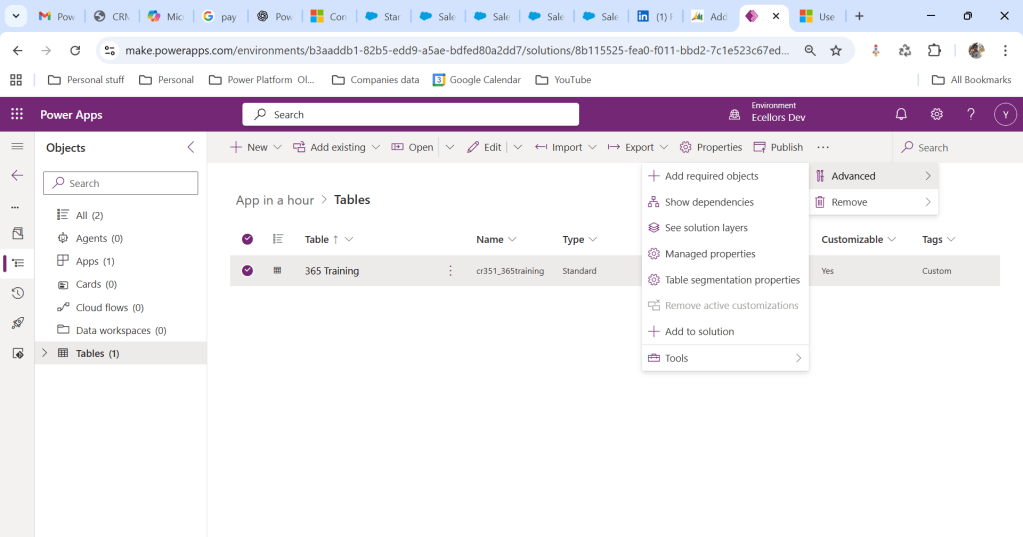
Click on Elipses…

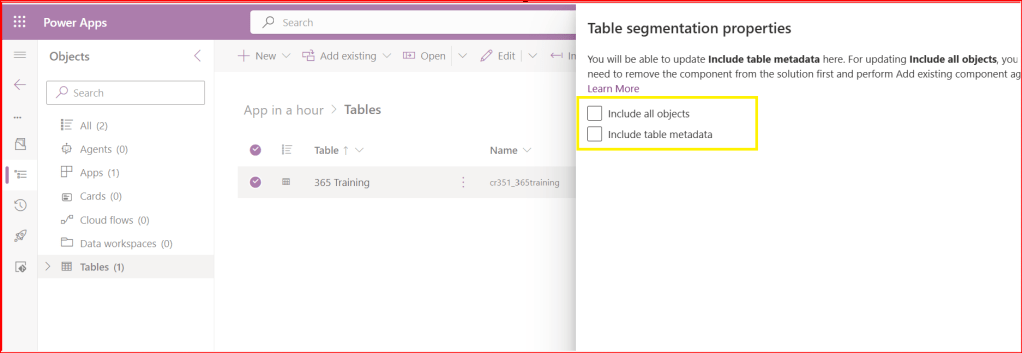
Choose table segmentation as shown above

So as highlighted above, you can include all the objects or include table metadata.

Hope this small tip helps…so even if you miss adding metadata, you can safely add it later at any point of time.

Cheers,

PMDY

Power Platform Solution Blue Print Review – Quick Recap

The Solution blueprint review is covers all required topics. The workshop can also be conducted remotely. When the workshop is done remotely, it is typical to divide the review into several sessions over several days.

The following sections cover the top-level topics of the Solution blueprint review and provide a sampling of the types of questions that are covered in each section.

Program strategy

Program strategy covers the process and structures that will guide the implementation. It also reviews the approach that will be used to capture, validate, and manage requirements, and the plan and schedule for creation and adoption of the solution.

This topic focuses on answering questions such as:

  • What are the goals of the implementation, and are they documented, well understood, and can they be measured?
  • What is the methodology being used to guide the implementation, and is it well understood by the entire implementation team?
  • What is the structure that is in place for the team that will conduct the implementation?
  • Are roles and responsibilities of all project roles documented and understood?
  • What is the process to manage scope and changes to scope, status, risks, and issues?
  • What is the plan and timeline for the implementation?
  • What is the approach to managing work within the plan?
  • What are the external dependencies and how are they considered in the project plan?
  • What are the timelines for planned rollout?
  • What is the approach to change management and adoption?
  • What is the process for gathering, validating, and approving requirements?
  • How and where will requirements be tracked and managed?
  • What is the approach for traceability between requirements and other aspects of the implementation (such as testing, training, and so on)?
  • What is the process for assessing fits and gaps?

Test strategy

Test strategy covers the various aspects of the implementation that deal with validating that the implemented solution works as defined and will meet the business need.

This topic focuses on answering questions such as:

  • What are the phases of testing and how do they build on each other to ensure validation of the solution?
  • Who is responsible for defining, building, implementing, and managing testing?
  • What is the plan to test performance?
  • What is the plan to test security?
  • What is the plan to test the cutover process?
  • Has a regression testing approach been planned that will allow for efficient uptake of updates?

Business process strategy

Business process strategy considers the underlying business processes (the functionality) that will be implemented on the Microsoft Dynamics 365 platform as part of the solution and how these processes will be used to drive the overall solution design.

This topic focuses on answering questions such as:

  • What are the top processes that are in scope for the implementation?
  • What is currently known about the general fit for the processes within the Dynamics 365 application set?
    • How are processes being managed within the implementation and how do they relate to subsequent areas of the solution such as user stories, requirements, test cases, and training?
    • Is the business process implementation schedule documented and understood?
    • Are requirements established for offline implementation of business processes?

Based on the processes that are in scope, the solution architect who is conducting the review might ask a series of feature-related questions to gauge complexity or understand potential risks or opportunities to optimize the solution based on the future product roadmap.

Application strategy

Application strategy considers the various apps, services, and platforms that will make up the overall solution.

This topic focuses on answering questions such as:

  • Which Dynamics 365 applications or services will be deployed as part of the solution?
  • Which Microsoft Azure capabilities or services will be deployed as part of the solution?
  • What if new external application components or services will be deployed as part of the solution?
  • What if legacy application components or services will be deployed as part of the solution?
  • What extensions to the Dynamics 365 applications and platform are planned?

Data strategy

Data strategy considers the design of the data within the solution and the design for how legacy data will be migrated to the solution.

This topic focuses on answering questions such as:

  • What are the plans for key data design issues like legal entity structure and data localization?
  • What is the scope and planned flow of key master data entities?
  • What is the scope and planned flow of key transactional data entities?
  • What is the scope of data migration?
  • What is the overall data migration strategy and approach?
  • What are the overall volumes of data to be managed within the solution?
  • What are the steps that will be taken to optimize data migration performance?

Integration strategy

Integration strategy considers the design of communication and connectivity between the various components of the solution. This strategy includes the application interfaces, middleware, and the processes that are required to manage the operation of the integrations.

This topic focuses on answering questions such as:

  • What is the scope of the integration design at an interface/interchange level?
  • What are the known non-functional requirements, like transaction volumes and connection modes, for each interface?
  • What are the design patterns that have been identified for use in implementing interfaces?
  • What are the design patterns that have been identified for managing integrations?
  • What middleware components are planned to be used within the solution?

Business intelligence strategy

Business intelligence strategy considers the design of the business intelligence features of the solution. This strategy includes traditional reporting and analytics. It includes the use of reporting and analytics features within the Dynamics 365 components and external components that will connect to Dynamics 365 data.

This topic focuses on answering questions such as:

  • What are the processes within the solution that depend on reporting and analytics capabilities?
  • What are the sources of data in the solution that will drive reporting and analytics?
  • What are the capabilities and constraints of these data sources?
  • What are the requirements for data movement across solution components to facilitate analytics and reporting?
  • What solution components have been identified to support reporting and analytics requirements?
  • What are the requirements to combine enterprise data from multiple systems/sources, and what does that strategy look like?

Security strategy

Security strategy considers the design of security within the Dynamics 365 components of the solution and the other Microsoft Azure and external solution components.

This topic focuses on answering questions such as:

  • What is the overall authentication strategy for the solution? Does it comply with the constraints of the Dynamics 365 platform?
  • What is the design of the tenant and directory structures within Azure?
  • Do unusual authentication needs exist, and what are the design patterns that will be used to solve them?
  • Do extraordinary encryption needs exist, and what are the design patterns that will be used to solve them?
  • Are data privacy or residency requirements established, and what are the design patterns that will be used to solve them?
  • Are extraordinary requirements established for row-level security, and what are the design patterns that will be used to solve them?
  • Are requirements in place for security validation or other compliance requirements, and what are the plans to address them?

Application lifecycle management strategy

Application lifecycle management (ALM) strategy considers those aspects of the solution that are related to how the solution is developed and how it will be maintained given that the Dynamics 365 apps are managed through continuous update.

This topic focuses on answering questions such as:

  • What is the preproduction environment strategy, and how does it support the implementation approach?
  • Does the environment strategy support the requirements of continuous update?
  • What plan for Azure DevOps will be used to support the implementation?
  • Does the implementation team understand the continuous update approach that is followed by Dynamics 365 and any other cloud services in the solution?
  • Does the planned ALM approach consider continuous update?
  • Who is responsible for managing the continuous update process?
  • Does the implementation team understand how continuous update will affect go-live events, and is a plan in place to optimize versions and updates to ensure supportability and stability during all phases?
  • Does the ALM approach include the management of configurations and extensions?

Environment and capacity strategy

Deployment architecture considers those aspects of the solution that are related to cloud infrastructure, environments, and the processes that are involved in operating the cloud solution.

This topic focuses on answering questions such as:

  • Has a determination been made about the number of production environments that will be deployed, and what are the factors that went into that decision?
  • What are the business continuance requirements for the solution, and do all solution components meet those requirements?
  • What are the master data and transactional processing volume requirements?
  • What locations will users access the solution from?
  • What are the network structures that are in place to provide connectivity to the solution?
  • Are requirements in place for mobile clients or the use of other specific client technologies?
  • Are the licensing requirements for the instances and supporting interfaces understood?

Solution blueprint is very essential for an effective Solution Architecture, using the above guiding principles will help in this process.

Thank you for reading…

Hope this helps…

Cheers,

PMDY

Python + Dataverse Series – #02 – use Datavese Web API using Python

Hi Folks,

This is in continuation to the previous blog post…if you haven’t gone through the earlier post on connecting to Dataverse using Python, please have a look here

Now, we will see how you can retrieve the records in Dataverse using Web API using Python…

  1. Follow the previous blog post for connecting to Dataverse using Python
  2. Once you get the access token via the TDS End point, we can invoke the Dataverse Web API using below code…
import pyodbc
import msal
import requests
import json
# Azure AD details
client_id = 'XXXX'
client_secret = 'XXXX'
tenant_id = 'XXXX'
authority = f'https://login.microsoftonline.com/{tenant_id}'
resource = 'https://XXXX.crm8.dynamics.com'
# SQL endpoint
sql_server = 'XXXX.crm8.dynamics.com'
database = 'XXXX'
# Get token with error handling
try:
print(f"Attempting to authenticate with tenant: {tenant_id}")
print(f"Authority URL: {authority}")
app = msal.ConfidentialClientApplication(client_id, authority=authority, client_credential=client_secret)
print("Acquiring token…")
token_response = app.acquire_token_for_client(scopes=[f'{resource}/.default'])
if 'error' in token_response:
print(f"Token acquisition failed: {token_response['error']}")
print(f"Error description: {token_response.get('error_description', 'No description available')}")
else:
access_token = token_response['access_token']
print("Token acquired successfully and your token is!"+access_token)
print(f"Token length: {len(access_token)} characters")
except ValueError as e:
print(f"Configuration Error: {e}")
print("\nPossible solutions:")
print("1. Verify your tenant ID is correct")
print("2. Check if the tenant exists and is active")
print("3. Ensure you're using the right Azure cloud (commercial, government, etc.)")
except Exception as e:
print(f"Unexpected error: {e}")
#Get 5 contacts from Dataverse using Web API
import requests
import json
try:
print("Making Web API request to get contacts…")
# Dataverse Web API endpoint for contacts
web_api_url = f"{resource}/api/data/v9.2/contacts"
# Set up headers with authorization token
headers = {
'Authorization': f'Bearer {access_token}',
'OData-MaxVersion': '4.0',
'OData-Version': '4.0',
'Accept': 'application/json',
'Content-Type': 'application/json'
}
# Add query parameters to get only 5 contacts with specific fields
params = {
'$top': 5,
'$select': 'contactid,fullname,emailaddress1,telephone1,createdon'
}
# Make the GET request
response = requests.get(web_api_url, headers=headers, params=params)
if response.status_code == 200:
print("Web API request successful!")
contacts_data = response.json()
print(f"\nFound {len(contacts_data['value'])} contacts:")
print("-" * 80)
for i, contact in enumerate(contacts_data['value'], 1):
print(f"Contact {i}:")
print(f" ID: {contact.get('contactid', 'N/A')}")
print(f" Name: {contact.get('fullname', 'N/A')}")
print(f" Email: {contact.get('emailaddress1', 'N/A')}")
print(f" Phone: {contact.get('telephone1', 'N/A')}")
print(f" Created: {contact.get('createdon', 'N/A')}")
print("-" * 40)
else:
print(f"Web API request failed with status code: {response.status_code}")
print(f"Error details: {response.text}")
except requests.exceptions.RequestException as e:
print(f"Request error: {e}")
except KeyError as e:
print(f"Token not available: {e}")
except Exception as e:
print(f"Unexpected error: {e}")

You can use the VS Code as IDE, copy the above code in a python file, next click on Run Python File at the top of the VS Code

So, once you get the Access token, you can invoke the Web API using Python similar to how we did it using Javascript…

Please download the Python Jupyter Notebook if you want to work on this in VS Code

https://github.com/pavanmanideep/DataverseSDK_PythonSamples/blob/main/Python-Dataverse-WebAPI-GetData-02.ipynb

If you want to follow along in this series, please see below post

Hope this helps…

Cheers,

PMDY

Python + Dataverse Series – #01 – Console Application using Python

Hi Folks,

This series is for Pro Code Developers especially those working on Dataverse and want to know how to work with Dataverse and Python. I am starting this series as I see little to no content in this area.

So, in this post, first we will try to understand how to write a console application using Python Code utilizing(Tabular Data Stream) the TDS end point. Well, there were many posts in the internet for connecting to Dataverse using Python but uses more libraries and requires bit more code

Below posts will have hardcoded configurations as they are meant for initial trial purposes, going further, we will align with the best practices.

import pyodbc
import msal
# Azure AD details
client_id = '0e1c58b1-3d9a-4618-8889-6c6505288d3c'
client_secret = 'qlU8Q~dmhKFfdL1ph2YsLK9URbhIPn~qWmfr1ceL'
tenant_id = '97ae7e35-2f87-418b-9432-6733950f3d5c'
authority = f'https://login.microsoftonline.com/{tenant_id}'
resource = 'https://ecellorsdev.crm8.dynamics.com'
# SQL endpoint
sql_server = 'ecellorsdev.crm8.dynamics.com'
database = 'ecellorsdev'
# Get token with error handling
try:
print(f"Attempting to authenticate with tenant: {tenant_id}")
print(f"Authority URL: {authority}")
app = msal.ConfidentialClientApplication(client_id, authority=authority, client_credential=client_secret)
print("Acquiring token…")
token_response = app.acquire_token_for_client(scopes=[f'{resource}/.default'])
if 'error' in token_response:
print(f"Token acquisition failed: {token_response['error']}")
print(f"Error description: {token_response.get('error_description', 'No description available')}")
else:
access_token = token_response['access_token']
print("Token acquired successfully and your token is!"+access_token)
print(f"Token length: {len(access_token)} characters")
except ValueError as e:
print(f"Configuration Error: {e}")
print("\nPossible solutions:")
print("1. Verify your tenant ID is correct")
print("2. Check if the tenant exists and is active")
print("3. Ensure you're using the right Azure cloud (commercial, government, etc.)")
except Exception as e:
print(f"Unexpected error: {e}")

The logic just uses two libraries in Python

  1. pyodbc
  2. msal

The code efficiently handles all the errors for efficient tracking….

You can easily work with Python using VS Code as below,

Hover over Run option –> Click Start Debugging

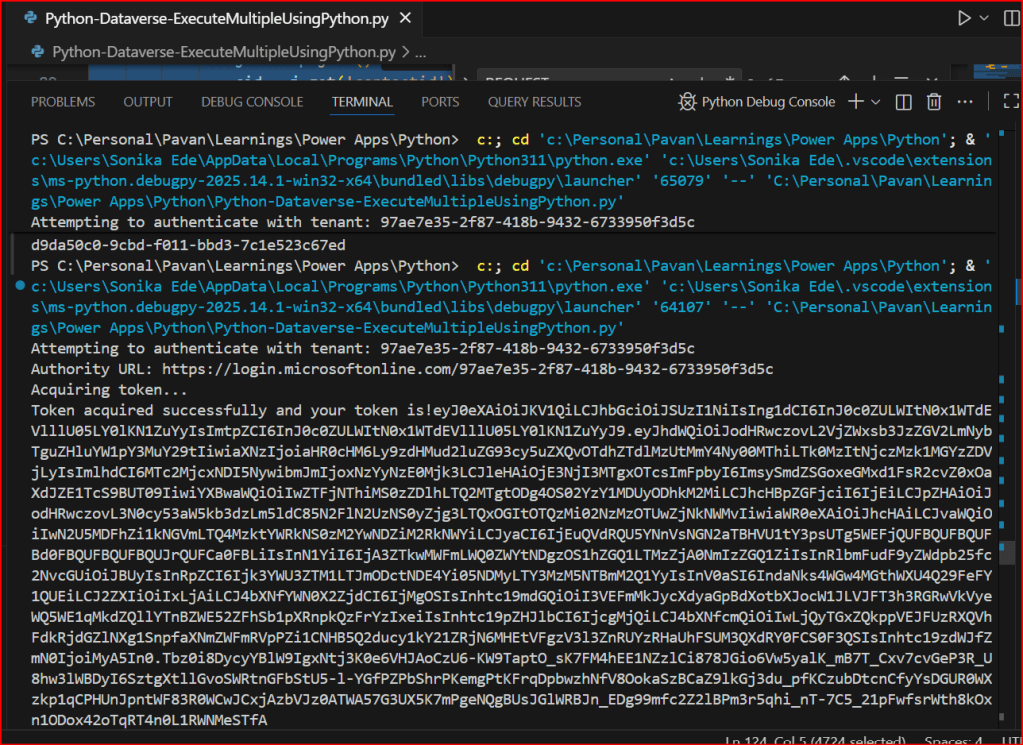
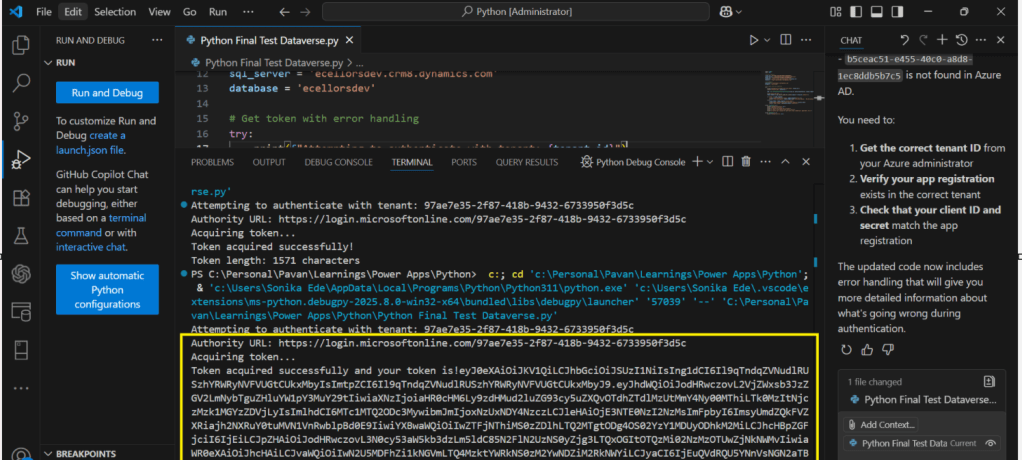
You will able to get the Access Token after invoking the Dataverse.

Download the Python Jupyter Notebook if you want to work on this in VS Code.

https://github.com/pavanmanideep/DataverseSDK_PythonSamples/blob/main/Python-Dataverse-ConsoleApp-01.ipynb

Hope this posts helps…

If you want to continue reading this series, please follow along

Cheers,

PMDY

Establishing tenant hygiene with the CoE Starter Kit – Learn COE #04

Hi Folks,

In this blog post, I am going to talk about establishing tenant hygiene using COE Stater kit, in today’s world where there increasing Power Platform demand. Organizations have become mature, that every implementation is now looking for having some kind of governance being established.

If you were some one who want to get some knowledge of implementing governance, you were at right place.

In order to efficiently implement governance, we need to understand the environment strategy, your current implementation has used. Of course if you were looking for some guidance, there were examples of tooling available in the CoE Starter Kit and out-of-the-box capabilities to help CoE teams effectively manage and optimize their Power Platform solutions.

Few key steps to be considered for maintaing this in your environment, so let’s get started…

  1. Define Environment Strategy
  • Assign your admins the Power Platform service admin or Dynamics 365 service admin role.
  • Restrict the creation of net-new trial and production environments to admins
  • Rename the default environment to ‘Personal Productivity’
  • Provision a new Production environment for non-personal apps/flows
  • Define and implement your DLP policies for your environments
  • When establishing a DLP strategy, you may need multiple environments for the same department
  • When establishing your Power Platform environment strategy, based upon your licensing, you may find that you need to provision environments without a Dataverse (previously called Common Data Service) database and also use DLP policies to restrict the use of premium connectors.
  • Establish a process for requesting access or creation of environments
  • Dev/Test/Production environments for specific business groups or application
  • Individual-use environments for Proof of Concepts and training workshops
  • Use a service account to deploy production solutions
  • Reduce the number of shared development environments
  • Share resources with Microsoft Entra Security Groups.

2. Compliance and Adoption:

The Compliance page in the CoE Starter Kit’s Compliance and adoption dashboard can help you identify apps and flows with no owners, noncompliant apps, and suspended flows.

  • Rename and secure the default environment
  • Identify unused apps, pending suspension, suspended cloud flows and not without an owner or not in solutions
  • Quarantined noncompliant apps and clean up orphaned resources
  • Enable Managed Environments and establish a data loss prevention policy
  • Apply cross tenant isolation
  • Assign Administrator roles appropriately
  • Apps and flows with duplicate names not compliant with DLP policies or billing policies
  • Apps shared with everyone and apps shared with more than 100 users and Apps not launched in the last month and in the last quarter
  • Flows using plain text passwords and using HTTP actions
  • Cross-tenant connections
  • Environments with no apps or flows
  • Custom connectors using HTTP environments

3. Managing Dataverse for Teams environments

If you were not using Dataverse for Teams, you can safely skip this step, else please review

The Microsoft Teams environments page in the CoE Starter Kits dashboard provides you with an overview of your existing Teams environments, apps and flows in those environments, and the last launched date of apps.

Screenshot of a Microsoft Teams Environments overview.

By checking for new Dataverse for Teams environments daily, organizations can ensure they’re aware of all environments in use. 

State of Dataverse for TeamsPower Platform action
83 days after no user activitySend a warning that the environment will be disabled. Update the environment state on the Environments list page and the Environment page.
87 days after no user activitySend a warning that the environment will be disabled. Update the inactive environment state on the Environments list page and the Environment page.
90 days after no user activityDisable the environment. Send a notice that the environment has been disabled. Update the disabled environment state on the Environments list page and the Environment page.
113 days after no user activitySend a warning that the environment will be deleted. Update the disabled environment state on the Environments list page and the Environment page.
117 days after no user activitySend a warning that the environment will be deleted. Update the disabled environment state on the Environments list page and the Environment page.
120 days after no user activityDelete the environment. Send a notice that the environment has been deleted.

Please note a warning is displayed only if the Dataverse for Teams environment is <= 7 days until disablement.

4. Highly used apps

The Power BI Dashboard available out of the box with COE Starter Kit will provide you the necessary guidance over high performing apps and also your most active users.

5. Communicating governance to your makers

This is one of the important step while setting up COE and governance guidelines, follow the below approaches

  • Clearly communicate the purpose and benefits of governance policies:Explain how governance policies protect organizational data
  • Make governance policies and guidelines easily accessible:Place the policies and guidelines in a central location that is easily accessible to all makers
  • Provide training and support:Offer training sessions and resources to help makers understand and comply with governance policies.
  • Encourage open communication: Foster culture where makers can ask questions and raise concerns about governance policies.
  • Incorporate governance into the development process:For example, you can require a compliance review before deploying a solution.

6. Administration of the platform

Power Platform Administrator Planning Tool which comes with COE Strater Kit provides guidance and best practices for administration. Also the planning tool can optimize environments, security, data loss prevention, monitoring and reporting.

6. Securing the environments

It is critical to establish a Data Loss Prevention (DLP) strategy to control connector availability.

The DLP editor (impact analysis) tool is available for use before making changes to existing policies or creating new DLP policies. It reveals the impact of changes on existing apps and cloud flows and helps you make informed decisions.

Reference: COE Starter Kit Documentation

If you face issues using the COE Starter Kit, you can always report them at https://aka.ms/coe-starter-kit-issues

Hope this helps…. someone maintaining tenant governance with COE starter kit…. if you have any feedback or questions, do let me know in comments….

Cheers,

PMDY