

Hi Folks,
As a Power Platform Admin/Consultant…did you often worry about your Power Platform Request Limits and usage left…? Do you receive warning messages from Microsoft regarding the usage of your database exceeded..? Want to see what are Custom Plugin Errors encountered while using your Model Driven App targeting Dataverse….then want to consolidate them and forward to your team to look into the issues without much efforts….then you were in the right place…
Just login with your credentials to admin page https://admin.powerplatform.microsoft.com/.
Expand Resources to the left…to find the Capacity menu

If you just want to know only the data usage, then you can ahead and click on Download as shown above to get one.
Want to get in depth analysis…then click on Details as highlighted in the same snap above.
This page shows your Database usage/File usage and respective categorizations by table as below..
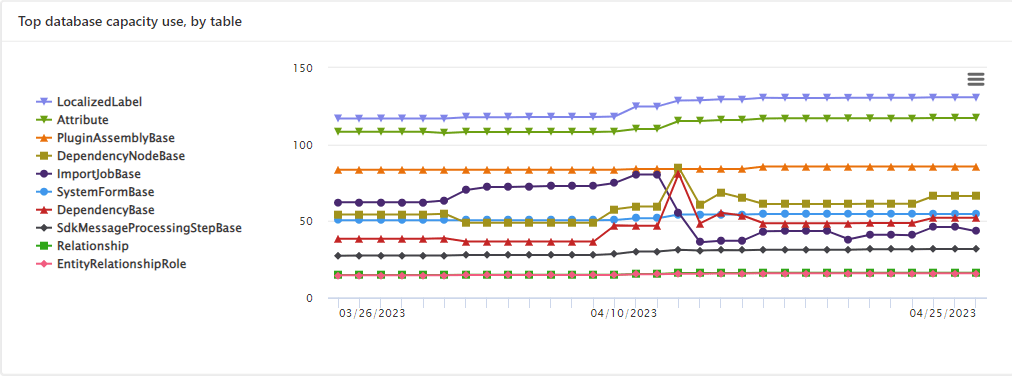
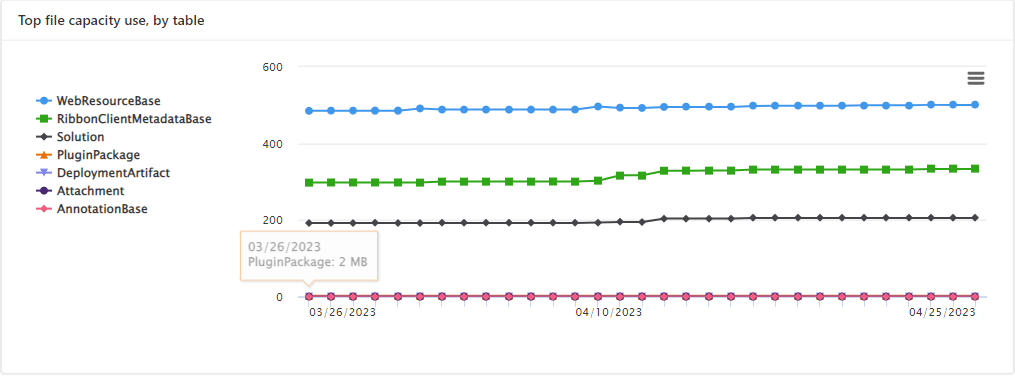

These are reports which I was able to extract from my trial environment, however all the reports were not available currently in my region. Yes, this is expected as this feature is still in preview and not recommended for Production Projects as of now. Definitely in the future…
Note:
- Many people including me till now thought that Plugins or at least any operation performed within Model Driven app will not be counted for the API request limits. But…
- If the requests are making CRUD, assign, or share–type requests, they’ll count except internal requests. For classic workflows, this includes actions such as checking conditions, starting child workflows, or stopping workflows.
- You should never use any third party tools for Integration whenever you were facing any request limit issues.
- Request limits are applied differently for licensed users and Non-licensed users.
- You can add more capacity to any of your products by assigning your environment in the manage addons page.
Hope you found this post helpful…
Cheers,
PMDY
 ECELLORS CRM Blog