JavaScript Arrow Functions

In this tutorial, you will learn about JavaScript arrow function with the help of examples.

Arrow function is one of the features introduced in the ES6 version of JavaScript. It allows you to create functions in a cleaner way compared to regular functions. For example,

This function

// function expression
let x = function(x, y) {
   return x * y;
}

can be written as

// using arrow functions
let x = (x, y) => x * y;

using an arrow function.


Arrow Function Syntax

The syntax of the arrow function is:

let myFunction = (arg1, arg2, ...argN) => {
    statement(s)
}

Here,

  • myFunction is the name of the function
  • arg1, arg2, ...argN are the function arguments
  • statement(s) is the function body

If the body has single statement or expression, you can write arrow function as:

let myFunction = (arg1, arg2, ...argN) => expression

Example 1: Arrow Function with No Argument

If a function doesn’t take any argument, then you should use empty parentheses. For example,

let greet = () => console.log('Hello');
greet(); // Hello

Example 2: Arrow Function with One Argument

If a function has only one argument, you can omit the parentheses. For example,

let greet = x => console.log(x);
greet('Hello'); // Hello 

Example 3: Arrow Function as an Expression

You can also dynamically create a function and use it as an expression. For example,

let age = 5;

let welcome = (age < 18) ?
  () => console.log('Baby') :
  () => console.log('Adult');

welcome(); // Baby

Example 4: Multiline Arrow Functions

If a function body has multiple statements, you need to put them inside curly brackets {}. For example,

let sum = (a, b) => {
    let result = a + b;
    return result;
}

let result1 = sum(5,7);
console.log(result1); // 12

this with Arrow Function

Inside a regular function, this keyword refers to the function where it is called.

However, this is not associated with arrow functions. Arrow function does not have its own this. So whenever you call this, it refers to its parent scope. For example,

Inside a regular function

function Person() {
    this.name = 'Jack',
    this.age = 25,
    this.sayName = function () {

        // this is accessible
        console.log(this.age);

        function innerFunc() {

            // this refers to the global object
            console.log(this.age);
            console.log(this);
        }

        innerFunc();

    }
}

let x = new Person();
x.sayName();

Output

25
undefined
Window {}

Hope this helps in improvising your JavaScript code for your Power Platform Implementations

Happy CRM’ing.

Cheers,

PMDY

Download CRM 365 V9.X Tools using PowerShell

Arun Potti's avatarArun Potti's Power Platform blog

Follow the below steps to download the Tools,

Step 1: Create a folder in D Drive and name it as “Dynamics_365_Development_Tools

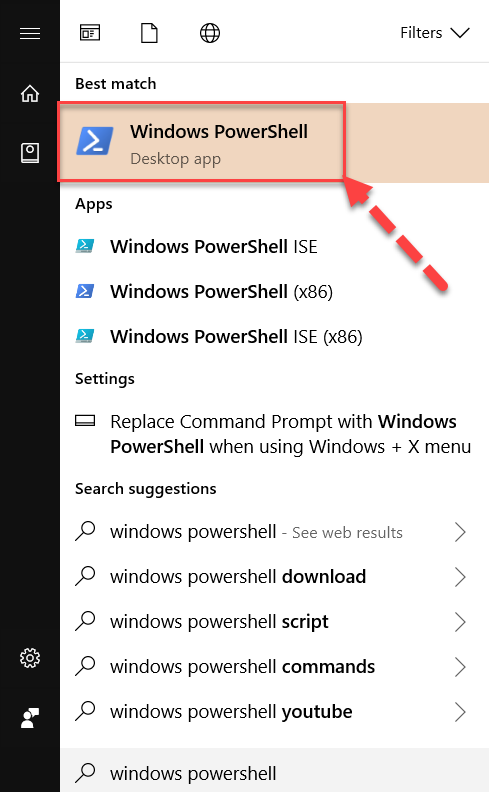
Step 2: Click on Windows, search for Windows PowerShell and open it.

Windows PowershellStep 3: Type the below command to change the directory.

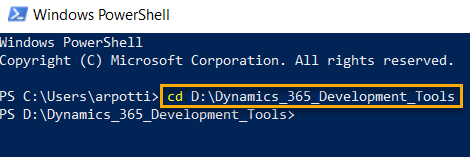
cd D:Dynamics_365_Development_Tools

and press Enter.

Windows Powershell Command to Change DirectoryStep 4: Copy & Paste the below PowerShell script in PowerShell Window to download tools from Nuget.

$sourceNugetExe = "https://dist.nuget.org/win-x86-commandline/latest/nuget.exe" $targetNugetExe = ".nuget.exe" Remove-Item .Tools -Force -Recurse -ErrorAction Ignore Invoke-WebRequest $sourceNugetExe -OutFile $targetNugetExe Set-Alias nuget $targetNugetExe -Scope Global -Verbose ## ##Download Plugin Registration Tool ## ./nuget install Microsoft.CrmSdk.XrmTooling.PluginRegistrationTool -O .Tools md .ToolsPluginRegistration $prtFolder = Get-ChildItem ./Tools | Where-Object {$_.Name -match 'Microsoft.CrmSdk.XrmTooling.PluginRegistrationTool.'} move .Tools$prtFoldertools*.* .ToolsPluginRegistration Remove-Item .Tools$prtFolder -Force -Recurse ## ##Download CoreTools ## ./nuget install Microsoft.CrmSdk.CoreTools -O .Tools md .ToolsCoreTools $coreToolsFolder = Get-ChildItem ./Tools | Where-Object {$_.Name -match 'Microsoft.CrmSdk.CoreTools.'} move .Tools$coreToolsFoldercontentbincoretools*.* .ToolsCoreTools Remove-Item .Tools$coreToolsFolder -Force -Recurse ## ##Download Configuration Migration ##…

View original post 92 more words

Power platform Plugin design mistakes which often make you mad…!!!

Hello friends,

Below blog details about the common plugin design mistake which often make you spend hours together to troubleshoot….

  1. Make sure you properly verify the filtering attributes are missing
  2. Don’t unnecessarily include all the parameters in the Pre/Post image
  3. Don’t retrieve all the data in your fetch queries
  4. Make sure your operation doesn’t take long time when you were trying to perform any synchronous operation.
  5. Check if any other operation is blocking your action or pushing your action to go next.
  6. Try to use trace log if you were able to call the plugin
  7. In some cases, if you have any issue with the plugin registration tool to profile, alternatively you can put this method of logging to trace out the issue.
  8. Use depth property to prevent infinite loop execution.

Hope you found at least you are able to understand why your plugin doesn’t trigger now.

Thank you…that’s it for today….

Cheers,

PMDY

Call Azure Function from Dynamics 365 CRM using Webhooks

priyeshwagh777's avatarD365 Demystified

This is a vast topic to cover in a blog. But I wanted to write from a bird-eye’s view of how this will pan out in an implementation where you perform a certain operation in Dynamics 365 CRM and an Azure Function is called to perform further operations.

This post is written keeping in mind fair knowledge of Azure Functions, Storage accounts and subscriptions in mind.

I’ll try to keep the article short, so stay with me! 🙂

Create a Function App in Azure

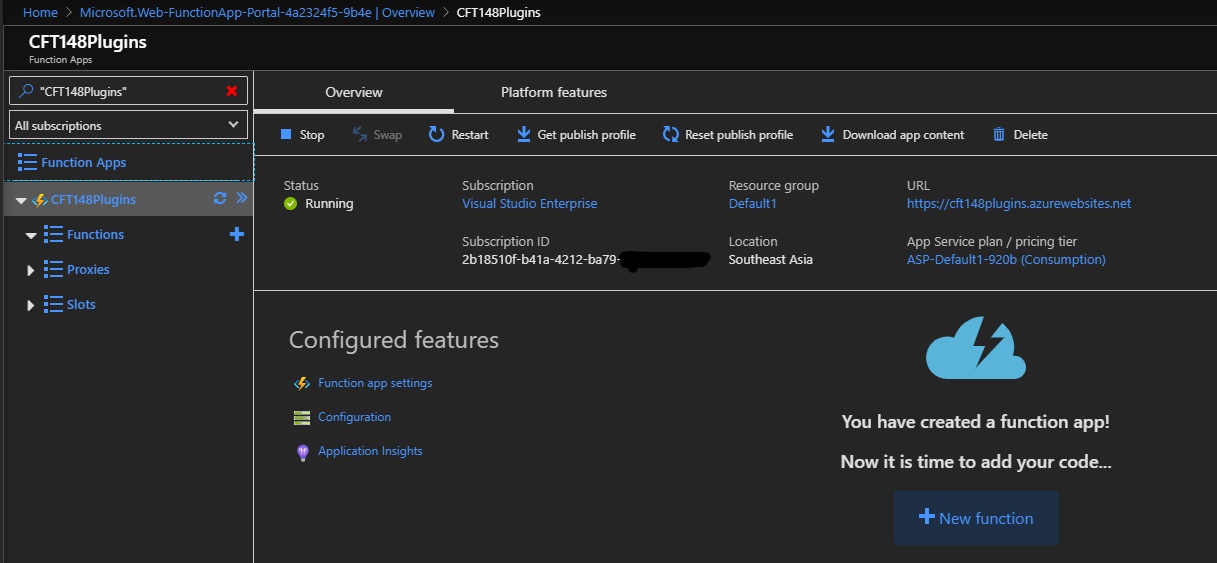
  1. Let’s say you have created a Function App in Azure already and want to connect to Dynamics 365 CRM. Click on the big + New Function button in the screenshot below
    resourceOverview_LI
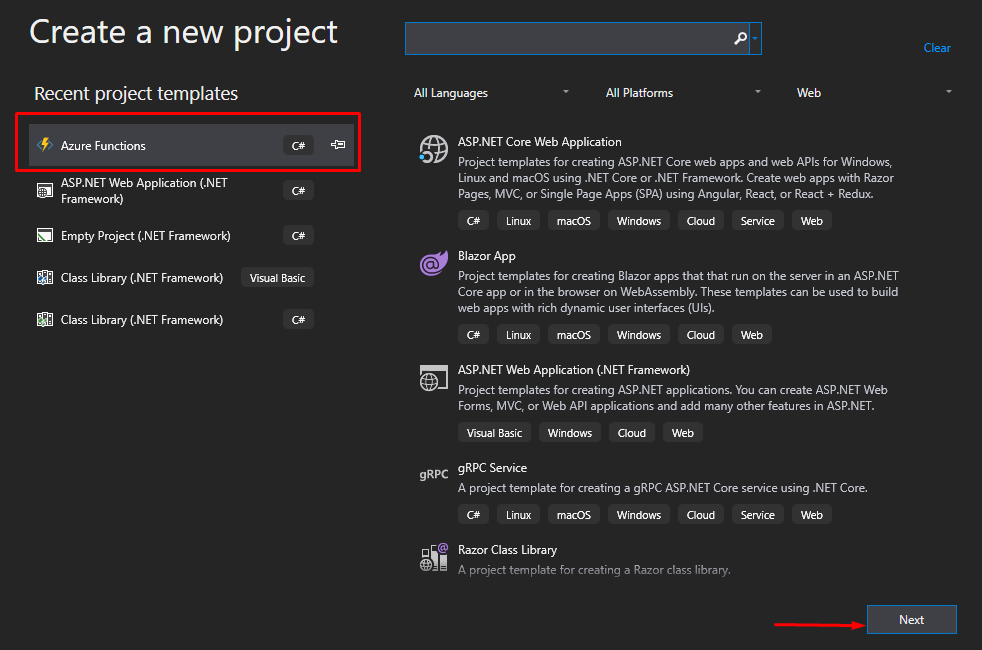
  2. Now, since I want to keep Visual Studio as my driver for coding and deployment, I’ll create a new Project in Visual Studio of type Azure Functions and click Next
    newProj
  3. On the next page, I’ll…

View original post 560 more words

How to pass an object from a model app driven app to a custom page?

Mehdi El Amri's avatarXRM Tricks (Power Platform & Dynamics CRM )

According to the current documentation, we can pass a dataverse record as a parameter. This is still very beneficial for some scenarios. But what if we want to pass a set of parameters without using an existing record.

After several attempts, I managed to pass an object containing some properties from the model driven app to the custom page using the navigateTo method. The next video illustrates this scenario. Indeed, the idea is to pass an object which contains two properties of type text from the MDA to the Custom Page using the navigateTo method.

As you can see, I used the recordId parameter to pass my JSON object. According to the documentation for the navigateTo method, the recordId parameter is optional and expects to be passed a GUID parameter.
Fortunately for us, Microsoft does not check if we pass a GUID or not, the API expects a string. Using…

View original post 210 more words

Power Platform Tools | Developer Toolkit for Visual Studio 2019

Rajeev Pentyala's avatarRajeev Pentyala – Technical Blog on Power Platform, Azure and AI

Power Platform Tools for Visual Studio supports the rapid creation, debugging, and deployment of plug-ins.

You may note that Power Platform Tools for Visual Studio is similar in appearance and function to the Developer Toolkit for Microsoft Dynamics CRM 2013.

While Power Platform Tools for Visual Studio is similar in appearance and function to the Developer Toolkit for Microsoft Dynamics CRM 2013, Power Platform Tools is a new product and completely independent of the Developer Toolkit.

Power Platform Tools is not directly compatible with any templates or projects from the Developer Toolkit and vice versa.

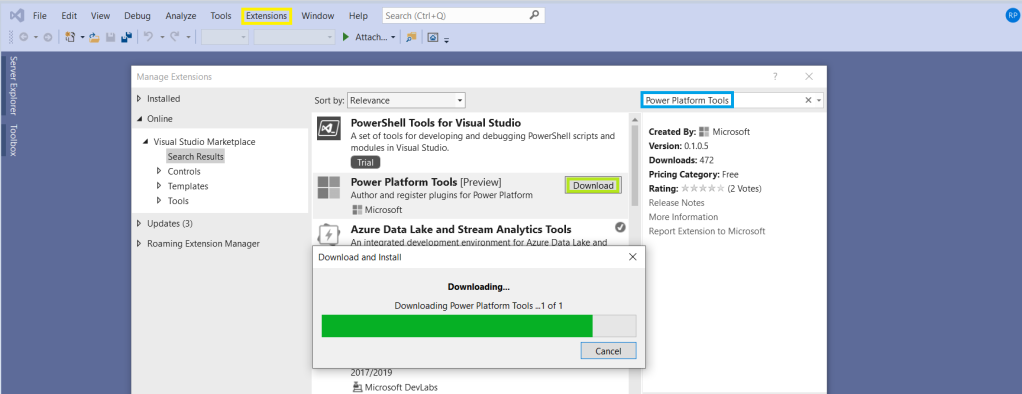
Steps to enable ‘Power Platform Tools’ extension in VS 2019:

  • From the Visual Studio 2019, click on ‘Extensions -> Manage Extensions’.
  • Expand the left navigation panel node Online > Visual Studio Marketplace. Search for “Power Platform Tools”, then click on ‘Download’.

  • Post Download, close all the Visual Studio instances and wait for few seconds…

View original post 112 more words

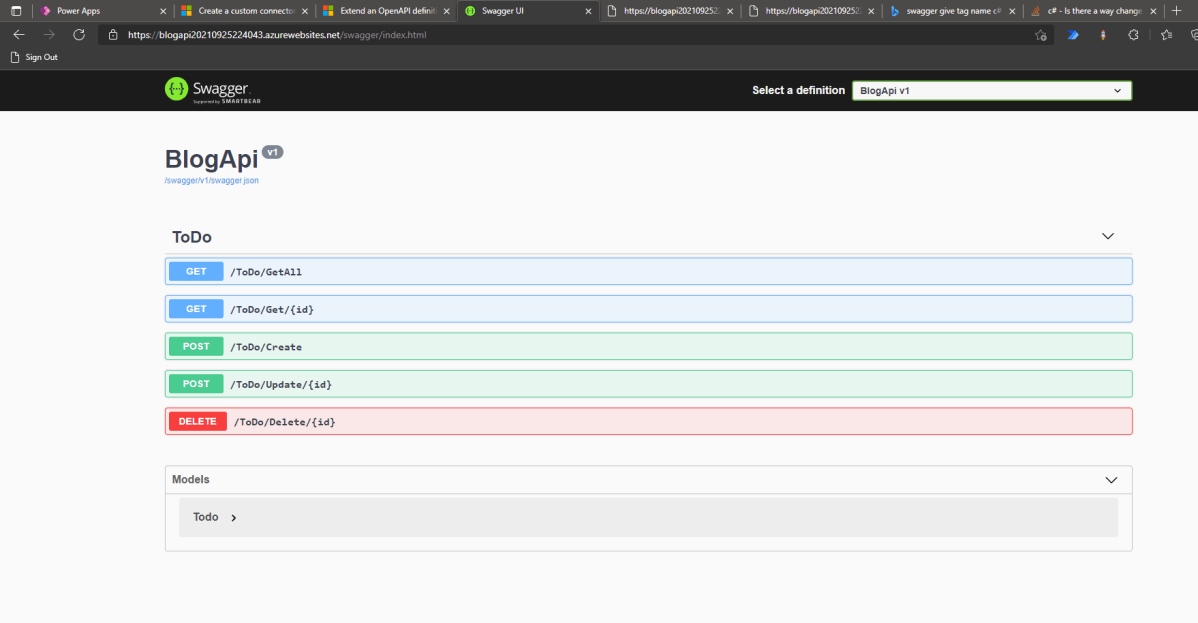
Exploration: Create Swagger API and Consume It In Canvas-Apps

temmyraharjo's avatarTemmy Wahyu Raharjo

Today we will learn how to create Swagger API > deploy it to Azure (App Service) > make custom connector > use it in Canvas Apps. Without further ado, let’s make it!

Create API

First, we need to open your CMD line, then set the CMD (using CD command) to the directory where you want to create the folder. Once you are already in the folder that you want it, run the below command (you need to have dotnet installed):

dotnet new webapi -o BlogApi

By default, the CLI will help you to generate WeatherController. I will remove all the things that are related to the WeatherController and make the below Controller:

using Microsoft.AspNetCore.Mvc; namespace BlogApi.Controllers; public class Todo { public Guid Id { get; init; } = Guid.NewGuid(); public string? Name { get; set; } public string? Description { get; set; } public bool IsCompleted { get…

View original post 839 more words

Granting Access to a Business unit Team via C#

Hi Folks,

I hope there isn’t any one who doesn’t know about security roles and access privileges being in Dynamics space. Most of the people should be aware of doing this via application, in this post, sharing one simple way to grant access to the records using C# code. Please use the below code to achieve the same.

private void ShareRecordtoBUTeamofRequestorUser(Guid Targetid, Guid TargetShare, IOrganizationService orgService)
        {
            try
            {
                if (Targetid != null && TargetShare != null)
                {
                    GrantAccessRequest grant = new GrantAccessRequest();
                    grant.Target = new EntityReference(MetadataHelper.VolunteerList.EntityLogicalName, Targetid);

                    PrincipalAccess principal = new PrincipalAccess();
                    principal.Principal = new EntityReference(MetadataHelper.Team.EntityLogicalName, TargetShare);
                    principal.AccessMask = AccessRights.ReadAccess;
                    grant.PrincipalAccess = principal;

                    try
                    {
                        //GrantAccessResponse grant_response = (GrantAccessResponse)orgService.Execute(grant);
                        orgService.Execute(grant);
                    }
                    catch (Exception ex)
                    {
                        throw ex;
                    }
                }
            }
            catch (Exception ex)
            {
                throw ex;
            }
        }

I have commented below lines in try block above and avoid using them because you will get an error for the same…

GrantAccessResponse grant_response = (GrantAccessResponse)orgService.Execute(grant);

An unhandled exception has occurred during execution of the plugin.
An error occured while getting default Team of Requestor BusinessUnit[A]Microsoft.Crm.Sdk.Messages.GrantAccessResponse cannot be cast to
[B]Microsoft.Crm.Sdk.Messages.GrantAccessResponse. Type A originates from ‘Microsoft.Crm.Sdk.Proxy, Version=9.0.0.0, Culture=neutral, PublicKeyToken=31bf3856ad364e35’ in the context ‘Default’ at location ‘C:\Microsoft.Crm.Sdk.Proxy.dll’. Type B originates from ‘Hisol.SCS.CRM.Plugins, Version=1.0.0.0, Culture=neutral, PublicKeyToken=bb2727b96c9cb15e’ in the context ‘LoadNeither’ in a byte array.

Thank you.

Cheers,

PMDY

Fetch more than 5000 records in one go…paging cookie way…but there’s a catch….

Hi Folks,

Hope some day or the other, every CRM Consultant will face this issue where they need to retrieve more than 5000 records in one go.

As every one in the internet suggests, paging cookie is the easiest way to achieve the same.

However here there is a catch…if you will use distinct=”false” no-lock=”true” along with your fetch query, you will never achieve the expected result and the timeout error keeps on popping up.

Pretty surely Microsoft have had documented this one, but I couldn’t find any relevant Microsoft article stating this. So thought of sharing this tip over my blog so that some day it will help some one. Here is the complete solution…

//Call the method to use Paging cookie and fetch multiple records in one go....
EntityCollection fetchDonationTransactionRecords = RetrieveAll(service, fetch);

/// <summary>
        /// RetrieveAll
        /// </summary>
        /// <param name="service"></param>
        /// <param name="fetchXml"></param>
        /// <returns></returns>
        public static EntityCollection RetrieveAll(this IOrganizationService service, string fetchXml)
        {
            EntityCollection finalCollection = new EntityCollection();
            int fetchCount = 5000;
            // Initialize the page number.
            int pageNumber = 1;
            // Specify the current paging cookie. For retrieving the first page, 
            // pagingCookie should be null.
            string pagingCookie = null;

            while (true)
            {
                // Build fetchXml string with the placeholders.
                string xml = CreateXml(fetchXml, pagingCookie, pageNumber, fetchCount);
                EntityCollection recordsCollection = new EntityCollection();
                FetchExpression expression = new FetchExpression(xml);
                recordsCollection = service.RetrieveMultiple(expression);

                // * Build up results here *

                // Check for morerecords, if it returns 1.
                if (recordsCollection.MoreRecords)
                {
                    // Increment the page number to retrieve the next page.
                    pageNumber++;
                    pagingCookie = recordsCollection.PagingCookie;

                    foreach (var record in recordsCollection.Entities)
                    {
                        finalCollection.Entities.Add(record);
                    }
                }
                else
                {
                    // If no more records in the result nodes, exit the loop. 
                    if (finalCollection.Entities.Count >= 5000)
                    {
                        foreach (var record in recordsCollection.Entities)
                        {
                            finalCollection.Entities.Add(record);
                        }
                    }
                    else
                    {
                        finalCollection = recordsCollection;
                    }
                    break;
                }
            }
            return finalCollection;
        }

Hope this helps…that’s it for today…be safe & happy CRM’ing….

Cheers,

PMDY

Missing Index – A factor to review before implementing performance changes

Hi,

Have u ever faced any performance issue with any of your REST API hosted out in the internet. So here’s the background, our client has a Custom Asp.Net Portal(remembering the old day school of using Asp’s, interesting…??) which is built on using the REST API.

So this REST API was having some performance issues, this is where we got to check on the newly created entity for our API Implementation…after couple of hours of research, we found that few indexes are missing.

You should be knowing how it’s difficult to read a book without indexes, so in the same way, the C# code was finding it difficult to retrieve the data without any indexes and after adding them, the peformance had been improved and with a bit of code improvisation, we got a significant improvement in the performance.

For those trying to search for missing indexes, please try out the below code…

SELECT DISTINCT

       CONVERT(decimal(18,2), user_seeks * avg_total_user_cost * (avg_user_impact * 0.01)) AS [index_advantage],

       migs.last_user_seek,

       OBJECT_NAME(mid.[object_id]) AS [table_name],

       mid.equality_columns,

       mid.inequality_columns,

       mid.included_columns,

       migs.unique_compiles,

       migs.user_seeks,

       migs.avg_total_user_cost,

       migs.avg_user_impact,

       p.rows AS [table_rows],

       mid.[statement] AS [DatabaseSchemaTable],

         GETDATE() QueryExecustionTime

FROM sys.dm_db_missing_index_group_stats AS migs WITH (NOLOCK)

INNER JOIN sys.dm_db_missing_index_groups AS mig WITH (NOLOCK)

ON migs.group_handle = mig.index_group_handle

INNER JOIN sys.dm_db_missing_index_details AS mid WITH (NOLOCK)

ON mig.index_handle = mid.index_handle

INNER JOIN sys.partitions AS p WITH (NOLOCK)

ON p.[object_id] = mid.[object_id]

WHERE mid.database_id = DB_ID(‘Starbucks_MSCRM’) –CHANGE DB NAME HERE –Starbucks_MSCRM

–AND mid.[object_id] = OBJECT_ID(‘dbo.ign_transactionbase’) –CHNAGE TABLE NAME HERE

ORDER BY index_advantage DESC OPTION (RECOMPILE);

GO

Hope you found some interesting scenario to deal with your performance issues.

Cheers,

PMDY